Nami Work Hands-On: One Sentence, Three Model Providers, an Auto-Edited 32-Second Promo
A real-task test of ByteDance's Nami Work (Work.n.cn)—a single prompt orchestrating Seedance 2.0 text-to-video + MiniMax TTS + ffmpeg across three model providers to deliver a 32-second promo video, with its reasoning, judgments, and constraints all visible in the interface.
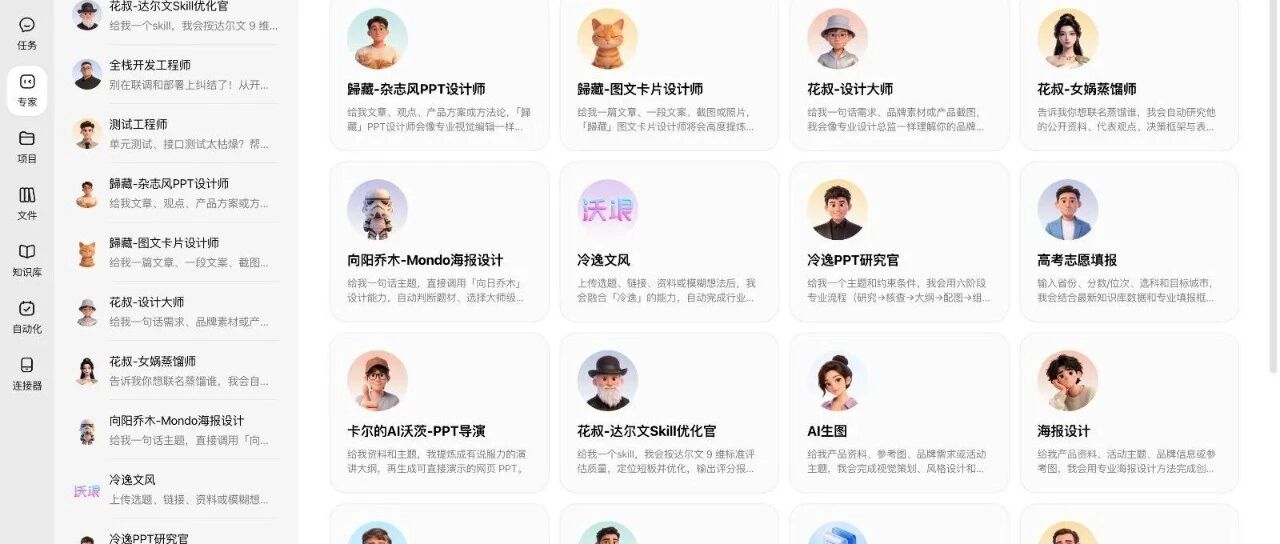
Nami Work is an AI workbench from ByteDance (at Work.n.cn), positioned as "assemble an AI team to get an entire job done." The biggest difference from chat AI: instead of giving you advice, it delivers finished products—and it does so by orchestrating multiple model providers.
This post tests the boundaries of what it can do with a real task: cutting a promo video for an open-source macOS product (FanBox). All I provided was one sentence + one GitHub URL; Nami Work itself orchestrated the APIs of three model providers plus an ffmpeg rendering pipeline, and delivered a 32-second, 1920×1080 video with music, plus a single-file HTML landing page and a rewritten pitch copy.
Two counterintuitive details along the way deserve even more attention: it rejected my audience assumption first, and it proactively flagged two "I made this call for you" decisions.
What Is Nami Work
One-line positioning: a workbench that can assemble an AI team and finish an entire job—pushing back on you when it should, then handing back the finished product.
Its model dropdown basically gathers the latest models from every leading domestic provider: Kimi K3, GLM-5.2, Doubao seed-2.1, MiniMax M3, DeepSeek-V4. This test ran entirely on Kimi K3 (1M context); even with a long execution chain, there was no context compression or stalled execution.
💡 Value point: for users worried that "next month the best model provider changes and the subscription is wasted," this "pick any strong domestic model, switch anytime" model removes single-vendor lock-in risk.
Before You Start
- Access: open Work.n.cn in a browser
- Task material: a publicly readable GitHub repo URL (let the expert Agent read it itself)
- Optional connectors: Feishu / DingTalk / Tuitui / QQ, configurable in settings; a phone can take over a running task
- Expert Plaza: built-in experts named after individuals (e.g., "Hua Shu – Design Master"), plus full-team formations (product development, marketing, viral social media, global CEO think tank)
Task 1: Cut a 32-Second Promo
Step 1: Give only a one-sentence brief
Using "Hua Shu – Design Master" from Expert Plaza, I sent exactly one sentence:
Make a promo video for this product aimed at white-collar workers.
Followed by a GitHub URL. Nothing else.
Step 2: Let it handle its own "pitfalls"
Nami Work read the repo first and hit a 404 fetching the README—it judged on its own that the default branch might not be main, switched to checking the default branch, and got it. This "hit a wall → climb out by itself" recovery ability is a hard benchmark for whether an agent is actually usable.
Step 3: Automatic division of labor + cross-model orchestration
It made an interesting allocation across the five storyboard segments:
- Opening and closing white-collar office scenes: generated with Seedance 2.0 text-to-video (with an "AI-generated" watermark in the lower right corner—compliance handled)
- Middle three segments: real assets from the repo—official promo images, git log screenshots on real hardware, in-place README preview, the right-side terminal
The production notes for the video state it plainly:
| Segment | Model / tool used |
|---|---|
| Opening/closing white-collar scenes | Seedance 2.0 text-to-video |
| Voiceover | MiniMax TTS |
| Camera moves & compositing | ffmpeg |
| Background music | CC-BY-licensed track (author credited) |
Three model providers + one rendering pipeline, running inside a single task—and I never configured a single API key.
💡 Key point: Nami Work treats "real assets first, never fabricate" as a default constraint—which matches the rules of Huashu Design in the open-source skill community. AI videos love stuffing in placeholder images; here that path is blocked.
Results
- Video spec: 1920×1080, 30 seconds, with music
- Real assets and AI-generated assets strictly labeled separately
- No model API keys configured by the user at any point
Task 2: The Four-Piece Positioning Rewrite
Hand it the whole bundle—"figure out who to reach, rewrite the copy, build the landing page, cut the video"—and brief background, goals, materials, and constraints the way you'd brief a subordinate.
Counterintuitive No. 1: It rejected my audience assumption first
My brief said "aimed at white-collar workers." Instead of executing as ordered, it split the audience assumption in half:
The white-collar direction holds, but not "all white-collar workers"—the segment of white-collar workers who are already directing AI to do work. Interpreted as "make it usable by ordinary marketing-department staff," it doesn't hold: someone who only chats with AI in a browser has no use case, and the copy must not lie to them.
Then it listed the three types who would actually use it (individual creators producing with AI, non-coder vibe coders, heavy AI knowledge workers), ranked by fit, with reasoning for each. And it ended with a dedicated line:
Explicitly not a fit: ordinary office workers (files live in WeChat/cloud drives, no AI on their computer that does work). Do not pitch this group when promoting.
Counterintuitive No. 2: Proactively flagging "I made this call for you" decisions
It separately flagged two things I never asked it to provide, calling them "two calls I made for you that need your confirmation":
- Barrier to entry: using FanBox assumes an agent like Claude Code or Codex is installed on the Mac. It stated this honestly in the landing-page FAQ instead of hiding it, reasoning that "hiding it only buys you downloads from people with no idea what to do next"
- Visuals: the default fluorescent-green terminal look and my promo images were both very "developer," so the landing page and video switched to a cream-paper-and-terracotta-orange skin—with a suggestion that I think about which set new users should see by default
💡 A hard benchmark for an AI workbench's maturity: there is a huge difference between a tool that can flag "this was my call, not yours" and one that rewrites 80% of the content while pretending nothing changed.
Deliverables
- Copy: one-line positioning + three value points, with zero developer words like terminal / repo / dependency anywhere; feature presentation order rearranged; self-assessed as "zero product changes needed, 80% of copy rewritten"
- Landing page: single-file HTML, 2.4MB, all screenshots inlined as base64—double-click to open, images never break in any environment; built from real repo assets, no placeholders
- Detail: the landing page headline rendered
Finderas 「访达」 (Finder's official Chinese name)—the "white-collar workers must understand it" hard rule was genuinely being enforced
💡 Why inline base64 matters: in a single-file HTML deliverable, images loaded over the network always break when opened locally by double-click. It's an old pitfall, and Nami Work handles it by default.
Use Cases
Where Nami Work's "organize an AI team to finish the whole job" creates the most value:
- One-person companies / OPC: outsource the entire post-build spread (copy, landing page, promo video) to AI when product development stalls at marketing
- Individual creators: use a single expert (design / copy) for single-track delivery
- The full chain from niche to launch: use full-team formations (product development, marketing, viral social media, global CEO think tank)
- People constantly on the move: brief tasks on the computer, take over and review on the phone (work runs in the cloud, cross-device handoff)
First-Use Advice
Context, not control.
Say everything up front—imagine yourself a manager and spell out the background, goals, and all product/project context. Models keep getting stronger; often giving fewer constraints and more room to explore delivers better results.
It's a management principle applied to human-machine collaboration: give context, not control.