
Using Claude Code Effectively: Building AI Engineering Infrastructure
Build a project-level AI engineering system around CLAUDE.md, skills, and hooks so Claude Code gets smarter the more you use it
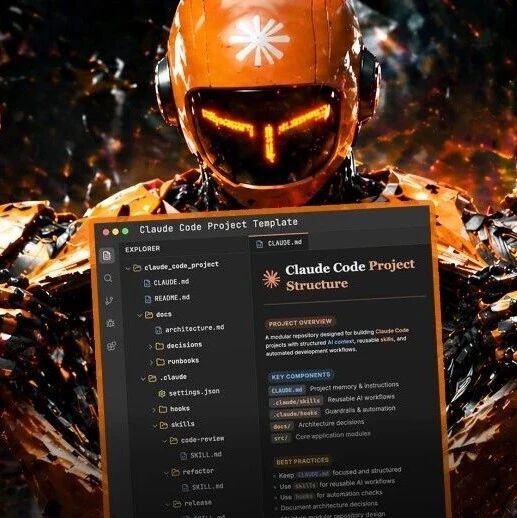
Using Claude Code Effectively: Building AI Engineering Infrastructure
Build a project-level AI engineering system around CLAUDE.md, skills, and hooks so Claude Code gets smarter the more you use it
Most people still use Claude Code the same way: "write a prompt -> copy and paste -> tweak repeatedly." But teams that have genuinely made AI programming work in production are no longer focused on optimizing prompts—their core work is building a set of engineering infrastructure around the model (a Harness). This article breaks down the three key engineering mechanisms in Claude Code, along with concrete steps you can take today.
The Core Concept: Model + Harness
Martin Fowler distilled the formula to: Agent = Model + Harness.
The word Harness comes from horse riding. A horse is strong, but it doesn't know where to go—the reins, saddle, and bridle determine the direction. By analogy to AI programming: the model is highly capable, but it doesn't know what rules to follow in your codebase. The Harness is the steering wheel, brakes, and navigation you build for it.
One set of numbers makes the point: VILA-Lab's research system analyzed the 512,000 lines of TypeScript source in Claude Code v2.1.88 and found that only 1.6% was AI decision logic—the remaining 98.4% was deterministic engineering infrastructure: permission gateways, context management, tool routing, error recovery.

Step 1: Create CLAUDE.md — the Project Brain
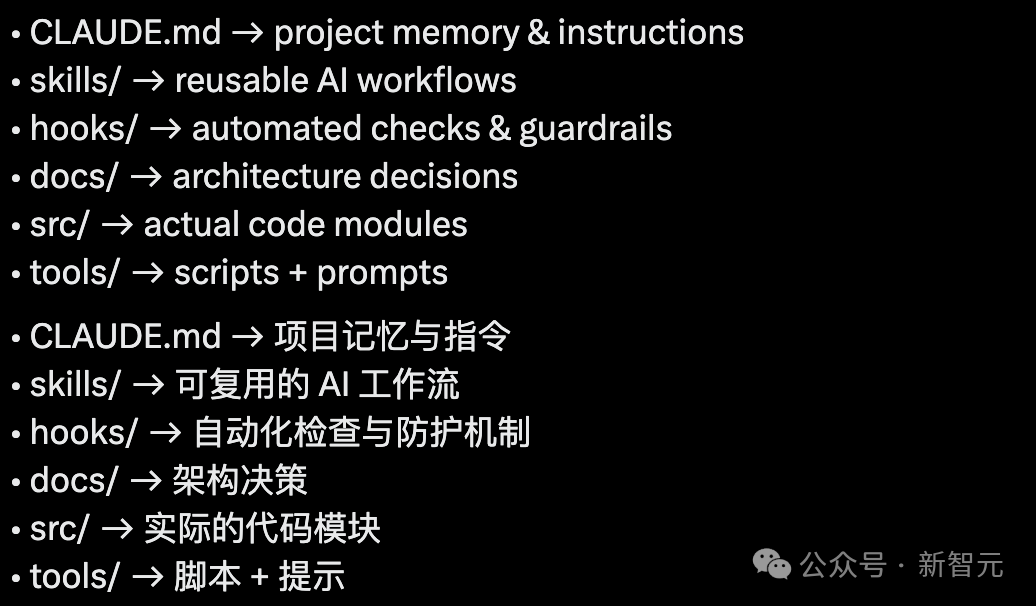
CLAUDE.md is a Markdown file placed in the project root, and Claude Code reads it automatically at the start of every session.
What it is
The project's brain and onboarding manual. Architecture decisions, naming conventions, testing requirements, and pitfalls you've hit repeatedly all go here.
How to write it
It doesn't need to be perfect, and it doesn't need to be long. Follow three principles:
- Every time Claude makes a mistake -> you add a rule
- Every time you repeat yourself -> you add a workflow
- Every time a bug appears -> you add a guardrail
# Project: MyApp

## Architecture Rules
- Use TypeScript strict mode
- Keep the API layer under src/api/
- Use functional components, no classes

## Naming Conventions
- File names in kebab-case
- Component names in PascalCase
- Utility functions in camelCase

## Common Pitfalls
- Don't call setState directly inside useEffect; use a ref to check whether it's mounted
- Database queries must include a limit to prevent full table scansTip: the next time the AI makes a mistake, don't fix it manually—ask yourself "what's missing from CLAUDE.md?" Add it, and the mistake won't happen again.
Step 2: Create Skills — Reusable Workflows
The .claude/skills/ directory holds reusable automation workflows.
The core idea
Boris Cherny, the creator of Claude Code, hammers on one line: "If you do something more than once a day, turn it into a skill or a command."
What makes a good Skill
- Code review: automatically reviews code style, security vulnerabilities, and performance issues
- Generating commit messages: produces well-formed commit messages from the diff
- Writing release notes: extracts changes from git log and generates a CHANGELOG
- Fixing a recurring class of bug: a templated workflow for batch-fixing similar issues
A Skill is essentially an executable piece of methodology. It isn't a prompt—it's an automation script with defined inputs and outputs.
Step 3: Create Hooks — Automatic Guardrails
.claude/hooks/ is the most critical part. It doesn't rely on the AI's own judgment—deterministic code stops the AI before it goes wrong.
Why Hooks matter most
This is what makes you comfortable letting the AI run "unsupervised." The error boundary is hard-locked by hooks rather than left to the AI to "be careful."
A real example
The OpenAI Frontier team's approach is worth copying. Their linter error messages aren't written for humans to read ("violation detected")—they're repair instructions written for the Agent:
// lint error in a typical project
Error: Unexpected console statement

// OpenAI Frontier's lint error
Error: Use logger.info({event: 'name', ...data}) instead of console.log
The Agent can read that instruction directly and fix it, with no human intervention needed.
The Full Directory Layout
your-project/
  CLAUDE.md              # Project brain (read automatically every session)
  .claude/
    skills/              # Reusable workflows
      code-review.md
      commit-gen.md
    hooks/               # Automatic guardrails
      pre-commit.sh
  docs/
    decisions/           # Architecture decision records (so the AI knows the "why")
  tools/                 # Custom tools
  src/                   # Business code
Proof It Works
This approach isn't just theory. LangChain improved its Terminal Bench 2.0 score from 52.8 to 66.5 purely by tuning the Harness (system prompt, tools, middleware, reasoning mode)—without changing the model.
What You Can Do Today
- Create a CLAUDE.md: put one in the root of your most important project; spend 10 minutes writing down your architecture rules and hard-won pitfalls
- Convert one repeated task into a Skill: find something you do more than twice a day and turn it into a workflow under
.claude/skills/ - Add a Hook where mistakes are easy: translate a human engineer's judgment into machine-readable constraints
The engineer's capability curve is shifting from "how many lines of code can I write" to "how rigorous an environment can I design for the AI." The act of writing code is being taken over by Agents, but designing the environment that lets an Agent write good code—that's still your job.
Toolin Editorial Team
Categories
Related articles

AgentDoG 1.5: An Open-Source Security Diagnostics and Guardrail Framework for AI Agents
A lightweight open-source agent security tool from Shanghai AI Lab that analyzes execution-trace risks with three-dimensional diagnostics and supports online guardrail deployment
Let AI Agents Take Jobs and Earn Money Automatically: A Hands-On ClawHunt Guide
From deploying an agent to bidding on tasks automatically, a complete walkthrough of how AI agents take on gigs and get paid on the ClawHunt platform

OpenAI Codex's /goal Feature: Letting the AI Decompose Tasks and Dispatch Agents on Its Own
Codex's new self-generating goal feature: humans supply the intent, and the AI automatically decomposes tasks and dispatches subagents to execute them

XtraGPT: An AI Paper Revision Tool Built on Full-Paper Context
An ACL 2026 paper that uses 20 academic writing criteria and full-paper context modeling to turn AI paper revision from generic polishing into controlled, targeted edits

Reviving Fable 5 with One Line of Code: System Prompt Injection in Practice, and the Principle Behind It
Using the leaked Fable 5 system-level prompt and the --system-prompt-file flag to inject Fable 5's 'personality blueprint' into Opus 4.8 and get closely matching output
FuseSearch: How a 4-Billion-Parameter Small Model Outguns Commercial LLMs at Code Localization
Ant Group's ACL 2026 work FuseSearch-4B uses an adaptive parallel search strategy to match Claude Haiku 4.5 on code localization — 93.6% faster with 68.9% fewer tokens