
A Practical Guide to Saving Tokens in Claude Code
Master the prompt caching mechanism, session management strategies, and six core rules to make your Claude Code quota last longer and spend better.

A Practical Guide to Saving Tokens in Claude Code
Master the prompt caching mechanism, session management strategies, and six core rules to make your Claude Code quota last longer and spend better.
Burning through your Claude Code quota too fast? Some Max users blow through a week's allowance in two days, and a single session can cost over $134 in real terms. The problem usually isn't heavy usage — it's that you don't understand the caching mechanism underneath. This article helps you figure out where tokens actually go and how to save them.
Prompt Caching: The Core of Saving Tokens
Every time a large language model receives your message, it has to "read" the entire input from scratch. In Claude Code, that input usually includes the system instructions, tool definitions, CLAUDE.md project rules, conversation history, and your new message. The first two parts barely change within a session, yet the model re-"reads" them every time.
Prompt caching does something simple: after computing the first time, it stores the intermediate results; the next time it encounters the same input prefix, it reuses the stored results and skips the recomputation. Reading from cache costs one tenth of recomputing.
But caching comes with two preconditions:
- The cache only works on "prefixes": the match must start from the very beginning and be character-for-character exact. Change a single character on page one and the entire cache is invalidated.
- The cache has a time-to-live: the main agent's cache window is 1 hour, sub-agents' is 5 minutes. Every cache hit refreshes the timer.
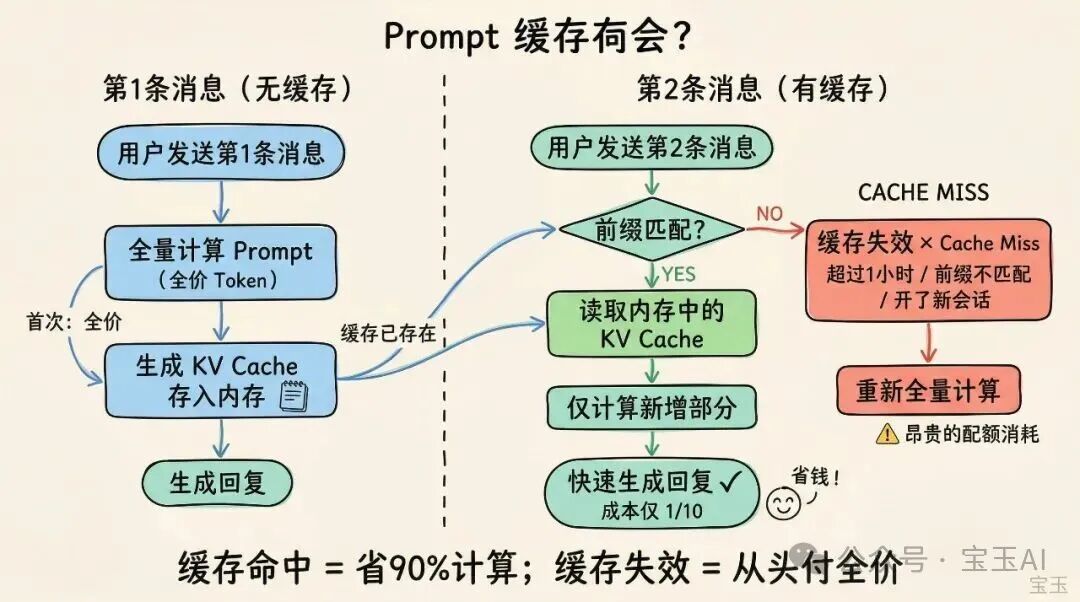
Where your cache hits land, and how often, directly determines your token spend
Three Counterintuitive Money-Saving Strategies
Once you understand caching, some "common sense" needs flipping.
While the Cache Is Warm, Continuing Beats a New Session
Every new Claude Code session has to reload the system prompt, tool definitions, CLAUDE.md, and project configuration. That "infrastructure" is roughly 50,000 tokens. Frequent /clear means repeatedly paying the full-price write fee for content that never changes.
In an active session, this content stays cached, and you only pay one tenth of the price each time.
Getting a Complex Task Right Once Beats Three Rounds of Back-and-Forth
Turning off extended thinking does save tokens on a single request. But for a complex refactoring task, doing it in one shot with extended thinking on versus turning it off and iterating for three rounds — the latter is very likely more expensive, because every extra round resends the entire context.
Simple tasks are the opposite: lowering /effort or turning off thinking mode in /config has an immediate effect.
Give Paths for Long Content; Don't Paste It into the Conversation
Don't copy-paste 10,000 lines of logs into the conversation and ask Claude to find the error — just send it the log file's path. Claude Code will use tools like grep to retrieve what it needs, pulling only the relevant parts into context.
Remember: the cheapest tokens are always the ones that never entered the context at all.

Controlling input quality is more effective than controlling output length
Keep Chatting or Start a New Session: A Decision Table
This may be the single most important judgment call for saving tokens in Claude Code. Many people's default habit is "clear when done," but the cheapest default is actually the reverse: keep going as long as you can, and treat starting a new session as a conditionally triggered operation.
Continue the current session when:
- The task hasn't changed — still debugging the same bug or writing the same module
- Less than 1 hour since the last message, so the cache is still alive
- The content in context is still useful for the current work
Start a new session when:
- The task has changed and the two contexts are completely different
- Idle for more than 1 hour, so the cache has most likely expired
- The context is stuffed with irrelevant content and too noisy
In one sentence: cache warm and task unchanged, keep chatting. Cache expired, task switched, or context too noisy — restart without hesitation.
A one-task-per-session working style almost never triggers quota problems
The 1M Context Window: Use with Caution
As of March 2026, Max, Team, and Enterprise plans default to Opus 4.6's 1M context window. Anthropic removed the 2x price premium for long context, but the 1M window is becoming the number-one reason many people's quotas hit bottom.
The problem lies in the cost of cache invalidation. You build up a very long session on the 1M window, step away from your computer for over an hour, come back and continue — the entire 1M-token cache has expired, and a single message triggers a full rebuild.
Most everyday sessions trigger compaction at 80-120K of context — they never even reach 200K, let alone 1M.
If you want to disable the 1M context window, add this to ~/.claude/settings.json:
{
  "env": {
    "CLAUDE_CODE_DISABLE_1M_CONTEXT": "1"
  }
}
If you want to set the auto-compaction threshold for context:
{
  "env": {
    "CLAUDE_CODE_AUTO_COMPACT_WINDOW": "200000"
  }
}
Context gets automatically compacted and summarized as it approaches 200,000 tokens, preserving continuity while keeping costs from spiraling.
Six Core Operating Rules
1. Use Sonnet for Everyday Work
Opus's input cost is about 1.7x Sonnet's, and it burns tokens roughly twice as fast. Sonnet is enough for most coding tasks; save Opus for complex architecture decisions and multi-step reasoning. Type /model in Claude Code to switch.
2. Don't Switch Models Mid-Session
Prompt caches are isolated per model. If you've built up 100,000 tokens of cache on Opus and switch to Sonnet to ask a simple question, Sonnet has to build its own cache from zero. When you need a lighter model, use a sub-agent instead of switching the main model.
3. Keep CLAUDE.md Lean and Control the Number of Skills
CLAUDE.md's content gets injected into every request. The official advice is to keep it within 200 lines and retain only rules that genuinely hold long term. More skills isn't better either — remember to turn off MCP services you aren't using.
One small trick: write maintainer notes in CLAUDE.md as HTML comments — Claude strips comments before injecting the context, so they cost no tokens.
4. CLI First, MCP Second
GitHub's gh CLI consumes far fewer tokens than the GitHub MCP server. If the command line can do it, don't install an MCP.
5. Spend a Few Tokens Planning First
For complex tasks, enter plan mode first — let Claude explore the code and propose an approach before implementation. What's truly expensive is rescanning the code, rewriting the implementation, and rerunning tests after the direction proves wrong.
6. Use permissions.deny to Limit What Gets Read
In .claude/settings.json, use permissions.deny to strictly limit what the model can read:
{
  "permissions": {
    "deny": [
      "Read(./.env)",
      "Read(./.env.)",
      "Read(./secrets/)",
      "Read(./node_modules/)",
      "Read(./build)"
    ]
  }
}
Cut unnecessary file reads at the source to avoid wasted tokens
Delegate Tasks to Reduce Main-Session Consumption
Sub-agents: Claude Code's sub-agents have their own context and return only a brief summary to the main session when done. The detailed output of code reviews, test runs, and doc lookups never sits in the main session, so you don't pay for that content on every subsequent message.
Codex plugin: If you also have an OpenAI subscription, people in the community use the following command to offload some tasks:
claude mcp add codex -- npx -y @openai/codex-plugin-ccGood candidates to delegate: structured bug fixes, code reviews, writing tests. Keep for Claude Code: architecture design, cross-file refactoring, and complex work that requires understanding the whole codebase.
Wrap-Up
The core idea of saving tokens comes down to one sentence: maximize cache hits and keep irrelevant content out of your context.
Starting a new session is a means, not the default. Once you understand prompt caching, you'll see that "continuing to work in an active session" is the default strategy, and "starting a new session" is an optimization triggered by specific conditions.
Toolin Editorial Team
Categories
Related articles

OpenWorker: Andrew Ng's Open-Source Desktop AI Coworker That Ships Finished Work
Andrew Ng open-sources OpenWorker (MIT), a local-first, model-agnostic desktop agent connecting to 25+ tools, turning "prepare a customer brief" into a finished document you can actually open.

AutoMIA: Two Images In, a 3D-Printable Mirror Illusion Out — Runs on a Single RTX 3090
AutoMIA, a Tsinghua CVPR'26 Highlight open-source project, turns two input images into a 3D-printable voxel mirror-illusion art model (STL-ready) — single RTX 3090, 76 seconds per design.

Macaron-V1: An Open-Source Coding Model That Compresses Personalized Experience into LoRAs with MoL
Mind Lab open-sources Macaron-V1 (Venti / Coding-Venti / Tall tiers), a Mixture-of-LoRA architecture built on GLM-5.2 744B plus four 1B LoRA experts, with a free hosted API and a UI4A plugin.

UniWorld-View: Single Image/Video to Any Camera Trajectory, Tops the WorldScore Leaderboard, Fully Open-Sourced
UniWorld-View, open-sourced by Peking University + Rabbitpre + Pengcheng Laboratory, generates novel-view videos along any camera trajectory from a single image/video — it tops Fei-Fei Li's team's WorldScore leaderboard, with code and weights fully open under Apache-2.0 and one-click downloads.

Claude Managed Agents Ships Six Updates: Skill Cap Raised to 500, With Ready-to-Run Payloads
Anthropic's managed agent platform CMA ships six updates at once: per-session skills up from 20 to 500, a five-level effort setting writable into per-agent config, and seeded sessions created in one step with initial_events.

DojoAgents: Build a Financial Research Agent Locally in 10 Minutes
An open-source agent framework from Shenchong Intelligence covering A-shares, US stocks, and Hong Kong stocks — deploy a financial research agent that autonomously analyzes market themes, locally, in 10 minutes.