
The Six Core Components of a Coding Agent, Fully Explained
A breakdown of the core architecture of AI coding agents like Claude Code and Codex CLI, covering repository context, prompt caching, tool calling, context slimming, session memory, and subagent delegation.
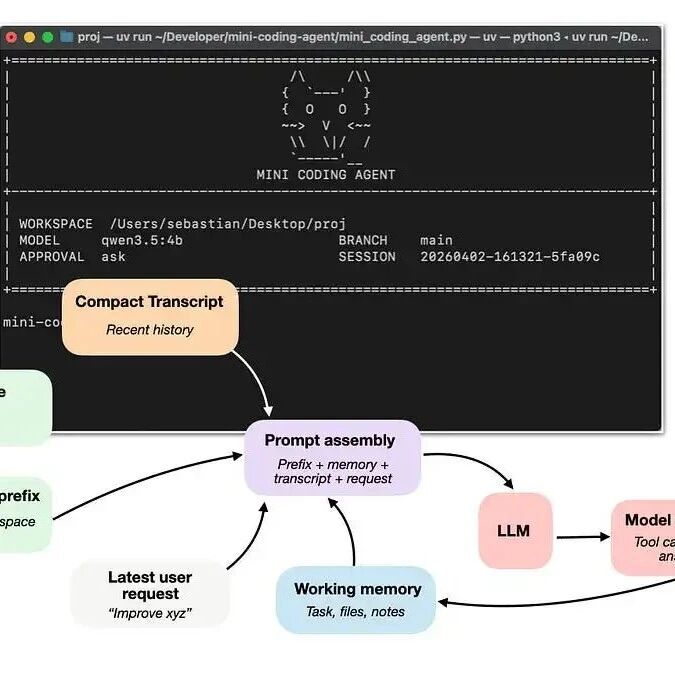
The Six Core Components of a Coding Agent, Fully Explained
A breakdown of the core architecture of AI coding agents like Claude Code and Codex CLI, covering repository context, prompt caching, tool calling, context slimming, session memory, and subagent delegation.
Why are Claude Code and Codex CLI so much stronger than using the exact same model straight in a chat box? The answer lies not in the model itself but in the layer wrapped around it -- the "Coding harness." This article breaks down the six core components of a coding agent, helping you understand why an Agent is more useful than a bare model and how to build your own coding agent.
Core Concepts: Model vs Agent
First, let's pin down three key concepts:
- Large language model (LLM): a base model, essentially an engine that predicts the next token
- Reasoning model: an LLM specially trained to spend more compute on intermediate reasoning and self-verification
- Agent: a loop system of model + tools + memory + environmental feedback
An analogy: the LLM is a stock engine, the reasoning model is a heavily modded high-horsepower engine, and the Agent harness is the full vehicle system that lets you drive that engine.

The relationship among base models, reasoning models, and Agents. An Agent keeps calling the model in a loop within a specific environment, handling complex tasks from real-world development.
Component 1: Live Repository Context
This is the most critical and the most fundamental component. When you say "fix the test code," the model cannot be going in blind. It needs to know:
- Whether the current directory is inside a Git repository, and on which branch
- What documentation and development guidelines the project has (such as
AGENTS.mdandREADME) - The file structure of the codebase
Upon receiving an instruction, the Coding harness first collects this information and generates a "workspace summary." That way, the model never starts from zero when facing each prompt.
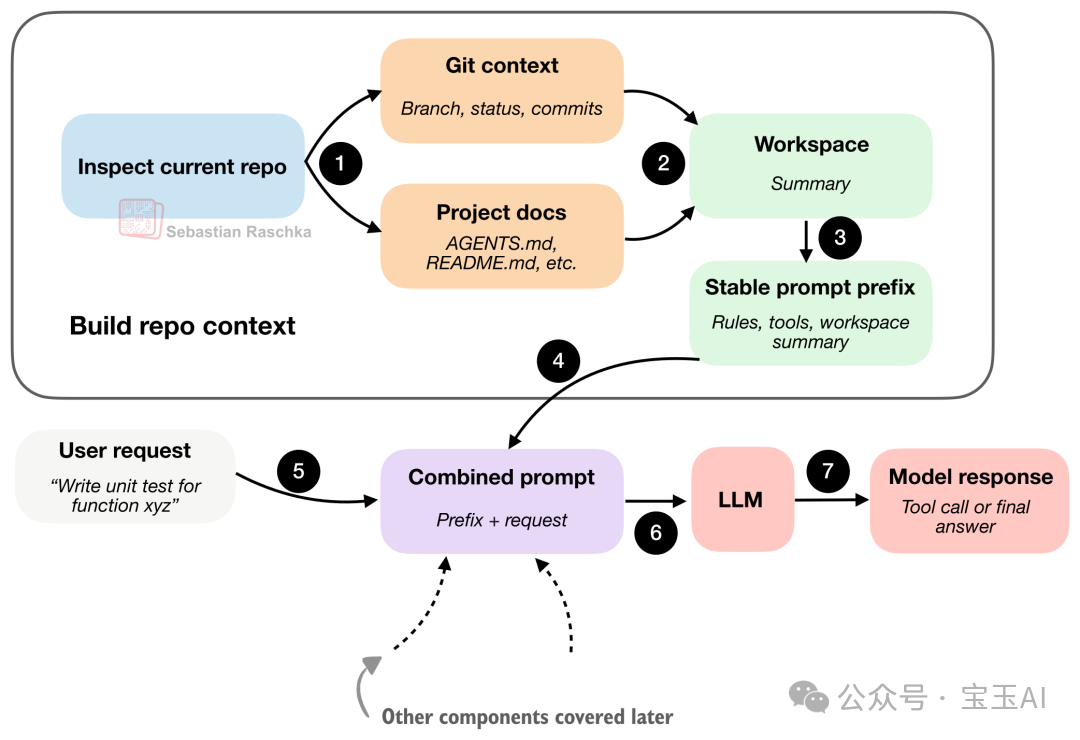
The Coding harness generates a workspace summary first, then merges it with the user request to give the model sufficient context.
Component 2: Prompt Cache Reuse
Once the context is collected, how do you feed it to the model efficiently? Reassembling all of the information from scratch on every call wastes enormous compute and cost.
Core strategy: split the prompt into a "stable" part and a "changing" part:
- Stable prefix (almost never changes): system instructions, tool descriptions, workspace summary -- cached and reused
- Changing part (updated every turn): short-term memory, recent conversation, latest instructions -- rebuilt each time
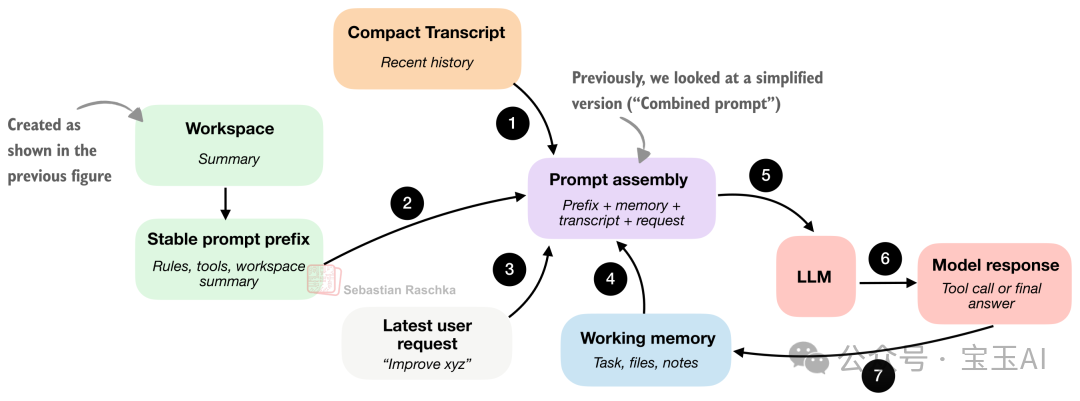
A prompt splits into a stable prefix and a changing part. Mainstream LLM APIs all support Prompt Cache; caching the stable prefix can drastically cut costs.
Component 3: Tool Integration and Invocation
An LLM inside a Coding harness does not just make suggestions -- it can actually execute commands. But not just any commands: the Harness provides a predefined toolbox where every tool has clear input requirements and boundaries.
The complete tool-calling flow:
- The model outputs a structured action request
- The Harness validates the action (is it on the whitelist? are the parameters legal?)
- High-risk operations require human approval
- The action is executed and the result is returned to the model
# The Harness's safety-check logic
def validate_tool(action):
    if action.tool not in KNOWN_TOOLS:
        return reject("unknown tool")
    if not action.params_valid():
        return reject("invalid parameters")
    if action.is_dangerous() and not user_approved():
        return reject("human approval required")
    if action.path_outside_repo():
        return reject("path outside repo")
    return execute(action)
Component 4: Context Slimming
Coding agents stuff the context window far more easily than ordinary chat, because they read files constantly and tool outputs tend to run long and rambling. A good Harness has at least two countermeasures:
- Clipping: ruthlessly truncating oversized document snippets and tool outputs
- Transcript reduction: distilling the full history into a lightweight summary
The core secret: the more recent the event, the more detail survives; the older it is, the harder it gets compressed. Files read repeatedly early on should be deduplicated.
Component 5: Structured Session Memory
Coding agents split state into two layers:
| Layer | Stored content | Size | Purpose |
|---|---|---|---|
| Working memory | Key points, current task, important files | Small | Keeping the task coherent |
| Full transcript | Every request, tool output, and model answer | Large | Supporting session resume |
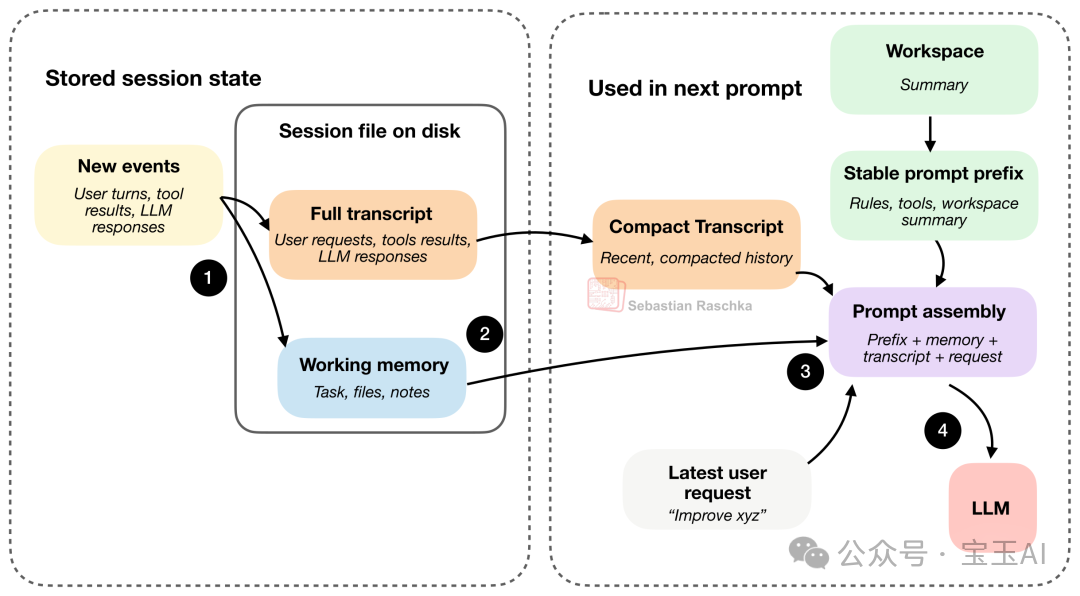
Working memory and the full transcript are usually stored on disk as JSON, so once you close the agent, the next session picks up seamlessly where you left off.
Component 6: Task Delegation and Constrained Subagents
Farming certain subtasks out to subagents for parallel processing can dramatically speed up the main task. But the key is constraints:
- Subagents get read-only access to files (or a restricted modification scope)
- Cap recursion depth to prevent endless subagent spawning
- Cap context size and execution time
A subagent must inherit enough context to do real work while staying under strict constraints -- this is where design skill is tested hardest.
Hands-On Practice
Sebastian Raschka built a Mini Coding Agent from scratch in pure Python, implementing all six components above with zero external dependencies.
- Project: https://github.com/rasbt/mini-coding-agent
- Core file:
mini_coding_agent.py, with comments in the code marking where each of the six components lives
If you want a deep understanding of how coding agents work internally, reading this project's source code is the best place to start.

Mini Coding Agent is a minimalist yet fully functional coding agent implementation.
Toolin Editorial Team
Categories
Related articles

MemSlides, Top of the HuggingFace Leaderboard: the PPT Agent That Remembers Your Preferences
Tsinghua, SJTU, and BUPT jointly open-sourced MemSlides, a memory-driven PPT generation agent supporting personalized style and multi-round local edits, topping the HuggingFace leaderboard.

ShotStream: the Open-Source Framework for Directing Multi-Shot Long Videos in Real Time (ECCV 2026)
CUHK MMLab and Kuaishou Kling jointly open-sourced ShotStream, the first real-time streaming multi-shot long-video generation framework — roughly 25x faster, with plot adjustments mid-generation.

Volcengine Seedance 2.0 API Integration in Practice: From Sign-Up to Your First Generated Video
A developer-oriented guide to the Seedance 2.0 video API: activating the Ark platform, API calls, SDK examples, TOS storage, and pricing gotchas.

Claude Artifacts Finally Gets Public Sharing + Real-Time Multiplayer Editing
Anthropic has added public link sharing and simultaneous multiplayer editing to Artifacts. This article explains what the capability is, how to use it, and how it differs from Claude Code Artifacts.

HunyuanOCR-1.5 Hands-On: SOTA End-to-End OCR from a 1B-Parameter Model
Tencent Hunyuan's HunyuanOCR-1.5 packs document parsing, text recognition, information extraction, and image-text translation into a single 1B-parameter VLM, and pushes inference speed up 6x. This guide walks you through running it locally or on vLLM.
WorkBuddy in Practice: An Open-Source Blueprint for Office Agents
A community author spent 7 days compiling an open-source WorkBuddy playbook (GitHub: AlephAITech/WorkBuddyGuide, MIT) covering tutorials, Skills, MCP, automation, and multi-agent practice. This article helps you quickly find the chapters you need.