
Big PPT Skill Update: Swiss International Style + AI Illustrations in One Click
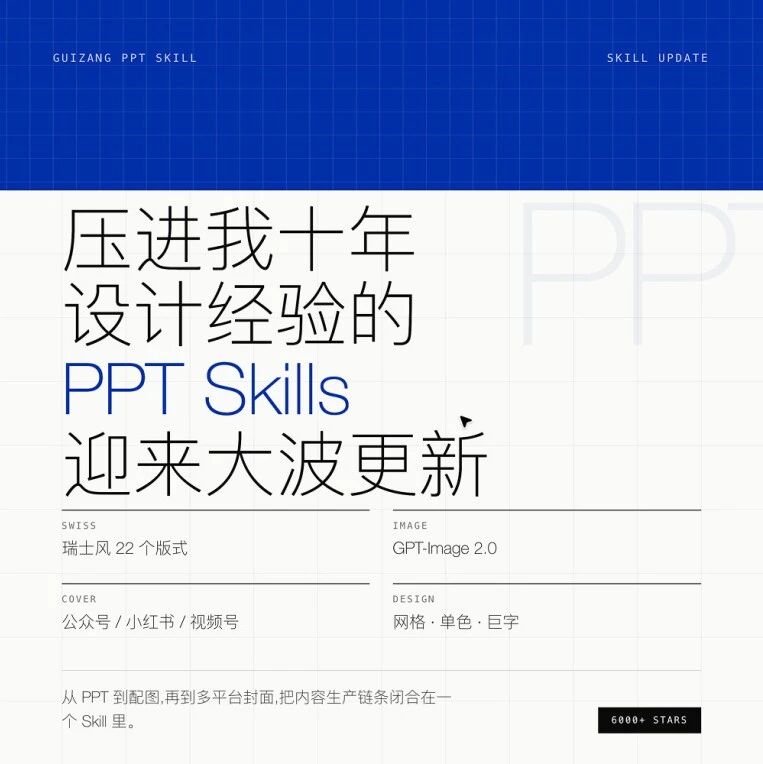
The open-source PPT Skill adds a Swiss International style, GPT-Image 2.0 auto-illustrations, and multi-platform cover generation -- the whole outline-to-publish workflow in one conversation.
Big PPT Skill Update: Swiss International Style + AI Illustrations in One Click
The open-source PPT Skill adds a Swiss International style, GPT-Image 2.0 auto-illustrations, and multi-platform cover generation -- the whole outline-to-publish workflow in one conversation.
After picking up 6000+ stars on GitHub, the open-source project guizang-ppt-skill has received its first major update. It adds a Swiss International visual style, integrates GPT-Image 2.0 for auto-generating illustrations, and can batch-output covers for multiple platforms such as Xiaohongshu, WeChat Official Accounts, and WeChat Channels. If you build slides with Claude or Codex, this Skill can compress the entire outline-to-publish workflow into a single conversation.
What's in This Update
Three core updates:
- New style B -- Swiss International: sans-serif type, one high-saturation anchor color, the grid above all; built for decks about facts and data
- Codex integrates GPT-Image 2.0: generates on-brand illustrations directly, including film-texture portraits, infographics, and polished UI screenshots
- Multi-platform cover generation: the same content outputs covers in many specs -- Xiaohongshu 3:4, WeChat Official Accounts 21:9, WeChat Channels landscape, and more
How to Trigger the New Style
After installing or updating the Skill, say this to Claude or Codex: "Make me a Swiss-style PPT".
The AI will ask which theme color you want:
| Theme color | Best for |
|---|---|
| Klein Blue IKB | General use, business launches, AI products (default recommendation) |
| Lemon yellow | Youthful, sports, retail, Y2K retro |
| Lemon green | Eco, sustainability, Gen Z brands |
| Safety orange | Alerts, news, high-energy topics |
Note: custom hex color values are not accepted -- this is a hard constraint written into SKILL.md to guarantee visual consistency.
The 22 Built-In Layouts at a Glance
The Swiss style ships with 22 named layouts covering covers, section openers, data, comparisons, and closers. You don't need to memorize names -- the AI picks automatically based on your content. Here are a few of the most distinctive:
Cover: the left half is an IKB field with a single line of huge reversed-out type; the right half is white space with meta info.
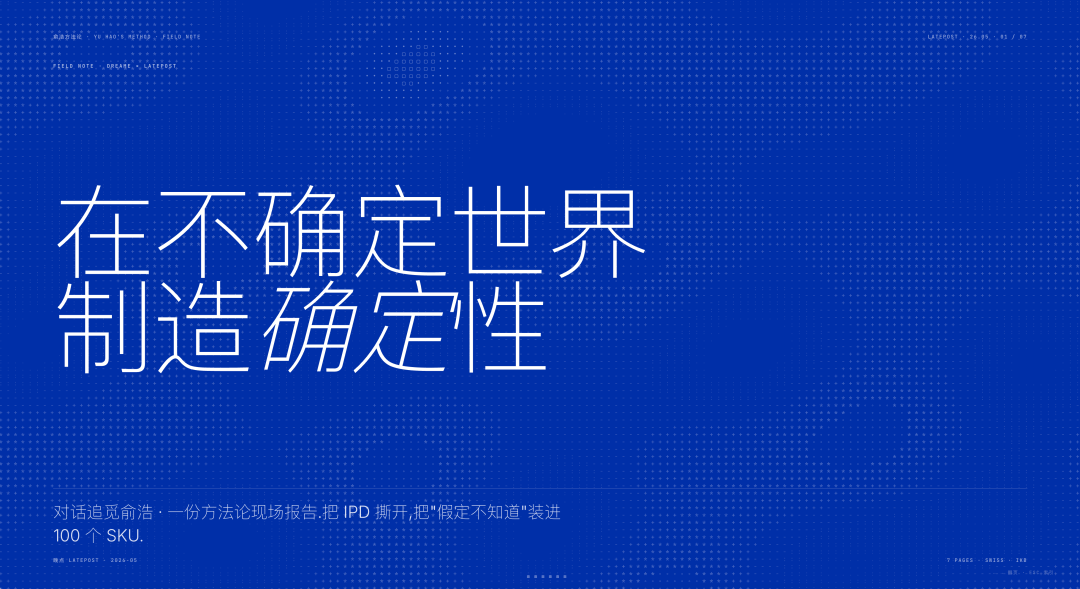
Statement: one sentence occupying 9.6vw (viewport width), with nothing on the page but it and a small one-line footnote. Great for opening a section or dropping your core argument.
KPI Tower: four solid-color columns whose heights are decided by the data. Margin tiers, price bands, conversion funnels -- any vertical number comparison reads at a glance.
Duo Compare: a hairline down the middle, text plus data on each side. Old system vs new plan, traditional vs AI -- this is the layout for those.
Let GPT-Image 2.0 Generate the Illustrations
If you use it inside Codex, the AI will proactively ask whether to generate illustrations once the deck is written. It automatically generates the right kind of image for the current deck's style and content:
- Documentary-style photos (film texture)
- Infographics (processes, comparisons, system relationships)
- Screenshot redesigns (rebuilding the original image at the deck's aspect ratio)
- Big-number data posters, flowcharts, system diagrams
Generated images automatically match the current deck's style and theme color. Pick Klein Blue and the illustrations use blue as their only anchor color; a Chinese deck gets Chinese labels, an English deck gets English.
Multi-Platform Covers: Publish as Soon as the Deck Is Done
Once the deck is done, just tell the AI:
Based on the core points of this PPT, give me a 3:4 Xiaohongshu cover.Give me a 21:9 WeChat Official Accounts header image.
The AI outputs images under the same theme colors, fonts, and single-focus rule. Xiaohongshu carousels can be batch-generated six at a time -- unified style, varied layouts. Official Account headers and share cards stay visually consistent too.
Three Practical Tips
Use film texture to fight the "AI look"
Just say: "Generate a 16:10 documentary photo: one person facing a screen in a late-night studio, natural light, low saturation, slight film grain, Fujifilm look." Film texture is GPT-Image 2.0's biggest value for slide imagery -- it strips the "AI-generated" label off the picture.
Redo screenshots at the deck's aspect ratio
Toss the raw screenshot to Codex: "Redo this at a 16:10 ratio, keep all UI elements, and add some real working-environment context." Run every screenshot through GPT-Image 2.0, and the whole deck instantly looks like the work of one person.
Wrap AI images in a PPT template
Posted on their own, GPT-Image-generated pictures may get flagged "likely AI-generated" by AI-detection tools, dragging down their recommendation weight on social platforms. Place the image inside a PPT template and screenshot the whole thing, and it becomes a finished piece.
Install and Update
Project URL: github.com/op7418/guizang-ppt-skill
Installation is unchanged: the README contains an "installation prompt for AI" -- paste it to Claude Code, Codex, or any AI Agent with shell access, and it pulls everything automatically. If you already have it installed, just tell the AI update guizang-ppt-skill for me and you're done.
Toolin Editorial Team
Categories
Related articles
The Claude Code System Prompt Cut List: 6 Categories of Old Rules to Delete, 2 New Sections to Add
Anthropic cut the Claude Code system prompt by 80% and added 70% back—deleting 6 categories of rules that patched older models, and adding two new sections, Delivering work and Corrections, to manage Opus 5's temper. An actionable checklist you can apply directly to your own agent prompts.
Nami Work Hands-On: One Sentence, Three Model Providers, an Auto-Edited 32-Second Promo
A real-task test of ByteDance's Nami Work (Work.n.cn)—a single prompt orchestrating Seedance 2.0 text-to-video + MiniMax TTS + ffmpeg across three model providers to deliver a 32-second promo video, with its reasoning, judgments, and constraints all visible in the interface.
The Opus 5 "Challenge Loop" Prompt: Making AI Its Own Taskmaster to Grind Out a AAA Game Prototype in 24 Hours
Matt Shumer's "Challenge Loop" prompt drives Opus 5 to iterate on its own with a multi-agent structure of main Agent + builder Agents + judge Agent, paired with Three.js and Blender MCP, replicating an Outer Wilds-caliber browser game solo in 24 hours.
DyRef Hands-On: Adding Multi-Reference Consistency to Qwen Image Editing Models—Stable Even at 7 Reference Images
DyRef from HIT Shenzhen (ECCV 2026 Oral) is a multi-reference consistency fine-tuning recipe + RL dynamic-reward training framework layered on Qwen-Image-Edit-2511, keeping subject, pose, and style consistent even with up to 7 reference images. This guide runs local inference, plus optional SFT/RL training.

Qwen Work Hands-On: An Earnings PPT in 7 Minutes—Three Scenarios Through Alibaba's New Office Agent
A hands-on tutorial for Alibaba's Qwen Work (qwenwork.cn) covering three reproducible scenarios—earnings PPT generation, podcast-to-Feishu-doc, and e-commerce site building—with pricing, credit consumption, and pitfalls to avoid.
SearchOS: An Open-Source Multi-Agent Search Framework from Renmin University + Ant, Turning Search State into Infrastructure
SearchOS is a multi-agent search collaboration framework open-sourced jointly by Renmin University of China and Ant Group. Borrowing relational-database ideas, it turns search state into schedulable infrastructure, with about 280 search skills preset.