
Running LLMs Locally, Hands-On: Building an Agent Coding Environment with Pi + LM Studio
Use the Pi agent framework with the LM Studio inference engine to run Gemma 4 on a local Mac for agent coding tasks, with the complete Docker configuration and a models.json example included.

Running LLMs Locally, Hands-On: Building an Agent Coding Environment with Pi + LM Studio
Use the Pi agent framework with the LM Studio inference engine to run Gemma 4 on a local Mac for agent coding tasks, with the complete Docker configuration and a models.json example included.
Local LLMs have graduated from "barely runs" to "gets real work done." A viral HackerNews post by Vicki Boykis (founding ML engineer at a startup) proves it: with the Pi agent framework plus LM Studio, a 2022 M2 Mac (64GB of memory) can run Gemma 4 through agent coding tasks — refactoring Python scripts, writing unit tests, building a recommender-system repository — with loop accuracy at around 75% of frontier models. This tutorial walks through the complete setup, for developers who want to build a private agent coding environment locally.
Before You Begin
Running a local agent pipeline takes three things: a local model inference engine, an agent framework, and local model artifacts. This tutorial's setup:
- Inference server: LM Studio (GUI, simple to configure, good for getting started)
- Agent framework: Pi (a lightweight agent framework)
- Model: the Gemma 4 series (
gemma-4-12b-qatrecommended — newer, smaller, faster, with little accuracy loss) - Hardware: a Mac with Apple Silicon recommended, at least 16GB unified memory (the author used an M2 with 64GB)
- Isolation: Docker (strongly recommended, to limit what the agent can execute)
- Estimated time: 30 minutes of setup plus model download time
- Cost: completely free (open-source tools, runs locally)
💡 Tip: The author tried many local inference options in practice (Open WebUI + llama.cpp, llama-cpp-python, Ollama, llamafiles, LM Studio) and settled on LM Studio because it lowers the configuration barrier the most. If you chase raw speed, going straight to llama.cpp is faster.
Step by Step
Step 1: Install LM Studio and Download the Model
Download and install from the LM Studio website. After launching, find the Gemma 4 series models in the search bar. Recommended downloads:
google/gemma-4-12b-qat(recommended — small and fast)gemma-4-26b-a4b(stronger performance, but needs more memory)
Once downloaded, start the inference server from LM Studio's Local Server tab; it listens on http://localhost:1234/v1 by default (OpenAI API-compatible).
Step 2: Configure Pi's models.json
Because the author runs all Pi sessions inside Docker containers, Pi's models.json needs editing so the containerized Pi can reach the inference endpoint LM Studio serves on the host.
The key setting is baseUrl pointing at host.docker.internal:1234 (this is Docker's standard way of reaching host services):
"lmstudio": {
  "baseUrl": "http://host.docker.internal:1234/v1",
  "api": "openai-completions",
  "apiKey": "not-needed",
  "models": [
    {
      "id": "google/gemma-4-12b-qat",
      "input": [
        "text",
        "image"
      ]
    }
  ]
}
Save the file to ${HOME}/.pi/agent/models.json.
💡 Tip:
gemma-4-12b-qatsupports multimodal input (text + image), so the input field lists both types. If your model supports text only, just remove"image".
Step 3: Configure Docker Compose
This is the most critical step — running Pi inside a restricted container with only bash privileges (no direct Python execution, no web browsing), so the agent cannot accidentally wipe files on the host.
services:
  pi:
    build:
      context: .
      dockerfile: Dockerfile
    image: pi-agent:0.74.0
    init: true
    stdin_open: true
    tty: true
    extra_hosts:
      - "host.docker.internal:host-gateway"
    environment:
      ANTHROPIC_API_KEY: ${ANTHROPIC_API_KEY:-}
      OPENAI_API_KEY: ${OPENAI_API_KEY:-not-needed}
      GEMINI_API_KEY: ${GEMINI_API_KEY:-}
      OPENAI_API_BASE: ${OPENAI_API_BASE:-http://host.docker.internal:1234/v1}
      WHATEVER_API_KEY: ${WHATEVER_API_KEY:-}
    volumes:
      - ${HOME}/.pi/agent/models.json:/config/models.json
      - ${WORKSPACE:-.}:/workspace
      - pi-config:/config
      - pi-sessions:/sessions
    working_dir: /workspace

volumes:
  pi-config:
  pi-sessions:
Key points explained:
extra_hostsmapshost.docker.internalto the host gateway so the container can reach LM Studio.OPENAI_API_BASEdefaults to the local LM Studio. Note that if you also use OpenAI's official API, you need to specify a separate base.volumesmounts the working directory into the container; the agent can only touch files inside this directory.
Step 4: Write the Launch Script
The following bash script automatically builds the container, sets up the workspace, and starts Pi:
#!/usr/bin/env bash
# Pi — Start the containerized Pi agent.

SCRIPT_DIR="$(cd -- "$(dirname "${BASH_SOURCE[0]}")" && pwd)"
WORKSPACE_DIR="${WORKSPACE:-$(pwd)}"

case "$WORKSPACE_DIR" in
  /) ;;
  *) WORKSPACE_DIR="$(cd -- "$WORKSPACE_DIR" && pwd)" ;;
esac

export WORKSPACE="$WORKSPACE_DIR"
sandbox="${PI_SANDBOX:-0}"
pi_args=()

while (($#)); do
  case "$1" in
    --sandbox)    sandbox=1 ;;
    --no-sandbox) sandbox=0 ;;
    *)            pi_args+=("$1") ;;
  esac
  shift
done

compose_files=( -f "$SCRIPT_DIR/docker-compose.yml" )
if [[ "$sandbox" == "1" ]]; then
  compose_files+=( -f "$SCRIPT_DIR/docker-compose.sandbox.yml" )
fi

repo_slug="$(basename -- "$WORKSPACE_DIR" | tr -c 'a-zA-Z0-9_.-' '-' | sed 's/^-//')"
[[ -z "$repo_slug" ]] && repo_slug="workspace"
container_name="pi-${repo_slug}-$$"

api_key_args=(
  -e OPENAI_API_KEY
  -e DEEPSEEK_API_KEY
  -e ANTHROPIC_API_KEY
  -e GEMINI_API_KEY
)

cmd=(
  docker compose
  --project-directory "$SCRIPT_DIR"
  "${compose_files[@]}"
  run --rm
  --name "$container_name"
  "${api_key_args[@]}"
  pi
)

if ((${#pi_args[@]})); then
  cmd+=("${pi_args[@]}")
fi

exec "${cmd[@]}"
Save it as pi, make it executable (chmod +x pi), then run it from any project directory where you want the agent to work.
Verifying the Results
With the setup done, run the launch script in your working directory. Pi starts the Docker container, loads your mounted models.json, and connects to LM Studio's inference endpoint.
Concrete tasks the author completed with this setup:
- Refactoring a Python script (originally a notebook) into a repository of 5-6 modules, and linting the modules to ensure generics carry correct type hints.
- Proofreading blog posts, writing unit tests.
- Building a recommender-system repository based on a two-tower model.
All of these far exceed what local models could manage last year. At runtime the KV cache grows to near the 64GB RAM ceiling, showing the model is genuinely using the hardware.
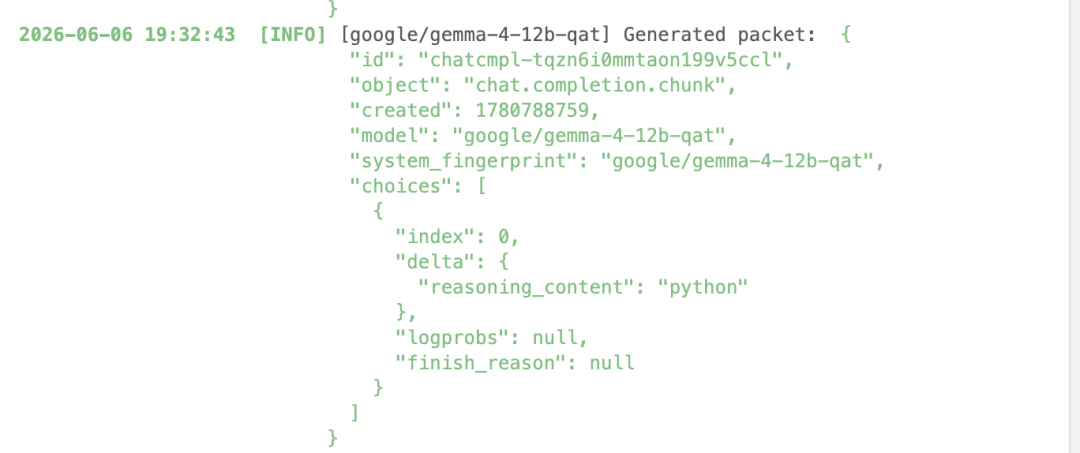
One of the most appealing things about local mode is transparency: you can watch tokens flow in and out in real time, change the context window size, adjust system prompts and quantization settings, and build a deep understanding of how the GPU processes tokens.
FAQ
- Inference is too slow: try a smaller model first (
gemma-4-12b-qatrather than the26b); for maximum speed, callllama.cppdirectly instead of going through LM Studio. - The context window is limited: the local context window size is entirely bound to your hardware. A 64GB Mac can run near full load; smaller-memory devices need a model with lighter quantization.
- Prompt template mismatch: a common early-days problem; LM Studio and HuggingFace's "use this model" buttons have greatly simplified the work, and such issues usually get fixed quickly by the community.
- The agent deletes files it shouldn't: this is exactly why you isolate with Docker. Even if the agent goes wrong inside the container, the rest of the host is unaffected. If you need network access (say, curl), open permissions in a separate, independent image instead.
- Can this run in production?: the author is explicit: "not sure it's fully ready for production software development yet." Treat it as a development aid and an experimental environment, not a core link in a production pipeline.
Related articles
Hermes Agent: The Open-Source Python Project That Beat OpenAI Codex
Hermes Agent cut its startup time by 63% through three engineering optimizations and beat the Rust-written OpenAI Codex 6:5 across 11 CLI benchmarks, with GitHub stars passing 160,000.

skill-cleaner: An Open-Source Tool to Put Your Agent Skills on a Diet
Peter, the 'father of the lobster,' has open-sourced skill-cleaner: 5 core features that audit and optimize your Agent skill descriptions, saving Token costs and improving Agent selection accuracy. Now open on GitHub.

SkyClaw-v1.0: A Free Agent Model Closing In on Opus 4.6
Kunlun Tech releases the SkyClaw-v1.0 Agent model: performance approaching Claude Opus 4.6 at half the price of mainstream models, OpenAI-interface compatible, free for a limited time.

CODA: Letting LLMs and Novices Write Speed-of-Light GPU Kernels
An open-source project from MIT, Princeton and others rewrites the scattered computations in Transformer training into the GEMM-Epilogue pattern, speeding up backpropagation by 1.6-1.8x
Multi-Machine Codex Collaboration: How to Actually Use Up Your AI Membership Quota
Build a Codex multi-machine collaboration system with 4 Macs, from research and planning to batch video generation, turning your AI membership from 'renewal anxiety' into 'continuous output'

ECC: An Open-Source Configuration System with 38 Agents for Claude Code
A GitHub favorite with 150k stars: a Claude Code configuration powerhouse with 38 specialized agents, 156 skills, and 1282 security tests, fully open-sourced under MIT