
YoooClaw C.ONE: The AI Message Butler That Sticks to the Back of Your Phone
An AI memory card that sticks to the back of your phone and automatically aggregates messages from WeChat, Feishu, and every other app, with smart summaries, scheduled pushes, and custom light-effect alerts -- say goodbye to message bombardment.

YoooClaw C.ONE: The AI Message Butler That Sticks to the Back of Your Phone
An AI memory card that sticks to the back of your phone and automatically aggregates messages from WeChat, Feishu, and every other app, with smart summaries, scheduled pushes, and custom light-effect alerts -- say goodbye to message bombardment.
YoooClaw C.ONE is an AI memory card that sticks to the back of your phone. It reads notification messages from every app on your phone (WeChat, Feishu, Alipay, and so on) and has AI summarize them automatically. You can set up scheduled pushes, and use custom light effects to flag important messages. Paired with an agent, it can also transcribe recordings, capture ideas, manage to-dos, and even direct your computer remotely to carry out research tasks.
What It Is
YoooClaw C.ONE is essentially an "AI hardware + software" combo:
- Hardware: a thin card that sticks to the back of your phone, with an LED light and a microphone
- Software: the YoooClaw app, which reads notifications, calls AI to process them, and manages scheduled tasks
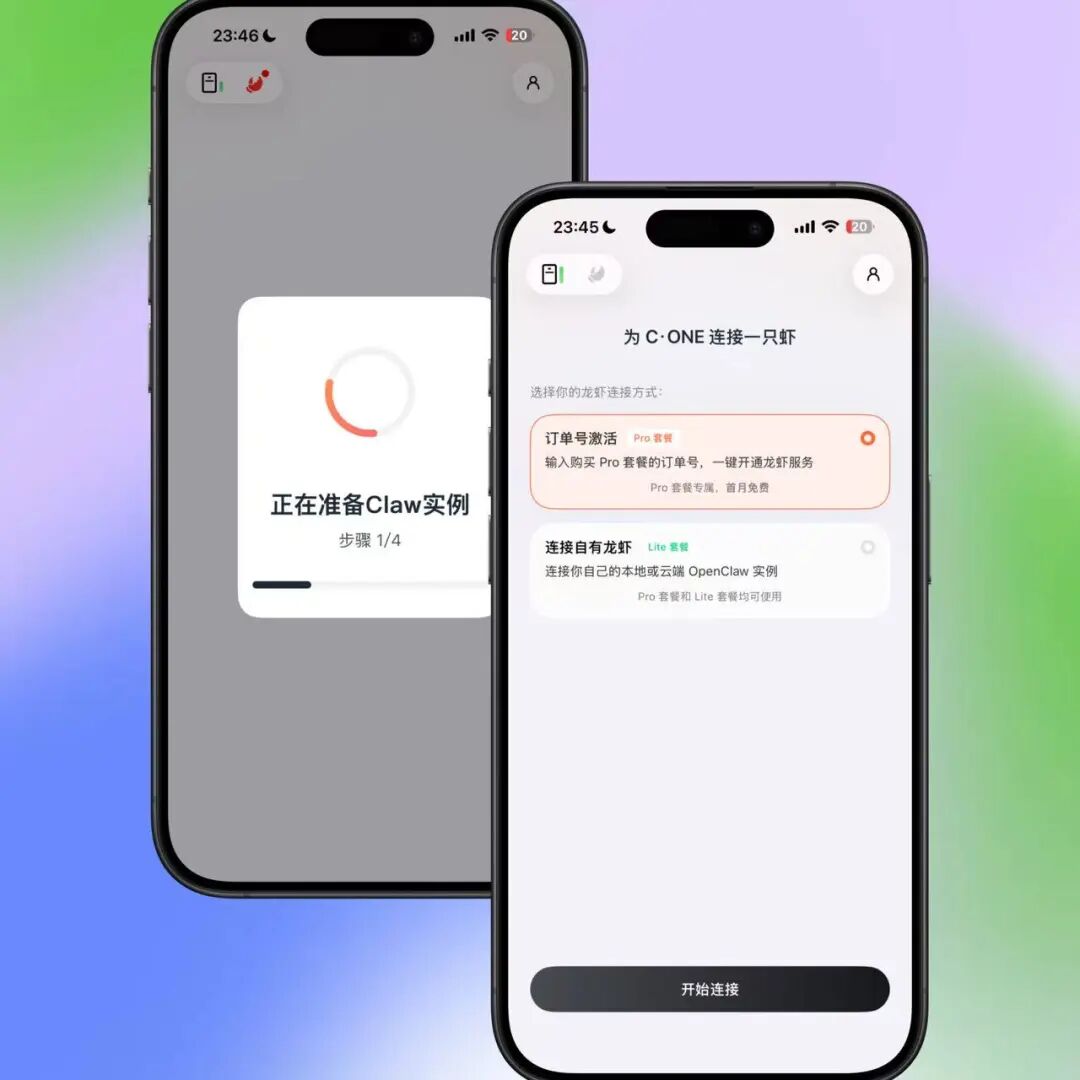
- Integration: connects to a local agent (such as OpenClaw/Hermes), or one-tap connects to ByteDance Volcano's ArkClaw (no deployment needed)
What it does can be summed up in one sentence: turning the "passive receiving" of phone notifications into "active management".
Core Features
Full message aggregation and smart summaries
This is the most basic and most essential feature. YoooClaw C.ONE reads push notifications from all apps on your phone, and AI distills them into a summary automatically.
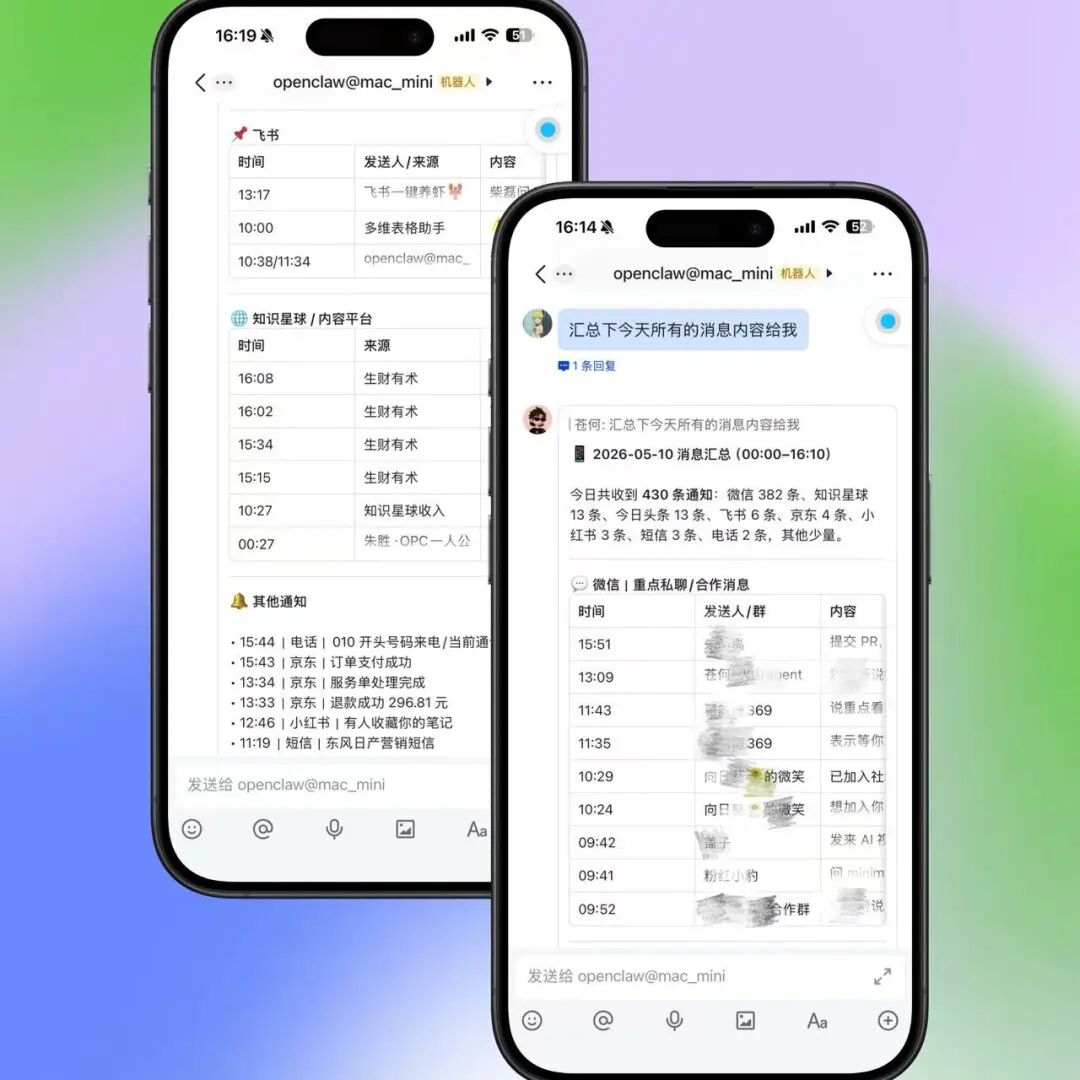
You just send one message to your agent: "Summarize all of today's messages", and it organizes every notification from WeChat, Feishu, Alipay, and the rest into a single digest for you.
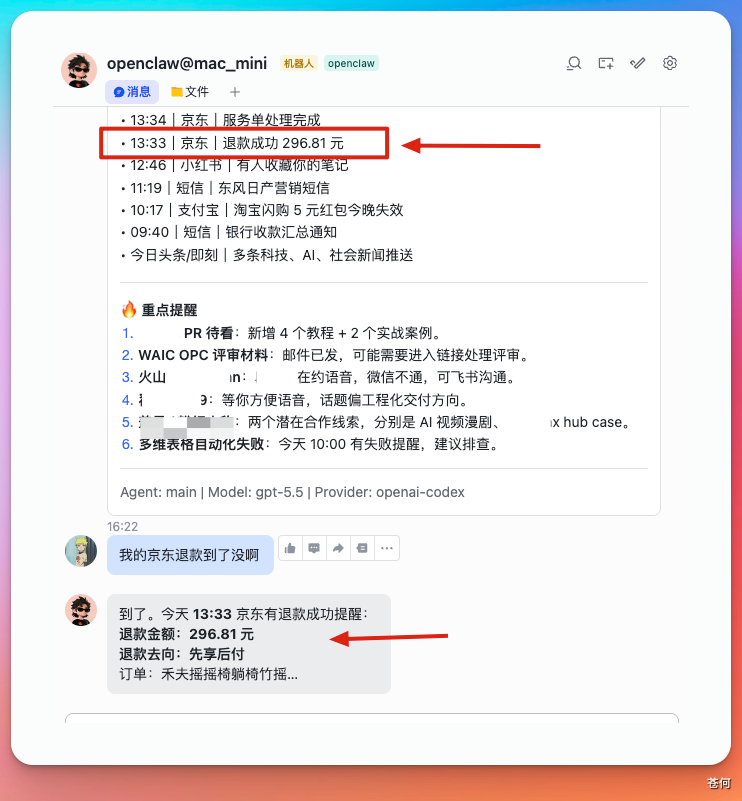
The more practical scenario is looking up specific information. Say you returned a JD.com parcel yesterday and don't know whether the money has been refunded -- just ask the agent, and it finds that refund notification in the records and tells you the result.
Scheduled tasks: an automatic push every day
You can set a scheduled task so the agent pushes a message summary at a fixed time each day:
Push a summary of yesterday's messages every day at 9:10
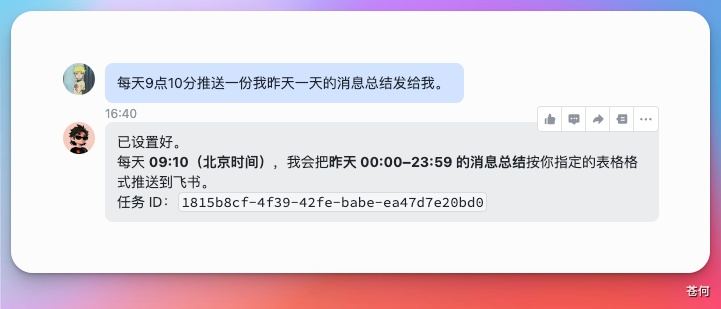
That way you can work with peace of mind instead of checking your phone constantly -- one summary in the morning is enough.
Custom light effects: important messages light up
This is a unique hardware-level feature. You can set rules: when a specific group chat or contact sends a message, the LED on the card flashes in the color you choose.
Create this light-effect rule for me: when the WeChat group "Dou Shi Cang He Ya" gets a message, flash red to alert me
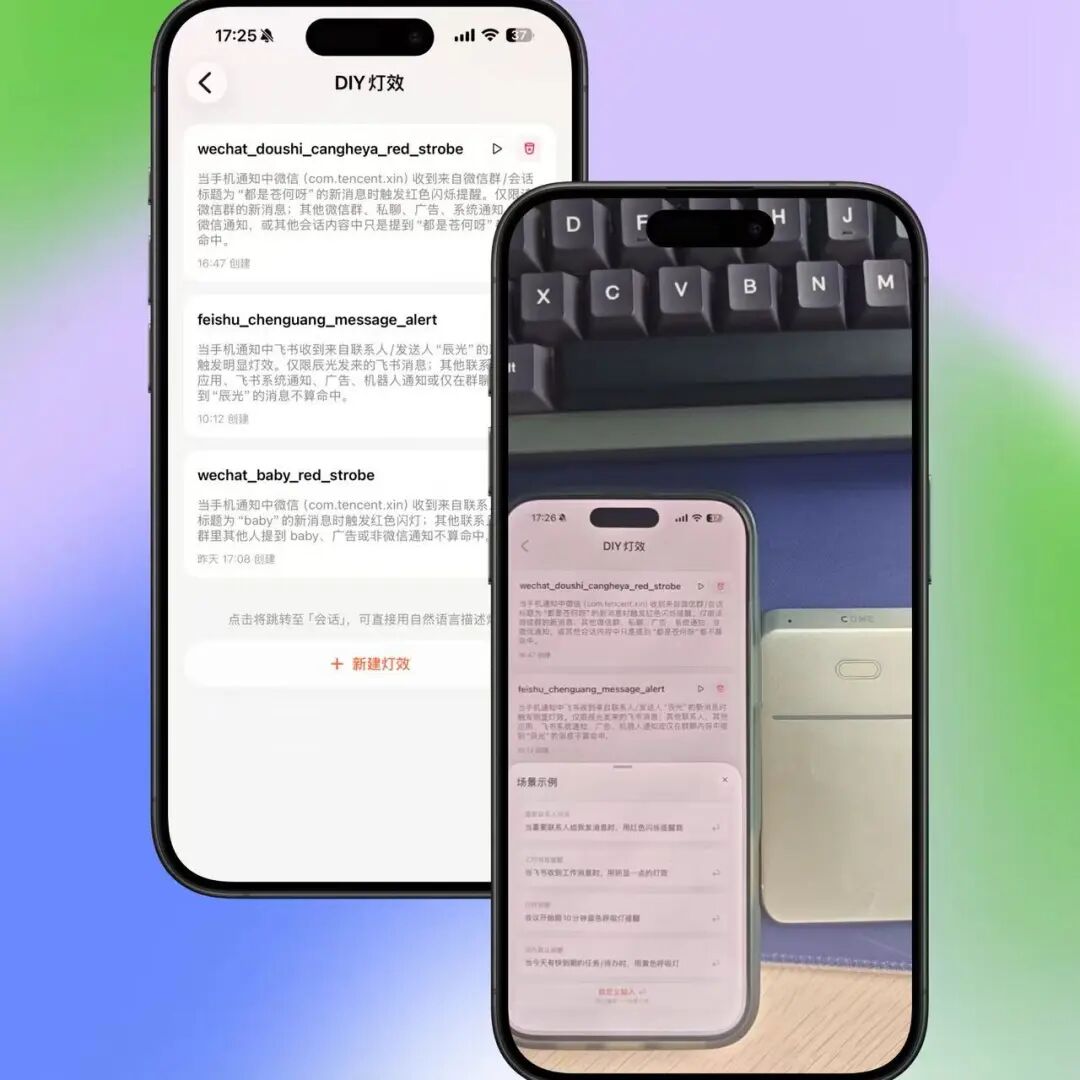
When you want to focus on work, lay the phone face-down on the desk; only a lit-up LED needs your attention. No opening WeChat, no getting interrupted by a barrage of messages.
Capturing ideas by voice
Press and hold the card to record by voice; the recording syncs automatically to the knowledge base you designate (say, a specific folder on your local Mac). Far faster than waking the phone, finding a notes app, and typing.
Extra-long recordings and meeting transcription
The card supports up to 5 hours of continuous recording. Once a recording finishes, it can be transcribed automatically and synced to the knowledge base, with AI then extracting to-do items. The whole flow -- record the meeting -> auto-transcribe -> extract to-dos -> scheduled push -- is done end to end.
Directing an agent remotely
With voice or text commands, have the agent carry out tasks on your computer:
Research how GEO is applied in the real estate industry, and send me the findings organized into a Feishu document
The agent does the research, the organizing, and the document-sending on your computer; you just wait for the results.
How to Use It
YoooClaw C.ONE has two connection modes:
Mode 1: connect a local agent (requires your own deployment)
- Deploy an agent on your computer (such as OpenClaw or Hermes)
- Pair by scanning a QR code in the YoooClaw app
- Suited to users with a technical background who need deep customization
Mode 2: one-tap connection to ArkClaw (no deployment)
- Open the YoooClaw app and choose to connect to ByteDance Volcano's ArkClaw
- No local deployment, no code to write, no manual API key configuration
- Ready the moment you open it, zero barrier to entry
Highlights from Real Use
The ultimate answer to read-but-no-reply: your boss messages you on Feishu; you don't want to open it and mark it read, but you do need to know what it says. Just ask the agent: "Chenguang just sent me a message on Feishu -- check what it says." The message stays unread, but you know the content.
Automated material collection: toss an article link from a WeChat Official Account to the agent and it saves it to the knowledge base automatically. More convenient than manually clipping into Notion, and the knowledge base content can be continuously learned by AI.
Skill distillation: feed specific chat logs to the agent so it learns a person's communication style and habits and distills them into a Skill. When similar conversations come up later, the agent can offer suggestions that better match that style.
Who It Is For
- Victims of message bombardment: too many WeChat group, Feishu, and DingTalk messages; you need unified management and filtering
- Knowledge workers: you need fragmented information (notifications, recordings, ideas) funneled into one knowledge base
- Agent users: already using agents like OpenClaw/Hermes and want a mobile entry point
- Meeting-heavy workers: you need automatic recording transcription and to-do extraction
Things to Note
- Privacy: the card reads the phone's notification shade, not data inside apps directly. Still, mind how sensitive information is handled
- Better Android compatibility: Android's notification-access permission mechanism differs from iOS, and the feature set is currently more complete on Android
- Depends on agent capability: the quality of message summaries depends on the agent model behind it; pair it with a strong model
Toolin Editorial Team
Categories
Related articles
Advanced Claude Code Guide: 15 Hidden Productivity Features
Insider tips from Claude Code's core developers. Covers 15 advanced techniques including /loop auto-running, Worktree parallel development, and Chrome extension verification.
Qwen3.5-Omni Hands-On: Native Omni-Modal Perception, an AI Coding Master Watching Through Your Camera
Qwen3.5-Omni from Tongyi Qwen is officially released, with native input across text, images, audio, and video. Hands-on testing shows formidable visual code understanding — it can interpret academic papers in real time and generate the corresponding code.

6 Must-Install Claude Skills: Double Your AI Agent's Capabilities
A curated list of 6 high-value Claude Skills covering frontend aesthetics, office document handling, web search, and persistent memory, with install links and use cases — ideal for Claude Code and OpenClaw users.

WeCom Open-Sources a CLI: AI Agents Directly Control Messages, Schedules, and Docs
WeCom has open-sourced wecom-cli, letting mainstream AI Agents such as Claude Code, Codex, and QClaw call 7 major categories of office capabilities. Setup takes 3 steps, with complete command examples included.