
A Hands-On Guide to Claude Code Session Management
Master Claude Code's context window, rewinding, compaction, and subagents — hands-on techniques to get the most out of your AI coding assistant.
A Hands-On Guide to Claude Code Session Management
Master Claude Code's context window, rewinding, compaction, and subagents — hands-on techniques to get the most out of your AI coding assistant.
Claude Code's context window has been upgraded to 1 million tokens, but the more space you have, the harder it is to manage. This article comes from the hands-on experience of Thariq, an official Anthropic evangelist, and it tackles the same problem: how to manage your context so Claude Code actually helps you get work done instead of making a bigger mess.
Who this is for: developers already using Claude Code, especially those who frequently hit “Claude forgot what we said earlier” or “quality drops sharply after compaction”.
Core Concepts: Three Things About the Context Window
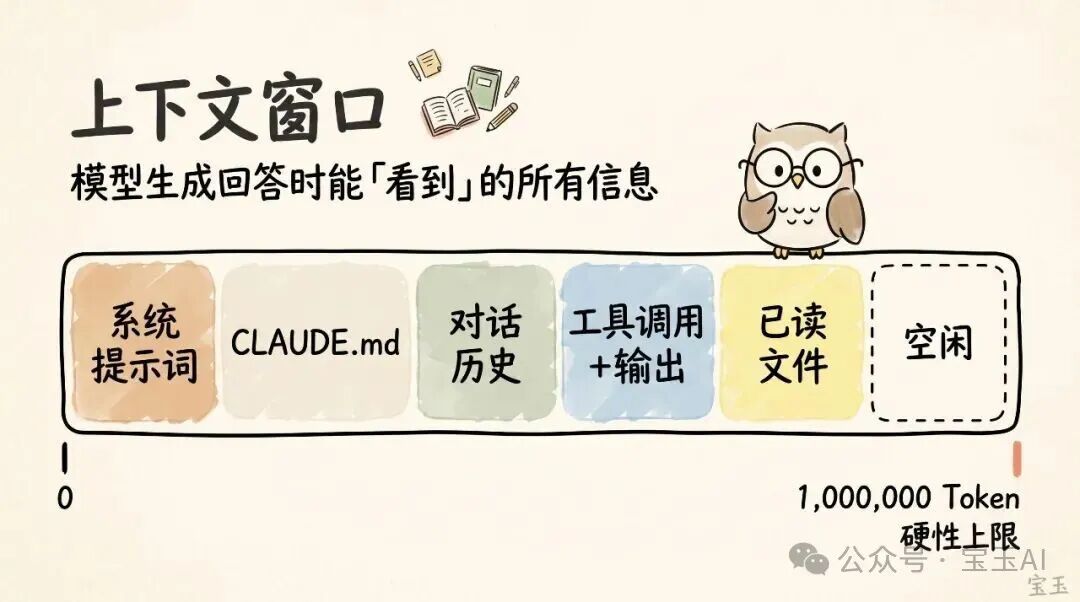
Context window: everything the model can “see” when generating a response, including the system prompt, chat history, tool calls and their outputs, and files it has read. Claude Code currently has 1 million tokens of context capacity.
Context rot: the longer the conversation history, the more scattered the model's attention, and important early information can get drowned out. This is an unavoidable physical limit.
Compaction: summarizing a long conversation into a concise digest to free up space and keep working. This is a “lossy” operation — you hand the judgment of “what matters” over to Claude.
Five Options After Each Turn
After Claude finishes a response, you have five paths:
| Action | Command | When to Use |
|---|---|---|
| Continue | Just type the next message | The task isn't done and the context is still clean |
| Rewind | /rewind or double-tap Esc | Claude went down the wrong path and you want to retry from a checkpoint |
| Clear | /clear | Switching to a completely new task |
| Compact | /compact | Same task but the context is too long; keep the key information and continue |
| Subagents | Triggered automatically or manually via the Agent tool | A subtask will produce lots of intermediate results and the main session only needs the final takeaway |
Tip 1: Rewind Instead of Correcting
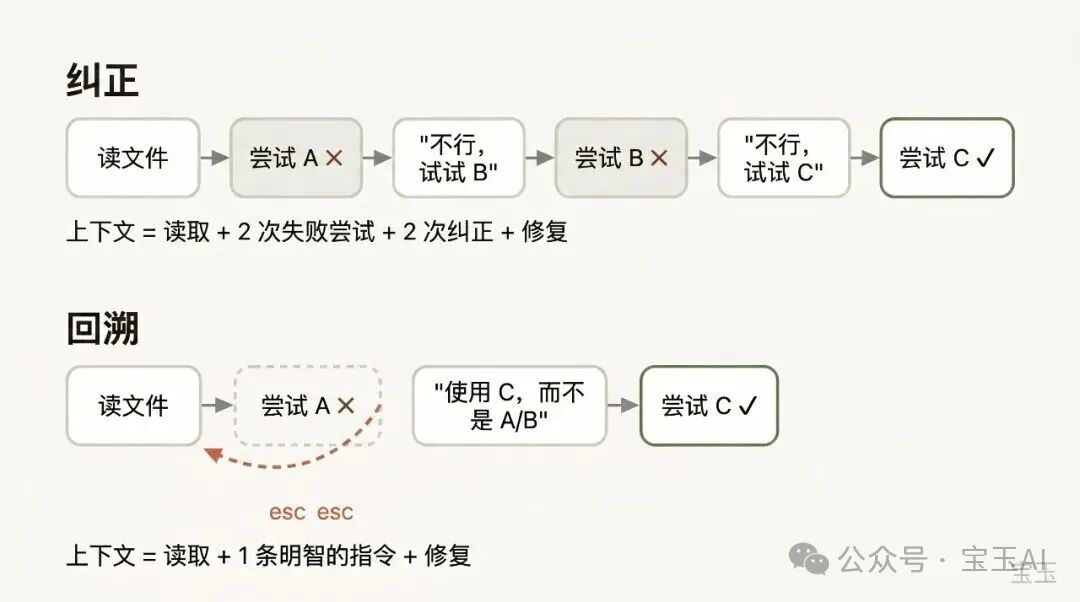
This is the single most important habit recommended by Anthropic. When Claude tries an approach and it fails, your instinct is to tell it “switch to approach X”. But the better move is:
- Double-tap
Escto rewind to the point right after it finished reading the file - Re-prompt with the lesson you just learned: “Don't use approach A anymore — the foo module doesn't support that. Try approach B directly”
The benefit: the noise of the failed attempt is completely removed from the context instead of continuing to interfere in later turns.
Tip: You can also use the “summarize from here” feature to have Claude summarize the lessons from its stumbles as a handoff note — like “future Claude” leaving a note for its past self.
Tip 2: Compact or Clear — Which One?
Compact (/compact): Claude summarizes the conversation history itself and replaces the original with the summary. Less effort, but you don't fully control what it keeps.
You can add instructions to steer the compaction:
/compact Focus on the refactoring of the authentication module and drop the test-debugging contentClear (/clear): you write down the key points yourself and restart from a clean state. More effort, but the new context is 100% what you consider important.
Rule of thumb: compact within a task, clear when switching tasks.
Tip 3: When Should You Start a New Session?
The basic principle: new task, new session.
1 million tokens let you complete longer, more complex tasks (like building a full-stack application from scratch), but tightly linked follow-up tasks are the exception. Say you just finished a new feature and now need to write its documentation — starting a new session is actually slower, because Claude has to read through all the code again.
Tip 4: Use Subagents for Read-Once-and-Done Work
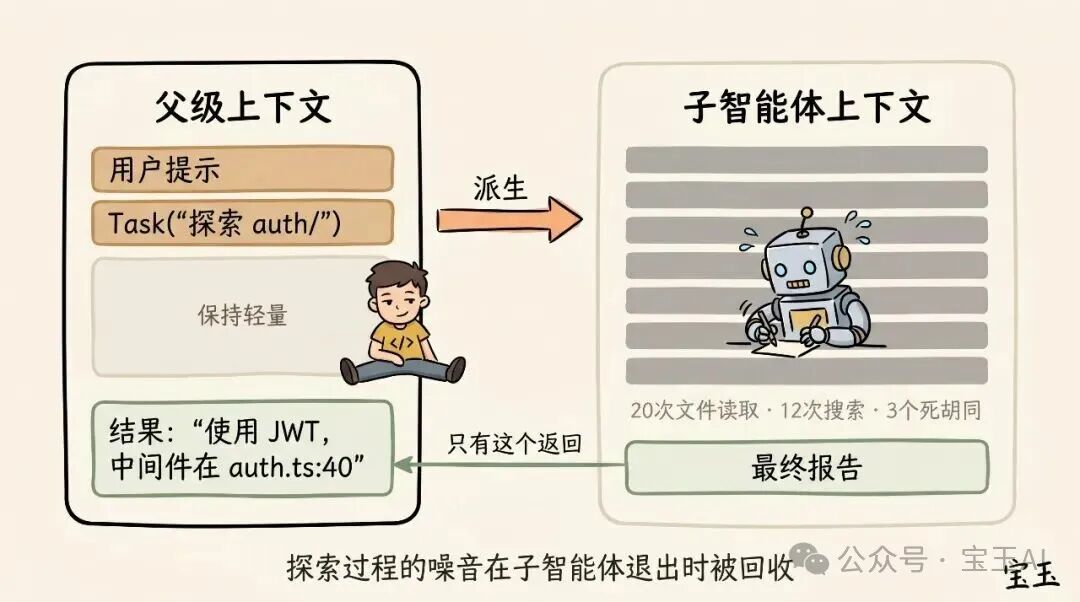
Subagents have their own context windows and return only their results to the main session when the work is done. The test for whether to use one: will you ever need to look at these intermediate results again? If not, send a subagent to do it.
Real-world usage examples:
- “Send a subagent to verify our recent work against this spec document”
- “Send a subagent to read through another codebase, summarize how it implements authentication, then mirror that implementation over here”
- “Send a subagent to write documentation for the new feature based on the Git change history”
Why Does Compaction Go Wrong?
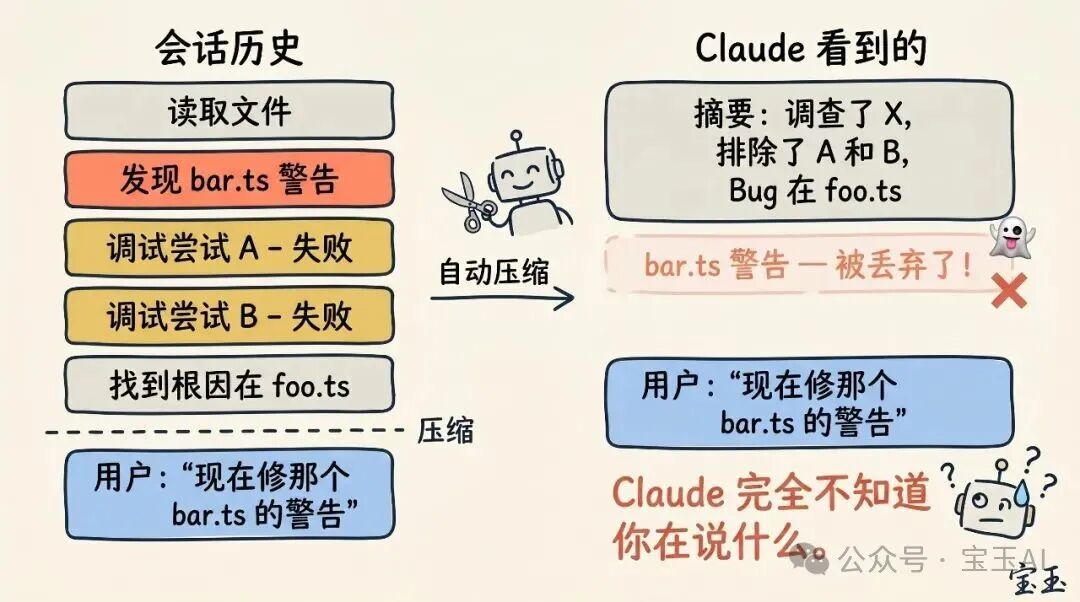
Compaction failures usually happen at one specific moment: when the LLM cannot predict what you will do next. For example, auto-compaction triggers after a long debugging stretch, and then you say “also fix that other warning we saw earlier in bar.ts” — but that warning was already discarded as irrelevant during compaction.
The countermeasure: with 1 million tokens of headroom, you can proactively run /compact ahead of time and include a description of “what I plan to do next”.
Toolin Editorial Team
Categories
Related articles
Getting Started with Claude Code from Scratch: A Step-by-Step Installation Guide for Users in China
No overseas phone number or Visa card required — Claude Code runs on domestic models too. A complete installation walkthrough for both Mac and Windows, from installing the framework to connecting GLM-5.1.
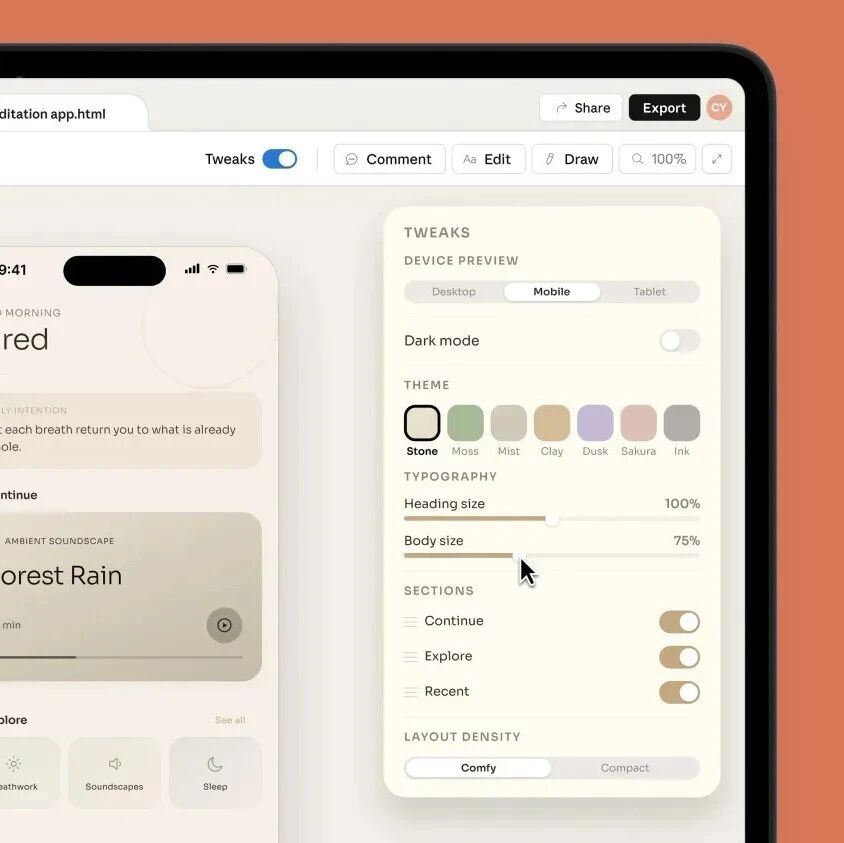
Claude Design Hands-On: Professional-Grade Design from a Single Prompt
Claude Design can build web pages, PPTs, prototypes, and even animated videos. This article collects the full set of use cases plus official practical tips, with the access URL and example prompts.
CLAUDE.md Goes Viral on GitHub: Four Rules to Keep AI Coding in Line
The CLAUDE.md configuration file, born from Karpathy's coding experience, hit number one on the GitHub trending chart, with 60,000 developers copying it. Four core principles to substantially raise your AI coding quality.
An Anthropic Lead's Vibe Coding Masterclass
Anthropic researcher Erik Schluntz shares hands-on lessons on using Vibe Coding responsibly in production, covering the 22000-line code merge case, the leaf node strategy, and advanced tips.

AI Memory Enhancement Tools: A Roundup and Hands-On Guide
From Claude-Mem to DeepSeek DSA, a roundup of the mainstream AI memory enhancement tools of 2026, with principle comparisons and selection advice.

A Hands-On, End-to-End Guide to Producing AI Short Dramas
From script to finished film: make AI short dramas from scratch with Doubao, Xiaoyunque, Vidu and other tools, with tool comparisons and cost references.