
How to Stream Interactive Charts Inside AI Conversations
Code Pilot recreates Claude's generative UI interaction, streaming interactive charts, widgets, and architecture diagrams — and it works with Chinese models like Kimi K2.5.
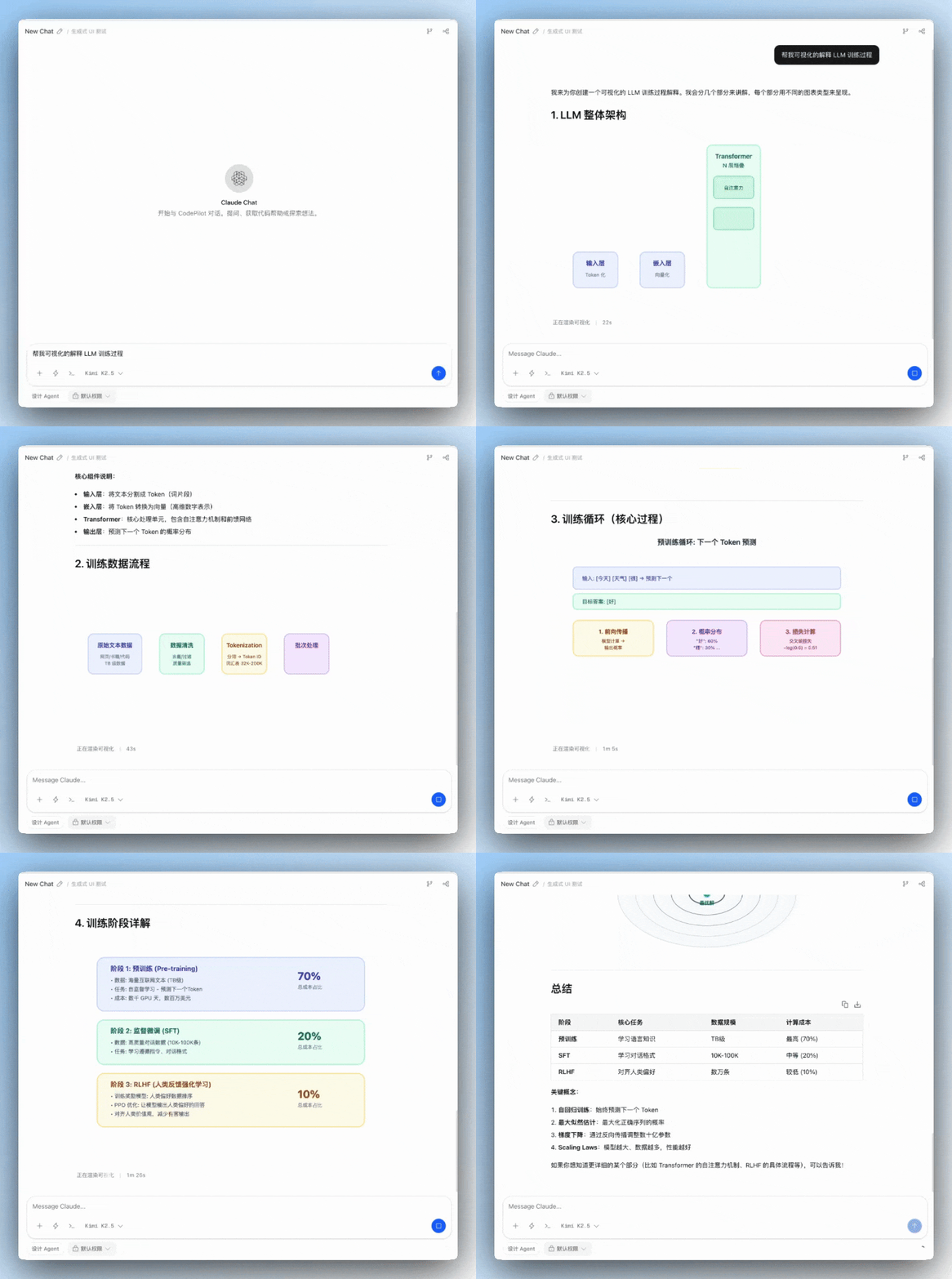
How to Stream Interactive Charts Inside AI Conversations
Code Pilot recreates Claude's generative UI interaction, streaming interactive charts, widgets, and architecture diagrams — and it works with Chinese models like Kimi K2.5.
The day before yesterday, Anthropic launched a new generative-UI-based interaction in Claude — charts, visualizations, and interactive widgets generated directly inside the chat.
The author of Code Pilot recreated the feature in two days, and made it more general-purpose: it supports Chinese models such as Kimi K2.5 and Minimax M2.5.
What Can It Do?
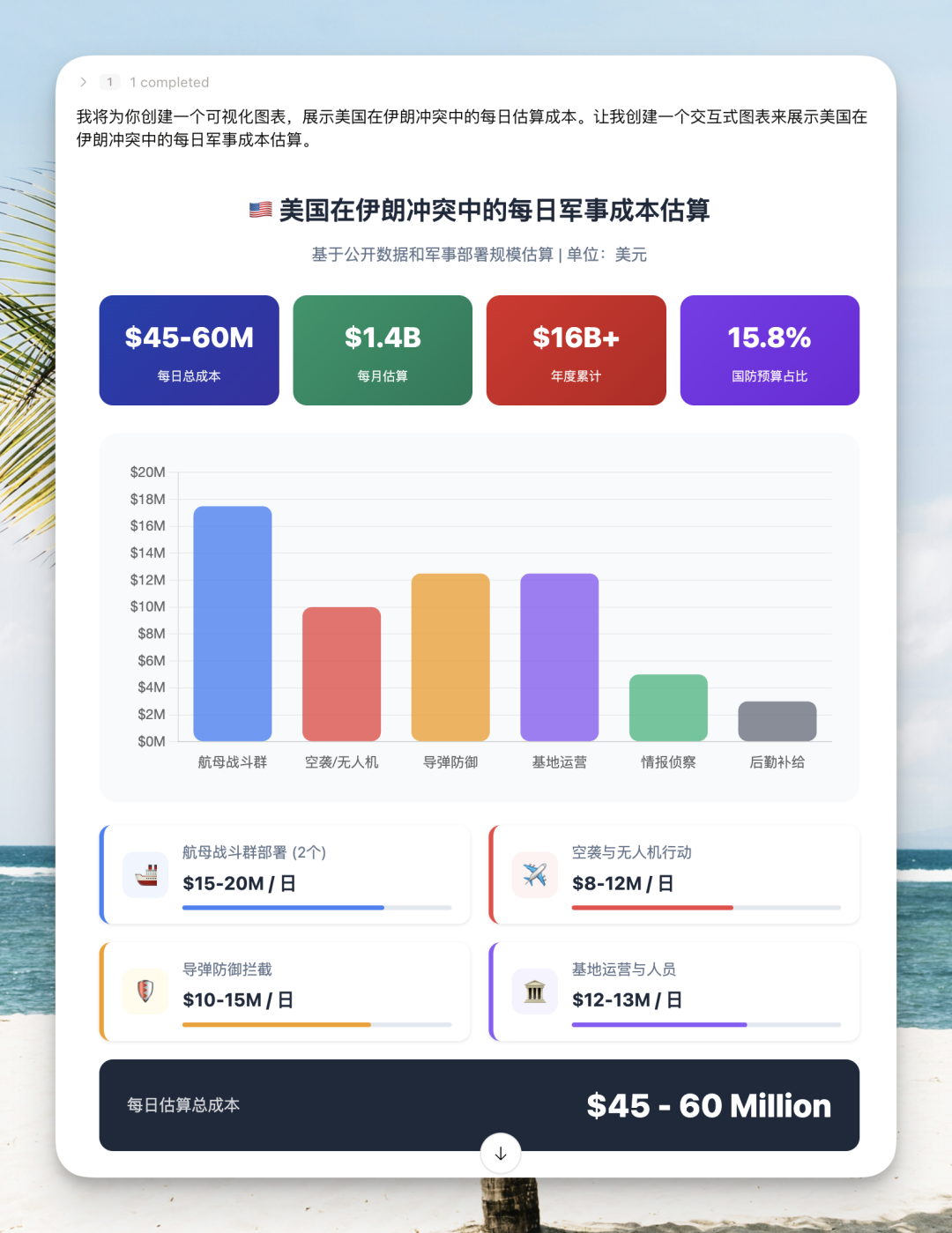
1. Data Visualization
Have the AI draw a chart of "estimated daily cost of the US-Iran conflict." Before, the AI would hand you a wall of text where the relationships between the numbers were impossible to see. Now it produces a chart directly, and how much each part costs is clear at a glance.
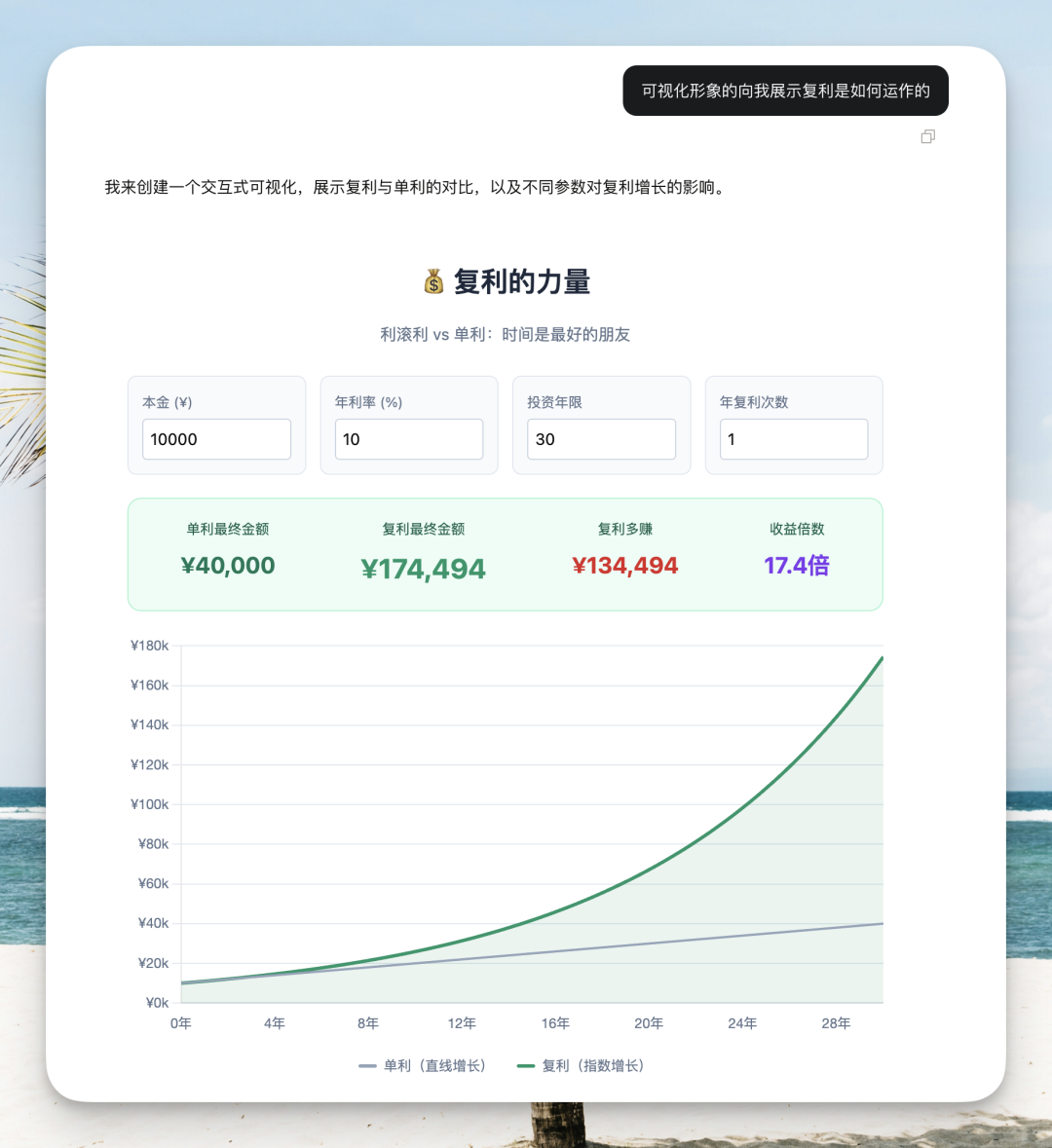
2. Interactive Widgets
Ask it to build a compound-interest calculator. Drag the slider to change the initial amount or the investment horizon, and the chart and numbers below update in real time. This isn't a static picture — it's a widget you can genuinely interact with.
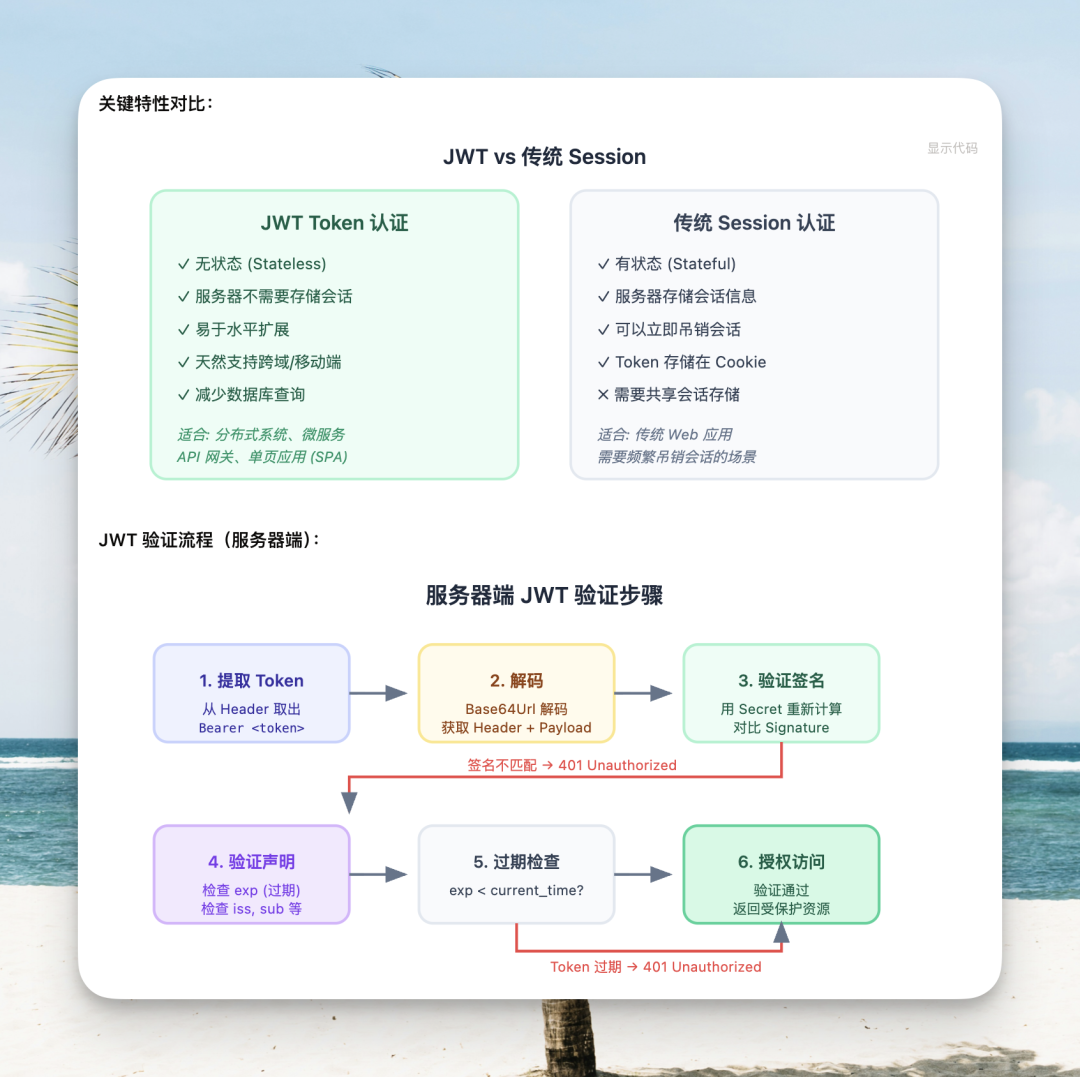
3. Architecture Diagrams and Flowcharts
Ask it to draw the complete flow from API to JWT authentication. Feature comparisons, flowcharts, and layered structures all come out graphical — far faster for understanding an architecture than reading a text description.
4. Analyzing Live Data
Throw a GitHub repository link at it, and it fetches the data and analyzes it visually. Stars, forks, tech stack, architecture design, core modules — all turned into charts.
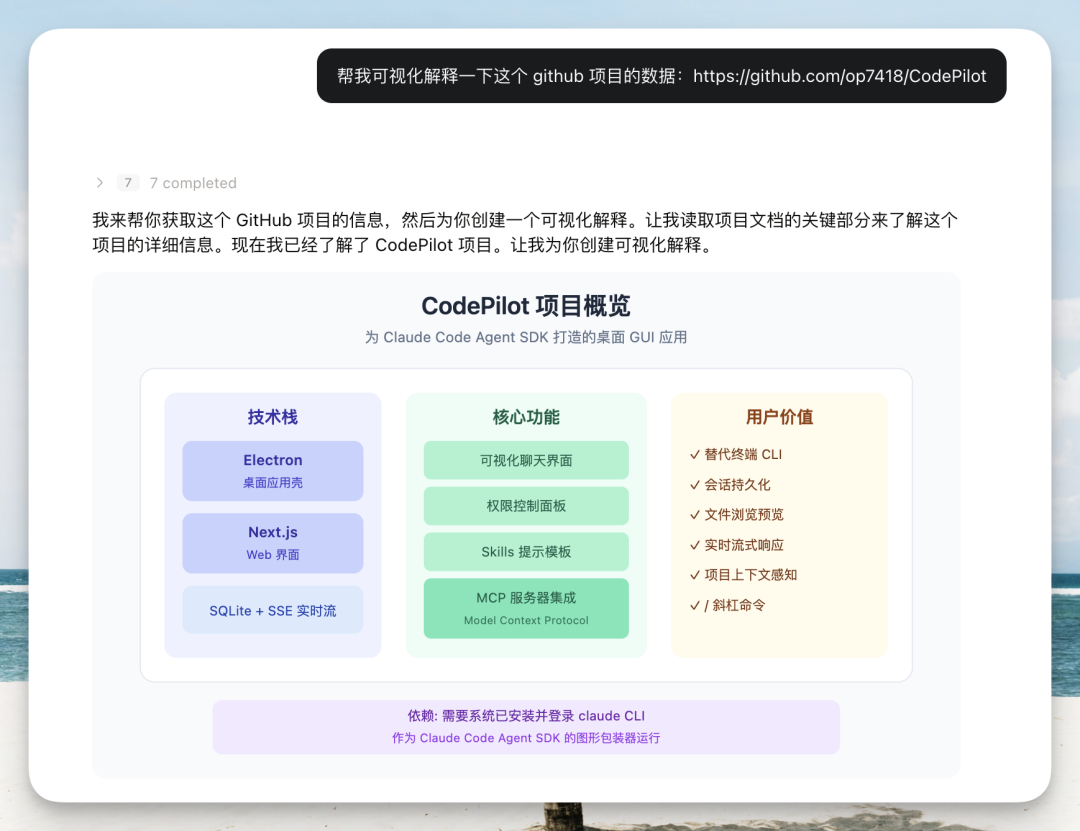
5. Deep Interaction and Explanation
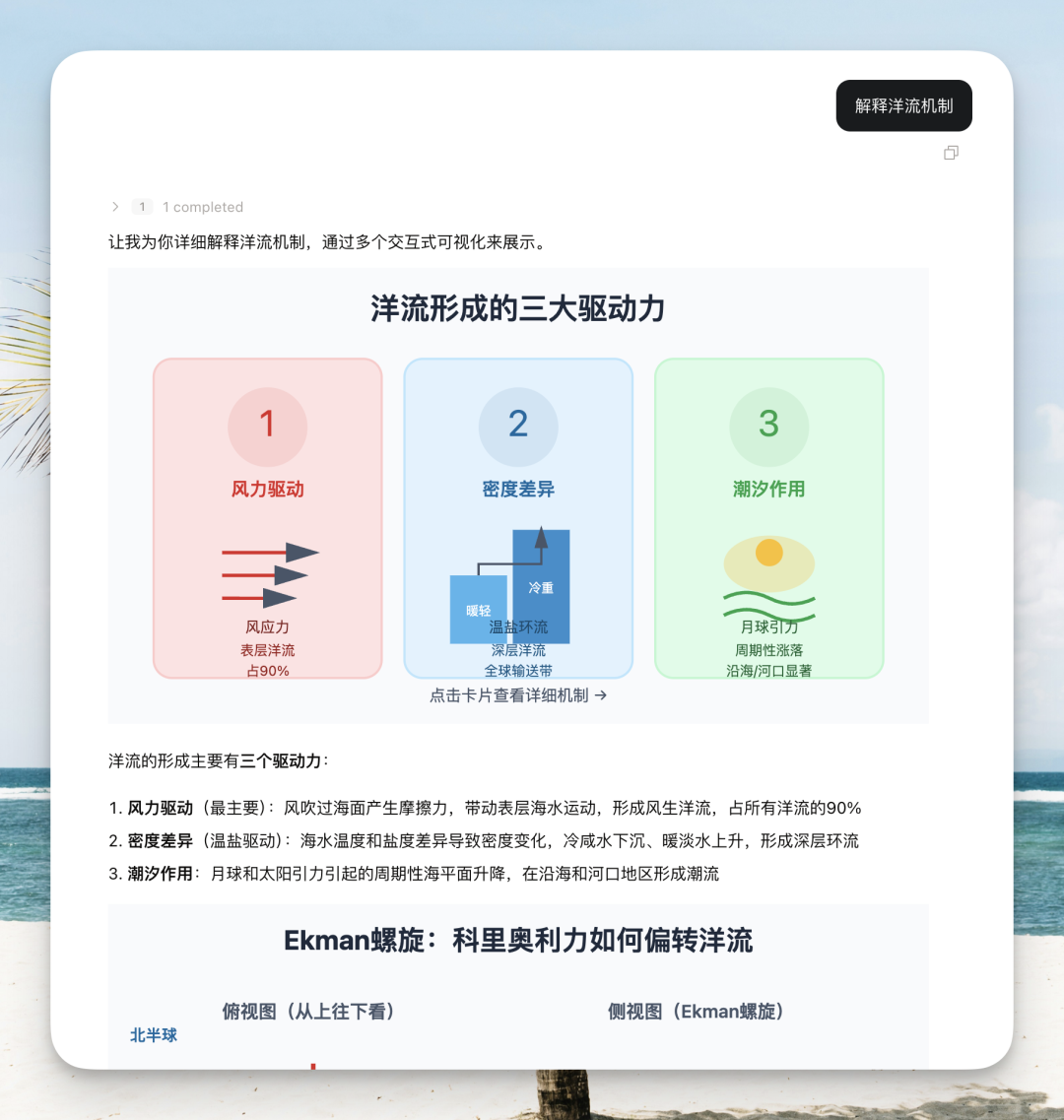
You can interact with the generated diagrams and ask for more detailed explanations. For example, have it explain the relationship between monsoons and ocean currents; click the "ocean current mechanism" button and it automatically sends a new instruction to the model, which continues generating diagrams of how ocean currents work.
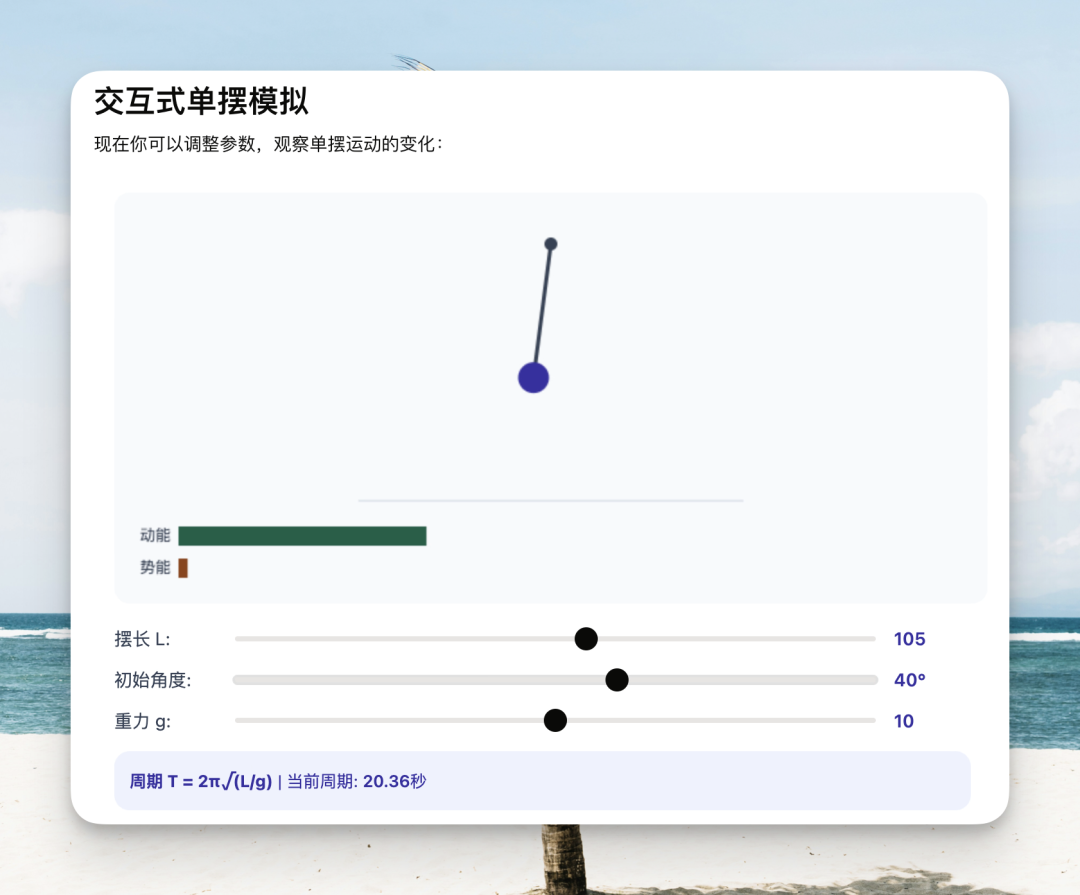
For visualizing physics and math formulas, every parameter can be controlled with sliders and inputs, and the animation changes instantly. Extremely useful for students.
Technical Implementation
Claude's Official Approach
Claude.ai uses the tool_use mechanism: the model calls a dedicated tool that outputs structured widget content, and the frontend parses the tool call's input parameters to render it.
But this approach has three problems:
- SDK limitation: in the Claude Agent SDK's preset: 'claude_code' mode, you can't register custom tools
- Streaming experience: a tool_use result can only be rendered after input_json_delta has finished assembling, with no incremental HTML rendering
- Render isolation: you have to deal with style leakage and script escape issues
Code Pilot's Approach
Trigger: code fences
The model outputs a special Markdown code fence to trigger rendering:
show-widget
{"title":"training_flow","widget_code":"<svg width=..."}
This format reuses Code Pilot's existing code-fence pattern, so the frontend parser chain supports it out of the box.
Rendering: sandbox iframe
Each widget renders inside an iframe with sandbox="allow-scripts".
- The CSP policy allows external scripts from only 4 CDN domains
connect-src 'none'blocks all network requests- Content updates arrive via postMessage
- During streaming preview it sends
widget:update, without executing scripts - On final render it sends
widget:finalize, which executes the scripts - A ResizeObserver watches for content height changes and reports them to the parent page via postMessage
CSS variable bridging
This is the key to making widgets blend visually with the app.
Code Pilot uses CSS variables in the OKLCH color space. When the iframe initializes, the bridging layer injects Code Pilot's variable values into the iframe's :root. CSS written by the model according to the guide can then use the current theme's colors directly.
When dark mode toggles, the parent page detects the class change, recomputes the variable values, and pushes them into the iframe.
Streaming render
This is the most complex part of the whole implementation. The model generates token by token, so at any moment the widget code you've received may be incomplete JSON, incomplete HTML.
Code Pilot's solution:
- Parse incomplete JSON and HTML in real time
- Render into the iframe as generation proceeds
- Execute the scripts once everything is complete
Chinese Model Support
Once Code Pilot was built, it wasn't just Claude that could use it. Kimi K2.5, Minimax M2.5, and native Anthropic models all run it fine.
The author specifically noted that the graphics K2.5 draws look even better than Sonnet 4.6's, and its architecture analysis is very detailed. If you use this feature, K2.5 is the recommended first try.
How to Use It
Install Code Pilot directly: https://github.com/op7418/CodePilot
Once installed it works right away, with no extra configuration.
Toolin's Take
This is a classic expression of open source spirit: "see something good, recreate it." More importantly, Code Pilot's implementation is more general-purpose than Claude's official one — it supports multiple models, and it's open source.
The core value of generative UI is: the AI's output is no longer limited to text — it can directly generate interactive interfaces. That has enormous value for data analysis, education, technical documentation, and other scenarios.
Who it's for?
- Analysts who need data visualization
- Students who need to understand complex concepts
- Developers who need to produce interactive demos quickly
Who it's not for?
- Scenarios that only need plain-text conversation
- Users with no requirements for visual presentation
Pricing: open source, free
Toolin Editorial Team
Categories
Related articles
Decomposing Your Business into Skills: The Real Meta-Skill of the AI Era
It's not that you can't use AI — you can't break things down. From goals to actions to judgment, one piece on turning the experience in your head into a structured Skill that AI can execute.

Claude Code Artifacts: Turning Terminal Development into a Shareable Web Dashboard
Anthropic brings Artifacts to Claude Code, generating shareable web pages in real time as you develop — team collaboration no longer relies on retelling things by hand.
Codex Record & Replay: Do It Once, and the AI Learns to Do It for You
OpenAI launches Record & Replay for Codex — record your workflow on your Mac and it automatically becomes a reusable Skill. Time to rethink automation.

Odysseus: A Local ChatGPT Hand-Built by a Top YouTuber, 30,000 Stars in 3 Days
Former world's #1 YouTuber PewDiePie open sourced a fully self-hosted AI workspace — free, no tracking, with a built-in Agent — pulling in 30,000 stars in three days.
Xiaomi Miloco 2.0: Smart Homes Finally Get a True AI Steward
Xiaomi open sources its whole-home AI solution Xiaomi Miloco 2.0 — multimodal perception, proactive intelligence, and household memory bring the Agent into the smart home ecosystem.

Agnes AI Makes Its Omnimodal API Free Indefinitely, with 1M Context and 4K Image Generation Upgrades This Week
Agnes AI has opened its text, image, and video omnimodal model APIs for free indefinitely, with 1M ultra-long context and 4K ultra-HD text-to-image upgrades landing this week.