
Codex Micro: OpenAI's First Hardware Is a $230 AI Supervisor Peripheral
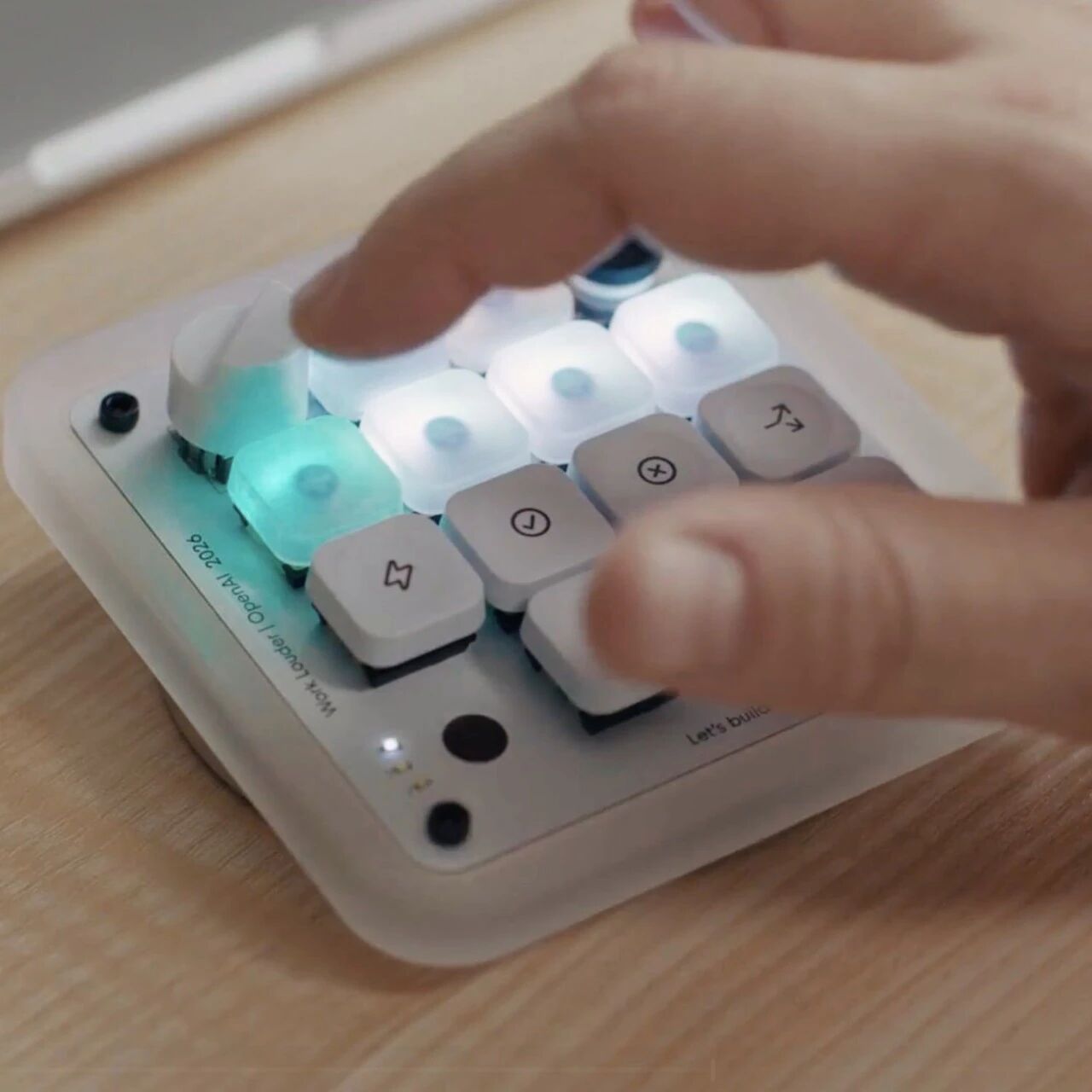
OpenAI and Work Louder jointly launch Codex Micro, their first branded hardware: 13 keys + knob + joystick, purpose-built for physically controlling multiple Codex agents, aimed at power users.
Codex Micro: OpenAI's First Hardware Is a $230 AI Supervisor Peripheral
OpenAI and Work Louder jointly launch Codex Micro, their first branded hardware: 13 keys + knob + joystick, purpose-built for physically controlling multiple Codex agents, aimed at power users.
On July 16, OpenAI released its first branded hardware product — Codex Micro (model kbd-1.0-codex-micro). It is not a pair of AI glasses, nor a robot, but a physical console priced at $230 (roughly 1500~1560 RMB), built by OpenAI together with peripheral maker Work Louder to monitor and operate multiple AI coding agents on the Codex platform in real time. Some netizens have already dubbed it a "1,500-yuan AI supervisor peripheral." This article lays out its hardware specs, its core positioning, and whether it even counts as "real AI hardware," so you can decide whether to spend the money.
What Codex Micro Is
One-sentence definition: a physical command center for Codex agent workflows.
It is not a standalone AI device but an external keyboard-style controller that must be used together with OpenAI's Codex platform (OpenAI's AI coding agent platform). Its reason for existing is to bake the actions Codex power users click through in software over and over into physical keys, so you can dispatch agents within arm's reach — no window switching, no memorizing shortcuts.
You can think of it as: a three-in-one console tailor-made for Codex — macro keyboard + knob + joystick.
Hardware Specs
- 13 mechanical keys: RGB-backlit, bindable to common actions in Codex workflows
- Touch sensor: supports touch-based interaction
- One knob: for adjusting agent parameters (netizens joke it is a "twist-the-knob-to-raise-IQ" control)
- One joystick: for quickly assigning tasks across multiple Codex agents (netizens call it "flip the joystick, hand out work")
The overall positioning is a desktop peripheral, connected over wired USB, with no battery required.
Core Features
1. Physically operating multiple Codex agents
The Codex platform lets you run multiple agents at once, and switching between them or assigning tasks in the software UI means clicking a mouse. Codex Micro maps those actions onto physical controls:
- Keys → trigger preset actions (start an agent, run tests, deploy)
- Knob → adjust parameters (temperature, iteration count, token limit)
- Joystick → quickly shift focus between agents and hand out tasks
2. Deep integration with Codex workflows
The keys are not generic shortcuts; they are deeply bound to the Codex platform's API. That means the device is nearly useless in other coding tools (such as Cursor or Claude Code) — it exists only for Codex.
3. Efficiency gains aimed at power users
For Codex power users juggling 3~5 agents at once, physical controls genuinely reduce context switching. But if you run a single agent, or only touch Codex occasionally, the marginal benefit of this peripheral is very low.
Hands-On: Is It Worth $230
Strengths
- Muscle memory: physical keys build muscle memory far more readily than software shortcuts, and operating speed is noticeably faster after extended use
- Real efficiency in multi-agent scenarios: the joystick + knob combo genuinely shortens the "hand out work + tune parameters" loop
- Build quality: Work Louder has real experience in peripherals, and the mechanical keys feel solid
Controversies
- "Macro keyboard / brand-faith keycaps" skepticism: many commenters argue it is essentially a programmable macro keyboard wearing a Codex skin, not genuine AI hardware innovation — the AI inference runs entirely in the cloud, and the peripheral itself has zero AI capability
- Closed ecosystem: it is nearly worthless outside the Codex platform, unlike a Stream Deck, which can be programmed to work with any software
- Price on the high side: for the same money you can buy a Stream Deck XL, which is more general-purpose and lets you customize any shortcut you like
Use Cases
- Codex power users: developers who run multiple agents daily and need frequent switching and parameter tuning
- AI coding team leads: bake the team's common Codex actions into physical keys to lower the barrier for team members
- Peripheral collectors / OpenAI devotees: as OpenAI's first hardware, it carries a certain novelty and collector value
Not a fit: users who stick to a single coding tool, or who haven't invested deeply in Codex. A general-purpose Stream Deck-style product is the more economical choice.
References
Related articles

Hyra-1.0: Tencent Hunyuan's Scientific Discovery Agent
2026-07-21

Meshy: Turning Text and Images into Usable 3D Models in 20 Seconds
2026-07-21

Qwen-Image-3.0: Alibaba Qwen's Third-Generation Image Generation Model
2026-07-21

Build an Automated Reddit Overseas Customer Acquisition Workflow with Qwen 3.8
2026-07-21

Qwen-Audio-3.0-TTS: The Speech Synthesis Model That Can Express Emotion
2026-07-20

Qwen3.8-Max Preview: A Hands-On Early Access Guide
2026-07-20