
DeepSeek Deep Code: A Chinese Terminal Alternative to Claude Code
Deep Code, the open-source terminal coding agent recommended in DeepSeek's official docs, supports deep thinking, adjustable reasoning effort, and Agent Skills — up and running in three steps.
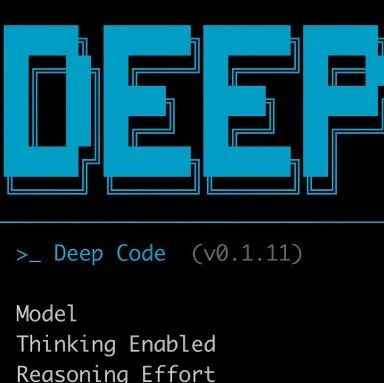
DeepSeek Deep Code: A Chinese Terminal Alternative to Claude Code
Deep Code, the open-source terminal coding agent recommended in DeepSeek's official docs, supports deep thinking, adjustable reasoning effort, and Agent Skills — up and running in three steps.
Can't use Claude Code, or want to run a terminal coding agent on a Chinese model? DeepSeek's official docs have already given Deep Code a recommended slot. It's an open-source terminal AI coding assistant built for the DeepSeek-V4 model, with support for deep thinking, reasoning-effort control, and Agent Skills. This post covers what it is, what it can do, and how to install it.
What Is Deep Code
The official one-line definition: "Deep Code is an open-source terminal AI coding assistant for the DeepSeek-V4 model."
It's a third-party open-source project (GitHub: lessweb/deepcode-cli, npm package @vegamo/deepcode-cli) built on the Node.js stack, and DeepSeek lists it as one of the recommended options on the Agent integration page of its official API docs. Positioning-wise it mirrors Claude Code — runs in the terminal, can invoke skills, targets the same "write code + modify code" engineering workflow — but the model is DeepSeek-V4, and the config file is shared with the VSCode extension.
⚠️ Note: DeepSeek states explicitly in its docs that this agent is provided entirely by a third party and listed only as a developer reference; the company makes no guarantees about its effectiveness or security. Evaluate it yourself before use.
Core Features
- Deep thinking: on by default for the deepseek-v4 model family, letting the model reason before it acts
- Adjustable reasoning effort: two levels,
maxorhigh, controlling how deeply the model "thinks" before acting - Agent Skills: an extensible skill system supporting both user-level and project-level skills
- Web search tool: can be enabled in the config so the agent can look things up online
- VSCode extension: shares the same
~/.deepcode/settings.jsonas the terminal CLI — configure once, works in both
Three Steps to Get Started
Step 1: Install
Requires Node.js 18+. Run in your terminal:
npm install -g @vegamo/deepcode-cliOnce installed, verify that it's ready (the official docs mark this step as "verify the installation"; run deepcode --version to confirm).
Step 2: Configure the API Key and Model
Create the config file ~/.deepcode/settings.json:
{
  "env": {
    "MODEL": "deepseek-v4-pro",
    "BASE_URL": "https://api.deepseek.com",
    "API_KEY": "sk-..."
  },
  "thinkingEnabled": true,
  "reasoningEffort": "max"
}
Get an API key from the DeepSeek open platform (platform.deepseek.com). Common model names are deepseek-v4-pro (flagship) or deepseek-v4-flash (lightweight).
Key config options:
| Option | Description |
|---|---|
MODEL | Model name, e.g. deepseek-v4-pro or deepseek-v4-flash |
BASE_URL | API endpoint, defaults to https://api.deepseek.com |
thinkingEnabled | Enables deep thinking (defaults to true for the v4 family) |
reasoningEffort | "max" or "high", the reasoning effort |
notify | Path to a notification script executed after each model reply |
webSearchTool | Whether to enable web search |
💡 Tip: The same config file is reused by the VSCode extension. Set it up in the terminal once and it's directly usable in the IDE.
Step 3: Enter Your Project Directory and Launch
cd /path/to/my-project
deepcode
Handy shortcuts after launch:
| Key | Action |
|---|---|
Enter | Send prompt |
Shift+Enter / Ctrl+J | New line |
Ctrl+V | Paste image from clipboard |
Esc | Interrupt the current model reply |
/ | Open the skills / commands menu |
/new | Start a new conversation |
/resume | Resume a previous conversation |
/exit | Exit |
How to Use Agent Skills
Skills are Deep Code's extension mechanism, discovered automatically from two locations:
- User-level:
~/.agents/skills/<name>/SKILL.md - Project-level:
./.deepcode/skills/<name>/SKILL.md
Press / to open the skill picker, or invoke a skill by typing its name (e.g. /skill-writer). That means you can turn your team's recurring workflows (code-style checks, framework-specific scaffolding, documentation generation) into skill files and share them across the team.
Who It's For
- Developers who want to use DeepSeek-V4 for terminal coding but have restricted access to Claude Code
- Engineering teams that want to capture internal workflows as reusable skills
- Users who prefer open-source, self-hostable options and don't want to be locked into a single subscription
The One-Line Takeaway
Deep Code isn't developed by DeepSeek itself, but it fills the gap for the "DeepSeek-V4 + terminal coding agent" combination. Simple to configure, extensible through skills, and sharing settings with VSCode, it's currently one of the most direct ways to run a Claude Code-style workflow on a Chinese model. Just remember it's a third-party project and evaluate the stability yourself.