
The Complete Guide to Prompting GPT-5.5 and Claude 4.7
A walkthrough of the official OpenAI and Anthropic prompting guides: 11 practical tips to make your prompts more effective and more cost-efficient.

The Complete Guide to Prompting GPT-5.5 and Claude 4.7
A walkthrough of the official OpenAI and Anthropic prompting guides: 11 practical tips to make your prompts more effective and more cost-efficient.
After the new models launched, many people felt they were "less obedient than the old versions," and their first reaction was that the models had gotten dumber. The reality is exactly the opposite — the models got smarter, but your way of writing prompts is still stuck in the "teach a slow student" era.
OpenAI and Anthropic released their official prompting guides almost simultaneously. This article distills the core points of both documents into 11 actionable tips that will immediately improve the output quality of GPT-5.5 and Claude Opus 4.7.
The Core Shift: From "Teaching Process" to "Defining Outcomes"
In the era of GPT-4o and Claude 3, good prompts were long: you told the model step by step what to do first, what to do next, and what format to output in the end. That approach worked because the models of the time genuinely needed hand-holding.
Today's models don't.
OpenAI says so explicitly in its GPT-5.5 guide: Over-specified process in old prompts adds noise, narrows the model's search space, and makes the answers overly mechanical.
A metaphor: an old-style prompt is like telling a college graduate "first turn on the computer, then open Word, then find the body-text area, then start typing." They can execute it, but you have boxed them in so tightly that their own judgment never comes into play.
GPT-5.5 Prompting: 6 Practical Tips
1. Define the Task by Outcomes, Not by Steps
Don't write "do A first, then B, then C." Write "the completion criteria are: X is done, Y is included, Z does not exist."
Old-style example:
First check A, then check B, then compare every field, then think through all the edge cases, then decide which tool to call, then call the tool, then explain the whole process to the user.
New-style example:
Solve the user's problem end to end. Success criteria: eligibility decisions are derived from existing policy and account data; all permitted actions are completed before replying; the final answer includes the actions taken, the user's message, and blockers; if evidence is missing, ask for the minimal missing fields.
The first version dictates how to walk; the second dictates where walking counts as done.
2. Use Absolute Words Sparingly
Cut the surplus "must," "always," and "only" out of your prompts. These coercive words used to be useful because older models needed explicit constraints to keep from going off the rails.
Newer models are much better at grasping real intent, and too many absolute rules make them rigid exactly where flexible judgment is called for. OpenAI's advice: reserve "absolute rules" for cases that genuinely allow no wiggle room (such as safety rules), and turn everything else into conditionals — "if ... then ..., otherwise ...".
3. Put a Budget Cap on Search
Without a limit, the model will keep searching until it finds something "better." Spell out the stopping conditions:
Only fire off a second search when: the core question has no answer, a required parameter is missing, or the user explicitly asks for comprehensive coverage. In every other case, answer once you have sufficient evidence.
4. Lead Multi-Step Tasks with a One-Line Progress Update
When users wait and see nothing, the experience suffers. Add one line to your system prompt:
Before starting a multi-step task, tell the user in one or two sentences what you are doing.
Perceived responsiveness improves noticeably.
5. Say "Why" in Format Instructions
"Use short paragraphs, no lists" is an instruction. "This is a briefing for executives with a 2-minute read time, conclusions first, with the derivations left out" is what actually makes the model understand the intent behind the format.
6. The Recommended Prompt Skeleton
Move from loose, long-winded instructions to a fixed structure, keeping every module as short as possible:
Role -> Personality -> Goal
-> Success Criteria -> Constraints
-> Output -> Stop Rules
Write only what actually changes behavior, and cut all the filler.
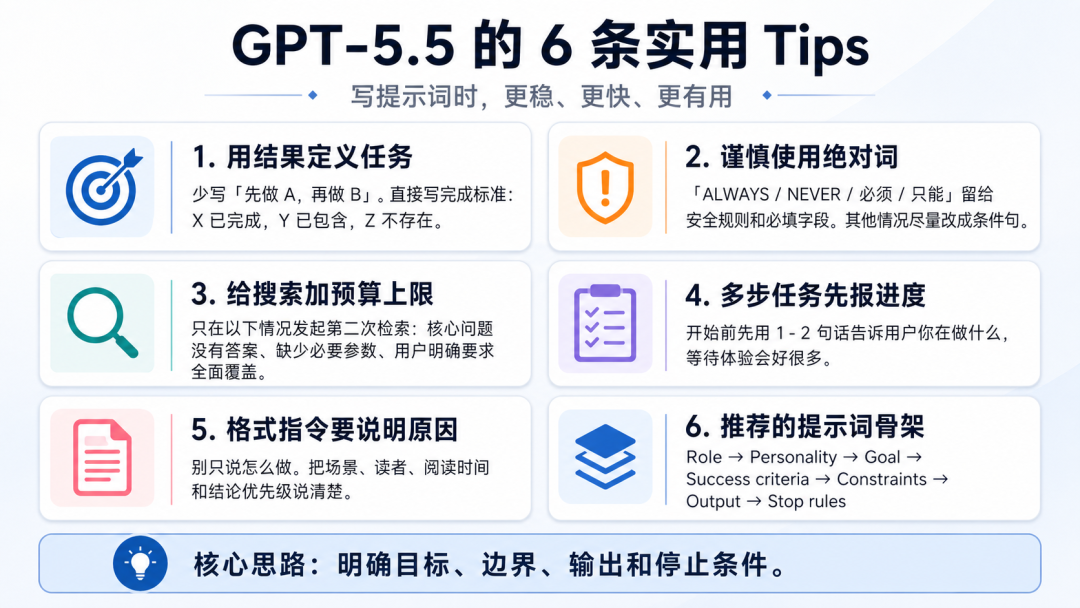
A summary of the prompt-optimization points recommended in the official GPT-5.5 guide
Claude Opus 4.7 Prompting: 5 Practical Tips
Claude Opus 4.7 has moved in a different direction from GPT-5.5. It has become more literal — it does what you say, and it no longer auto-fills the "you probably also wanted" parts.
1. Coverage Must Be Stated Explicitly
When Opus 4.6 ran into task A, it would casually handle similar task B for you as well. 4.7 won't. If your task involves multiple items of the same kind, you must enumerate them one by one, or explicitly write "apply the same treatment to all similar cases."
2. At Low Effort, It Only Does What You Say
In low and medium modes the model executes strictly by the letter and does not expand on its own. If the task involves multi-step reasoning, add one line to the prompt:
This problem requires step-by-step thinking; please work out the logic before answering.
That is cheaper than raising the effort level.
3. "Warmth" Must Be Defined Explicitly
4.7's tone is drier and more opinionated than 4.6's, with fewer confirmation-style warm-ups. If your product needs a particular tone (warmer, more exploratory, more willing to ask questions back), write it into the system prompt — you cannot rely on the model's defaults.
4. Progress Updates Are Built In
Many agent prompts used to say "summarize progress after every 3 tool calls." 4.7 has that behavior built in, so there is no need to specify it manually anymore.
5. Image Token Costs Tripled
4.7 supports a maximum long edge of 2576px, and a single image can consume up to about 4784 tokens — 3 times the old cap. If your workflow processes images in batches, compress them before sending, otherwise your costs will double.
Key points for migrating prompts to Claude Opus 4.7
Two Personality Templates
The GPT-5.5 documentation provides two typical "personality" templates that are worth copying outright:
A steady, task-oriented collaborator:
You are a capable collaborator: approachable, steady, and direct.
Assume the user is competent and acting in good faith.
Prefer making progress over stopping for clarification when
the request is already clear enough to attempt.
Stay concise without becoming curt.
Match the user's tone within professional bounds.
An opinionated, curiosity-driven explorer collaborator:
Adopt a vivid conversational presence: intelligent, curious,
playful when appropriate. Ask good questions when the problem
is blurry, then become decisive once there is enough context.
Be warm, collaborative, and polished. Offer a real point of
view rather than merely mirroring the user.
Personality template examples from the official GPT-5.5 documentation
References
- OpenAI GPT-5.5 prompting guide: https://developers.openai.com/api/docs/guides/prompt-guidance?model=gpt-5.5
- Claude Opus 4.7 migration guide: https://platform.claude.com/docs/en/about-claude/models/migration-guide
Toolin Editorial Team
Categories
Related articles

ChatGPT's Big Voice Upgrade: GPT-Live Full-Duplex Mode Goes Live
OpenAI has released the GPT-Live full-duplex voice model family. ChatGPT can finally talk while listening, chime in naturally, and know when to stay silent, replacing the original Advanced Voice Mode.
LingBot-World 2.0: An Open-Source, Playable Interactive World Model with Effectively Unlimited Duration
Ant Group's Robbyant has open-sourced LingBot-World-Infinity: hour-level real-time generation at 720p/60fps, with a built-in agent proposing events automatically — turning watching video into entering a world.
Two Open-Source Skills: Have Codex/Claude Code Make Your Illustrations and Web Designs
The open-source guizang-material-illustration article-illustration skill and web-design-taste web design skill install into Codex with one command — goodbye to AI-flavored illustrations and cookie-cutter web pages.

Tencent Hunyuan Hy3 Official Release: A Homegrown Coding Agent Model Matching GLM-5.2
The official Tencent Hunyuan Hy3 is live: 295B MoE architecture, agent task success rate up to 90%, API price of ¥1 per million tokens, with a limited-time free trial inside WorkBuddy.

Vidu S1: The Open-Class Interactive Video Model That Lets Digital Humans Talk in Real Time
Shengshu Technology's Vidu S1 achieves real-time voice-driven video generation at 540P/25FPS, runs on consumer GPUs, and turns a single image into a conversable digital human.

A Guide to Codex's Three Computer-Control Modes
Codex's three control modes — Computer Use, the Chrome extension, and the in-app browser — each fit different scenarios. This piece breaks down the permission hierarchy and offers best practices.