
Diffusion Templates: Control Image Generation Like Building Blocks
ModelScope has open-sourced the Diffusion Templates framework along with 11 ready-made templates, supporting plug-and-play control over brightness, style, photo editing, super resolution, and more -- greatly lowering the barrier to controllable generation.
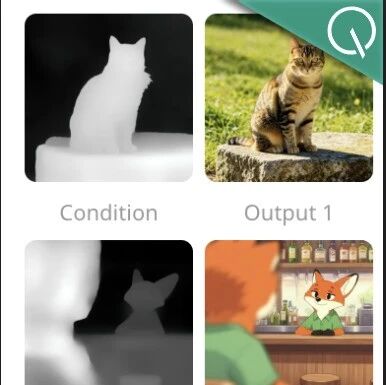
Diffusion Templates: Control Image Generation Like Building Blocks
ModelScope has open-sourced the Diffusion Templates framework along with 11 ready-made templates, supporting plug-and-play control over brightness, style, photo editing, super resolution, and more -- greatly lowering the barrier to controllable generation.
Behind the boom of the diffusion model ecosystem, a persistent headache remains: the model ecosystem is far too "fragmented". You finally get a new model running, then want to add a control feature only to find the code structure is completely incompatible; try to stack multiple control conditions, and the plugins fight each other under the hood. Diffusion Templates exists to unify this mess.
It is a plugin framework designed specifically for diffusion models, letting tools like ControlNet, LoRA, and IP-Adapter combine freely like building blocks without conflicting with one another.
What Is Diffusion Templates
Diffusion Templates is a full-featured plugin framework for diffusion models. Each plugin is called a Template, and it can guide a base model to generate specific visual content. The core design of the framework is the Template Cache -- a medium format for model capabilities (such as KV-Cache), through which a Template passes control information to the base model.
The code has now been fully open-sourced under the DiffSynth-Studio project, along with 11 open-source Template models trained on FLUX.2-klein-base-4B.
Project URL: https://github.com/modelscope/DiffSynth-Studio
Framework Structure
The framework consists of four modules:
- Template Input: the model's input, with fields decided by each Template itself, giving developers maximum freedom
- Template Model: the template model, loadable from the ModelScope model hub or a local path
- Template Cache: the model's output, also a subset of the base model Pipeline's input parameters
- Template Pipeline: the module that schedules multiple Template models, responsible for loading and integrating their outputs
The 11 Open-Source Templates at a Glance
The templates below are trained on FLUX.2-klein-base-4B and are compatible with that model's LoRA and fine-tuned versions:
| Template | Function | Model Link |
|---|---|---|
| Brightness adjustment | Precisely control lighting intensity in the image | Template-KleinBase4B-Brightness |
| Structure control | ControlNet-like control over spatial structure and perspective | Template-KleinBase4B-ControlNet |
| Super resolution | Upscale low-resolution images into high-definition ones | Template-KleinBase4B-Upscaler |
| Sharpness boost | Enhance image sharpness and clarity | Template-KleinBase4B-Sharpness |
| Image editing | Precisely modify images from natural language instructions | Template-KleinBase4B-Edit |
| Aesthetic alignment | Tune aesthetic parameters so results better match human taste | Template-KleinBase4B-Aesthetic |
| Inpainting | Regenerate content only inside the masked area | Template-KleinBase4B-Inpaint |
| Age control | Flexibly control a person's age when generating portraits | Template-KleinBase4B-Age |
| Tone adjustment | Freely adjust the image's tone and color mood | Template-KleinBase4B-SoftRGB |
| Content reference | Generate new images referencing an input image's style and composition | Template-KleinBase4B-ContentRef |
| Quirky panda | Generate all kinds of hilariously quirky panda-head memes | Template-KleinBase4B-PandaMeme |
Template Stacking in Action
The biggest advantage of Templates is that they stack freely, like building blocks. Take the same photo of a cat:
- Template 1 (image editing): change the visual style to anime
- Template 2 (inpainting): keep the surrounding environment unchanged
- Template 3 (brightness adjustment): raise the brightness a notch

Or take a blurry cat photo and stack the super resolution and sharpness boost Templates:
Two models trained toward different objectives render in concert, noticeably improving image quality.
Related Resources
- Project homepage: https://modelscope.github.io/diffusion-templates-web/
- Open-source code: https://github.com/modelscope/DiffSynth-Studio
- Technical report: https://arxiv.org/abs/2604.24351
- Model collection (11 models): https://modelscope.cn/collections/DiffSynth-Studio/KleinBase4B-Templates
- Datasets (17 datasets): https://modelscope.cn/collections/DiffSynth-Studio/ImagePulseV2
Who It Is For
- AI image creators: stop worrying about plugin conflicts and combine control conditions freely
- Model developers: the framework lowers the barrier to training controllable-generation models, so you can build new Templates quickly
- Product teams: a standardized plugin mechanism makes model integration simple and reliable
Related articles
NVIDIA RTX Spark: NVIDIA Redefines the AI PC, 128G Unified Memory Runs a 120B Model Locally
NVIDIA has released the RTX Spark consumer AI chip: 128GB of unified memory and 1 PFLOP of compute, able to run a 120B large model locally on a 14mm laptop — the Windows ecosystem enters the AI PC era
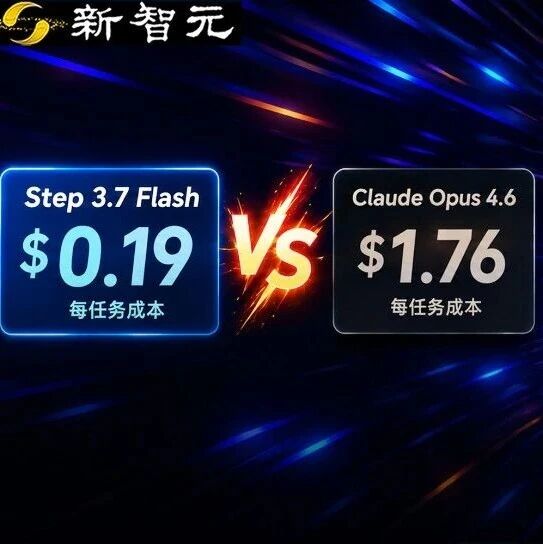
Step 3.7 Flash Hands-On: 400 TPS Inference, Agent Tasks at 1/9 the Cost of Claude
StepFun has released Step 3.7 Flash: 400 tokens/second inference, 11B activated parameters delivering 97% of Claude Opus 4.6's performance, open source and locally deployable

ClawGym: An Open-Source Framework Unifying Agent Training and Evaluation
RUC has open-sourced a full-pipeline Claw Agent framework spanning data, training, and evaluation, with 13.5K executable tasks and support for sandbox-parallel reinforcement learning
Codex Computer Use Lands on Windows: A Hands-On Guide
OpenAI Codex now officially supports operating Windows PCs, with complete setup steps, limitation notes, and how to control it remotely from your phone
Gamma-World: An Open-Source Multi-Agent World Model
NVIDIA and Tsinghua have open-sourced a multi-agent world model: trained on two players, it generalizes directly to four, supporting zero-shot real-time rollouts of multiplayer scenarios
Step 3.7 Flash in Claude Code: A Hands-On Guide
A hands-on test of StepFun's open-source Flash model integrated into Claude Code, using complex Agent workflows to see whether a Chinese model can stand in for closed-source foundations