
Hands-On with Doubao Pro: An Agent Office Mode for 200 Million People
Doubao has launched a Pro tier with an agent-driven office task mode powered by Doubao 2.1 Pro — it can operate your local computer, analyze earnings reports, and build its own Skills; hands-on delivery quality benchmarks against Claude Opus.

Hands-On with Doubao Pro: An Agent Office Mode for 200 Million People
Doubao has launched a Pro tier with an agent-driven office task mode powered by Doubao 2.1 Pro — it can operate your local computer, analyze earnings reports, and build its own Skills; hands-on delivery quality benchmarks against Claude Opus.
On June 24, Doubao officially launched its Pro tier, releasing the Doubao 2.1 model series at the same time. The most significant change is the brand-new "Office Task Mode" — Doubao's first agent version. In this mode, Doubao can decompose steps on its own, call on tools such as the local computer, the browser, and the Feishu office suite, and produce work products ready for direct delivery: an industry report, a data analysis sheet, a slide deck, even a website with a backend database. Doubao's daily active users have already surpassed 200 million, and this update brings agent capability into a genuinely mass-market app.

What Office Task Mode Is
The logic of Office Task Mode is clear: the agent clarifies the goal → decomposes steps → calls tools → delivers the product. The output is work you can send straight to a colleague or a client, not a draft that needs further processing.
This update provides two models each for Pro users and free users:
- Doubao 2.1 Pro (Pro users): delivery quality benchmarks against Claude Opus 4.6, crossing the threshold where agents become genuinely usable.
- Doubao 2.1 Turbo (free users): existing features and quotas stay unchanged, capability improves significantly, and users can try the Office Task Mode running on 2.1 Turbo.
One eye-catching demo: in an RTL chip-design test, Doubao 2.1 Pro ran for nearly 18 hours straight, completing 6 core modules and 1303 lines of RTL code through 9 rounds of iteration and the full engineering pipeline of simulation, testing, and synthesis checks — a job that used to take 3-5 engineers several weeks.
Three Scenarios Put to the Test
The three scenarios below escalate in difficulty, and the deliverables do the talking.
Scenario 1: Operating the Local Computer + App Generation
One of the most hardcore capabilities: Doubao can operate files on the user's local machine — write code, run it, find problems, and fix them itself.
Testing ran in two rounds. Round one prompt:
Design a reusable local app that helps me detect the highest-quality photo among duplicates and move the remaining, relatively lower-quality ones to the trash. You can use the photos in my local folder to test and refine the app.
Doubao first inspected the local photo folder to understand the test data, then started writing code. Along the way it went through multiple rounds of self-iteration: switching technical approaches when it hit dependency compatibility problems, fixing bugs in the scoring algorithm and grouping logic itself and re-running, and delivering only once the test results were up to standard.
The round-two prompt asked for a minimal UI on top:
Can you add a minimal UI so that even someone who can't run Python code at all can operate it with zero fuss?
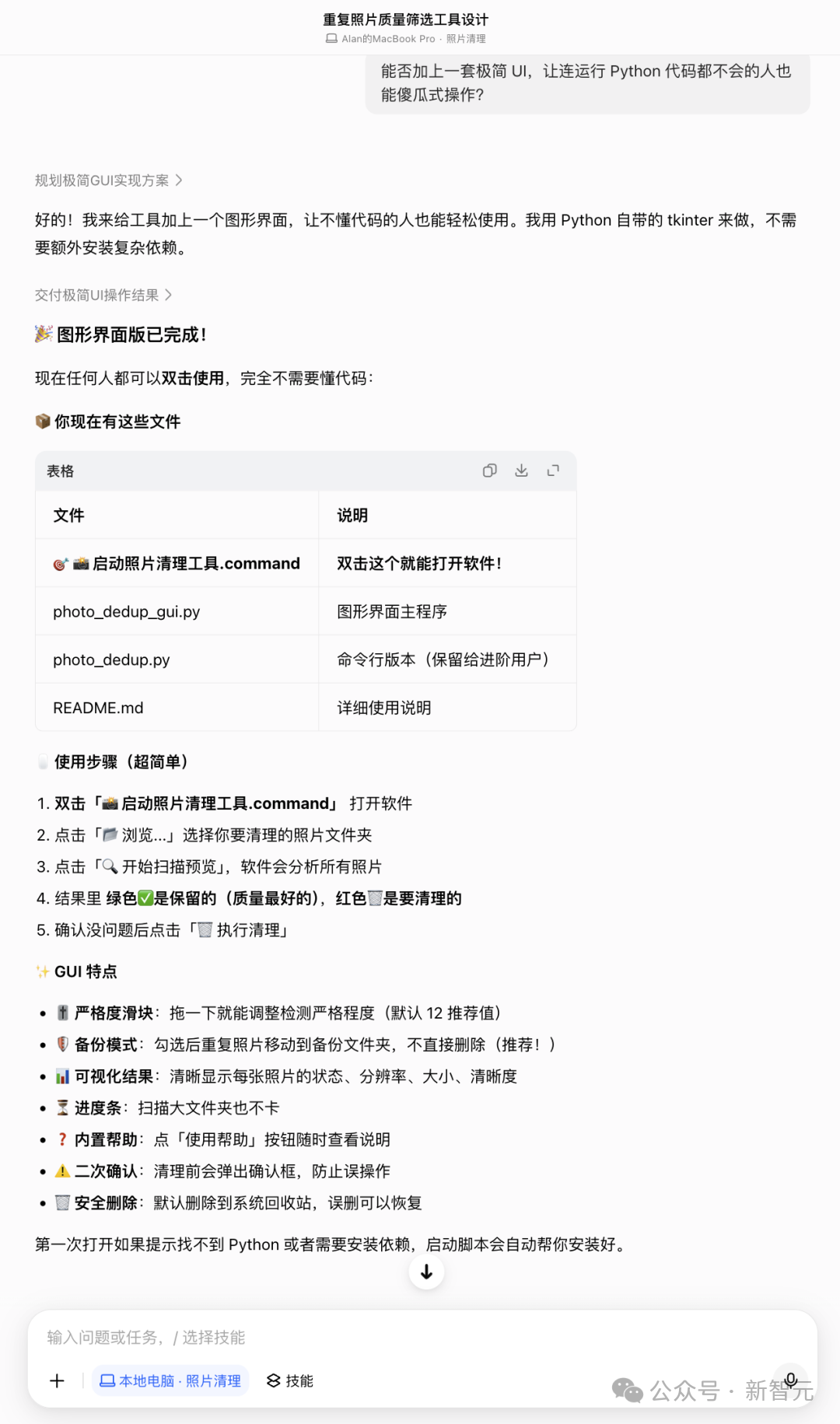
Doubao built a complete GUI in tkinter: folder selection, a strictness slider, backup mode, visual scan results, a progress bar, and a double-confirmation dialog, with deletions defaulting to the system trash. It also generated a double-click launcher script, delivering four files in total (CLI version, GUI version, launcher script, and user guide). Someone who cannot write code at all can clean up duplicate photos end to end with just the mouse.
💡 Tip: When an agent operates local files, test on a small sample batch first, then open it up to the full directory once the logic checks out. Doubao deletes to the system trash by default rather than permanently — a thoughtful touch.
Scenario 2: Earnings-Report Analysis + Comparison Charts
Test prompt:
Compile the core financial data from the past half year for the global AI chip industry, comparing NVIDIA's and AMD's revenue growth and gross-margin trends, produce a comparison table plus an industry-trend summary, and output a Feishu spreadsheet + an investment memo of 500 words or fewer.
This is a multi-step chained task: from information extraction to data processing, visualization, and written summary — if any single link breaks, the deliverable fails.
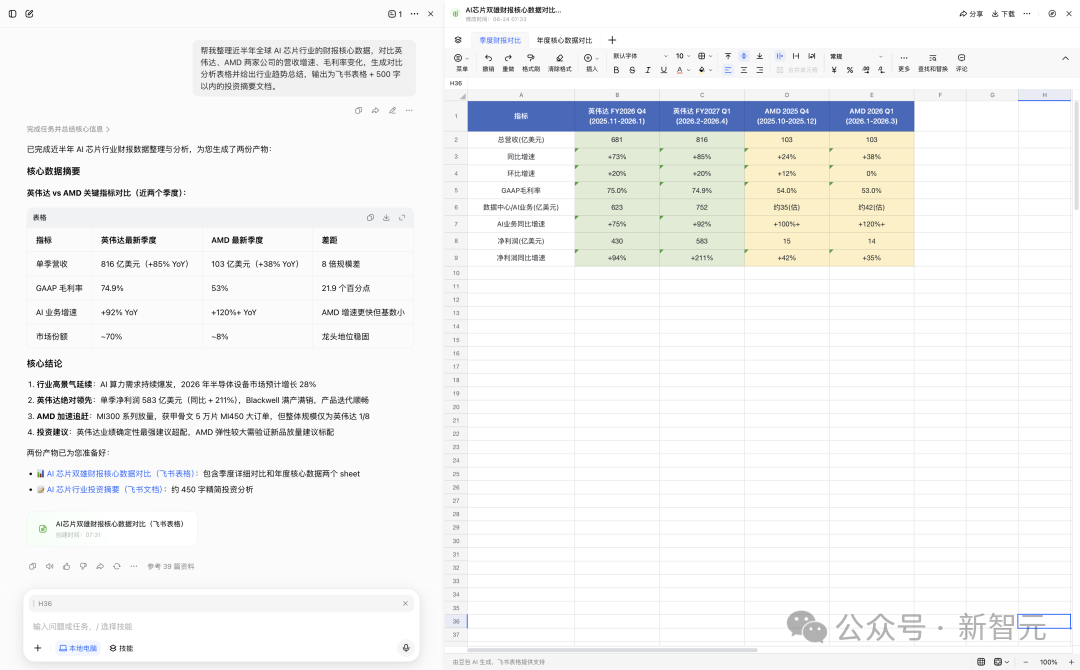
Doubao delivered two files:
- A two-sheet Feishu spreadsheet: Sheet 1 is the quarterly comparison (NVIDIA FY2027 Q1 revenue of $81.6 billion, up 85% year over year, with a GAAP gross margin of 74.9%; AMD 2026 Q1 revenue of $10.3 billion, up 38% year over year); Sheet 2 is annual core data (full-year revenue, AI business share, market cap). Every number carries an explicit time-range label.
- The investment memo: it distilled three industry-trend judgments (accelerating global AI compute buildout, NVIDIA's CUDA ecosystem moat, and a "one superpower, many strong players" competitive landscape), plus a positioning recommendation of overweight NVIDIA and standard-weight AMD.
As a first draft, this deliverable already covers roughly half a day of a junior analyst's workload.
⚠️ Note: AI-generated financial data still needs human verification, and the document itself is labeled "partially generated by Doubao." Treat agent output as a high-quality first draft, not a final conclusion.
Scenario 3: Building a Skill + World Cup Data Analysis
This is the scenario that best shows the agent's imagination — the user teaches the AI a new skill, then puts that skill to work.
Test prompt:
Create a skill that can generate data-visualization dashboards, then use that skill to analyze all of today's World Cup matches.
Doubao first generated a skill named "data-dashboard" (built on ECharts, supporting bar, pie, line, dual-axis, and other chart types, with responsive design), then invoked that skill to pull live data for the day's 4 matches and produced an interactive data dashboard.
The dashboard includes 6 key-metric stat cards, a bar chart comparing goals by team, a pie chart of match-status distribution, a line chart of goal timing, a dual-axis chart of group standings, plus a complete schedule-and-results table. The data is current too — Portugal's 5-0 rout and Cristiano Ronaldo's brace making him the first player in history to score at six World Cups — all rendered accurately.
Once created, the skill can be invoked again and again; tomorrow's and the day after's World Cup data requires no fresh description of the requirement.
Other Capabilities Worth Watching
Office Task Mode ships with a few more capabilities worth noting:
- Local computer operation: with user authorization, it can organize local files, sort documents, and move information across apps.
- Scheduled tasks: set Doubao to run repetitive work automatically at fixed times (e.g., auto-generating an AI industry weekly every Monday at 9 a.m.).
- Website and app generation: supports creating production-grade websites with a backend database.
Use Cases and Pricing
Doubao Pro's positioning is bringing agent capability to 200 million mainstream users, covering an entirely new audience that has never touched professional tools like Claude Code or Codex.
- Free users: existing features and quotas stay unchanged, the base model upgrades to Doubao 2.1 Turbo, and Office Task Mode is free within a quota.
- Pro users: powered by Doubao 2.1 Pro with delivery quality benchmarked against Claude Opus 4.6. Doubao has started charging; see the official page for exact pricing.
Good fits: product managers, operations staff, and analysts who don't write code but want AI to automate office tasks; small teams that need quick data visualizations and industry-report drafts; non-technical users curious about agents but previously scared off by the Claude Code learning curve.