
Qwen Meets Taobao, Tested: Conversational Shopping, a Closed Loop from Discovery to Checkout
Qwen is officially connected to Taobao: users can search, compare prices, place orders, pay, and check logistics entirely within a conversation. Four scenarios put the AI shopping experience to the test.

Qwen Meets Taobao, Tested: Conversational Shopping, a Closed Loop from Discovery to Checkout
Qwen is officially connected to Taobao: users can search, compare prices, place orders, pay, and check logistics entirely within a conversation. Four scenarios put the AI shopping experience to the test.
Qwen is now officially connected to Taobao, which means you can complete the entire flow -- finding products, comparing prices, placing orders, checking logistics -- right inside a conversation. Shopping online used to mean hopping between pages to search, compare, and read reviews; now you tell Qwen "what you want, your budget, and the scenario", and leave the rest to it. This article tests the AI shopping experience after Qwen's Taobao integration through four real scenarios.
How to Get Started
Two entry points:
- Qwen App / web: just say in the conversation what you want to buy
- Taobao App: bottom bar "Messages" -> "AI Shopping Assistant"
Both entry points share the same conversational shopping capabilities.
Four Scenarios, Tested
Scenario 1: Concrete spec requirements -- buying a gaming laptop
Request: "A gaming laptop under 5000 yuan, 14 inches, that can run Black Myth: Wukong."
Instead of simply listing products, Qwen opened with a conclusion: "Under 5000 + 14-inch + able to run Black Myth: Wukong is doable." Then:
- It proactively provided the game's minimum hardware threshold
- Locked the requirement to laptops with RTX 3050/3060 discrete graphics
- Flagged the risks: 14-inch gaming laptops are thermally stressed and may throttle under sustained heavy load
- Offered a fallback: relaxing to 15.6 inches buys a stronger GPU
- Recommended two options at different price points
The whole process explained, asked questions, and narrowed the field at the same time -- like a genuinely clued-in sales assistant helping you decide.
Scenario 2: Vague mood-based needs -- more joy in the kitchen
Request: "It's summer and I want to add a few things to our kitchen to make cooking more joyful."
Qwen first framed the essence of the problem: "cooking happiness = 30% tools + 70% atmosphere". That judgment stepped outside the logic of traditional keyword matching.
With "atmosphere" as the through-line, the recommended categories leapt past cookware: good-looking aprons, Japanese-style tableware sets, odor-killing aromatherapy, kitchen greenery, mechanical timers, and little ornaments. After recommending, it followed up: "Which direction would you like to start with? The greenery-and-scent atmosphere route, or the practical-yet-pretty apron-and-tableware route?" A vague need had been gathered into two clear directions.
Scenario 3: A cross-category plan -- cyberpunk-style soft furnishing for the whole home
Request: "A 60-square-meter loft apartment, budget 30,000 yuan, cyberpunk style, covering the living room, bedroom, kitchen, and bathroom."
Qwen distilled the core elements of cyberpunk (high-tech feel + industrial metal textures, with a palette built on black, silver-gray, electric blue, and violet), then gave structured budget allocation suggestions by zone. It also broke out the "ambient lighting system" as its own section, calling it the soul of the cyberpunk style and suggesting programmable RGB light strips throughout the home. One round of recommendations came out as a directly executable plan.
Scenario 4: Dodging duds -- spotting the "IQ tax"
Request: asking whether an energy wristband is worth buying.
Qwen analyzed the many reasons the product could be an "IQ tax" (phrases like "balanced magnetic field", for instance), talked the user out of it outright, and did not blindly push alternatives. It then offered reasonable solutions grounded in science, with each recommendation annotated with its scientific basis.
From Recommendation to Order: The Full Loop
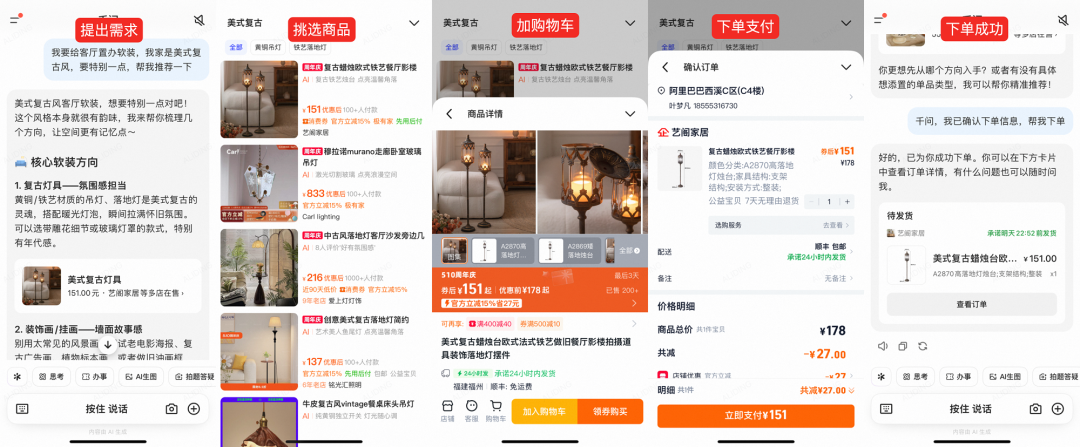
Most AI shopping products on the market "recommend but never buy". With this deep Taobao integration, Qwen extends its reach into the purchase itself and after it:
During purchase
- Prices and a buy entry shown directly under the recommendation card
- Payment completed inside the conversation flow
- Automatically claims spend-and-save coupons and matches national subsidies for you
- Recommends items with shipping insurance when the need calls for it, filtering out options that don't support it
After purchase
- Check recent orders and shipment status
- Change the address, contact customer service
- Proactively recommend new arrivals that match your style based on purchase history
- Automatically snap up an item for you when its price drops
Extra Features in the Taobao App
The AI Shopping Assistant entry in the Taobao App also offers several practical features:
- AI discovery: send the AI a link to an influencer's outfit post, and it recognizes the looks and finds every matching item on Taobao in one tap
- AI try-on: preview how clothing items look on you, virtually
- AI savings: automatically rounds up platform deals and generates a money-saving plan in one click
What Makes It Noteworthy
The core value of Qwen's Taobao integration is not merely one more entry point -- it is the first time AI has fully connected into the transaction system of the top e-commerce platform in China by GMV. That means:
- The breadth and depth of product supply is there (from brand flagships to small and mid-sized sellers)
- Users don't have to relearn how to shop
- The distance from decision to checkout shrinks visibly
- Every user gets a shopping advisor on call at all times
Toolin Editorial Team
Categories
Related articles

Advanced Claude Code Guide: 15 Hidden Productivity Features
Insider tips from Claude Code's core developers. Covers 15 advanced techniques including /loop auto-running, Worktree parallel development, and Chrome extension verification.
Qwen3.5-Omni Hands-On: Native Omni-Modal Perception, an AI Coding Master Watching Through Your Camera
Qwen3.5-Omni from Tongyi Qwen is officially released, with native input across text, images, audio, and video. Hands-on testing shows formidable visual code understanding — it can interpret academic papers in real time and generate the corresponding code.

6 Must-Install Claude Skills: Double Your AI Agent's Capabilities
A curated list of 6 high-value Claude Skills covering frontend aesthetics, office document handling, web search, and persistent memory, with install links and use cases — ideal for Claude Code and OpenClaw users.

WeCom Open-Sources a CLI: AI Agents Directly Control Messages, Schedules, and Docs
WeCom has open-sourced wecom-cli, letting mainstream AI Agents such as Claude Code, Codex, and QClaw call 7 major categories of office capabilities. Setup takes 3 steps, with complete command examples included.

Feishu CLI Hands-On: Let AI Directly Manage Your Feishu Docs, Calendar, and Base Tables
Feishu CLI is now open source. Paired with AI tools like Claude Code, it can read and write Feishu docs, query your calendar, and create Base tables directly — no manual copy-pasting. This article walks through the full setup process step by step.