
Seedance 2.0 + LibTV Canvas Workflow: No Queuing, One Stop from Script to Finished Video
The LibTV platform integrates the full-power Seedance 2.0, with a canvas workflow chaining script, storyboard, generation, and editing into one pipeline — no queuing. Includes a hands-on tutorial and a pitfall guide.
Seedance 2.0 + LibTV Canvas Workflow: No Queuing, One Stop from Script to Finished Video
The LibTV platform integrates the full-power Seedance 2.0, with a canvas workflow chaining script, storyboard, generation, and editing into one pipeline — no queuing. Includes a hands-on tutorial and a pitfall guide.
Generating videos with Seedance 2.0 on the Jimeng official site means queuing until you question your life choices. This article introduces an alternative: the LibTV platform, which integrates the full-power version of Seedance 2.0, requires no queuing at all, and provides a canvas-style workflow that takes you from script to finished video in one place.
What Is LibTV
LibTV is not a video generation model; it is a platform. It hooks in all the mainstream video generation models on the market (Seedance, Kling, and others), so you don't have to register and top up with each one — one stop covers everything.
Launched on March 18, 2025, it passed 100,000 visits on its first day online.
Its biggest difference lies in the workflow design. Video production is normally fragmented: one tool for the script, another for storyboarding, another for generation, and editing still requires CapCut. LibTV connects all of these:
Script -> Video script -> Storyboard design -> Video generation -> Final cutEverything happens inside a single LibTV canvas.

Getting Started Guide
Step 1: Log In and Create a Project
Visit liblib.tv and click "Start Creating". The interface is completely different from a traditional video editor — it's an infinitely extending canvas.
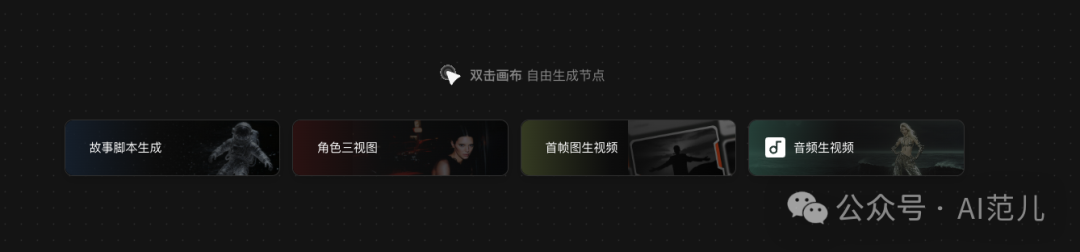
Four modes are available:
- Story script generation: full script -> text-to-video
- Character three-view sheets: keeps character appearance consistent
- First-frame image-to-video: upload an image + prompt
- Music-to-video: audio-driven video generation
Step 2: Pick a Mode and Start Creating
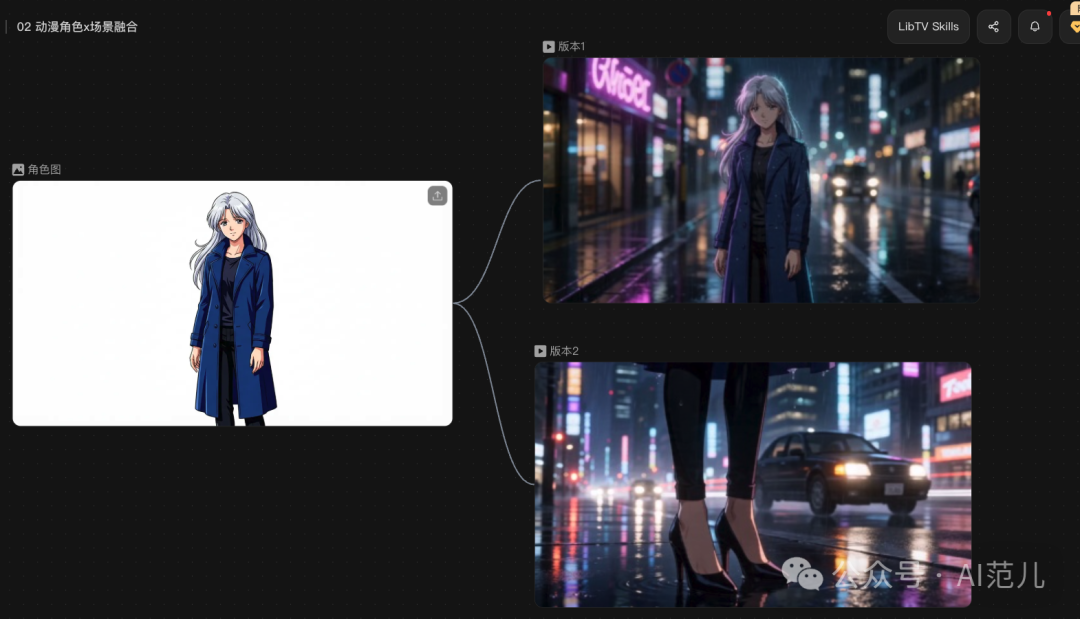
Mode A: Blending Anime Characters into Real-World Scenes
Choose "first-frame to video", upload an anime character image, write a prompt, pick the model (Seedance 2.0), duration, and aspect ratio, then click generate.
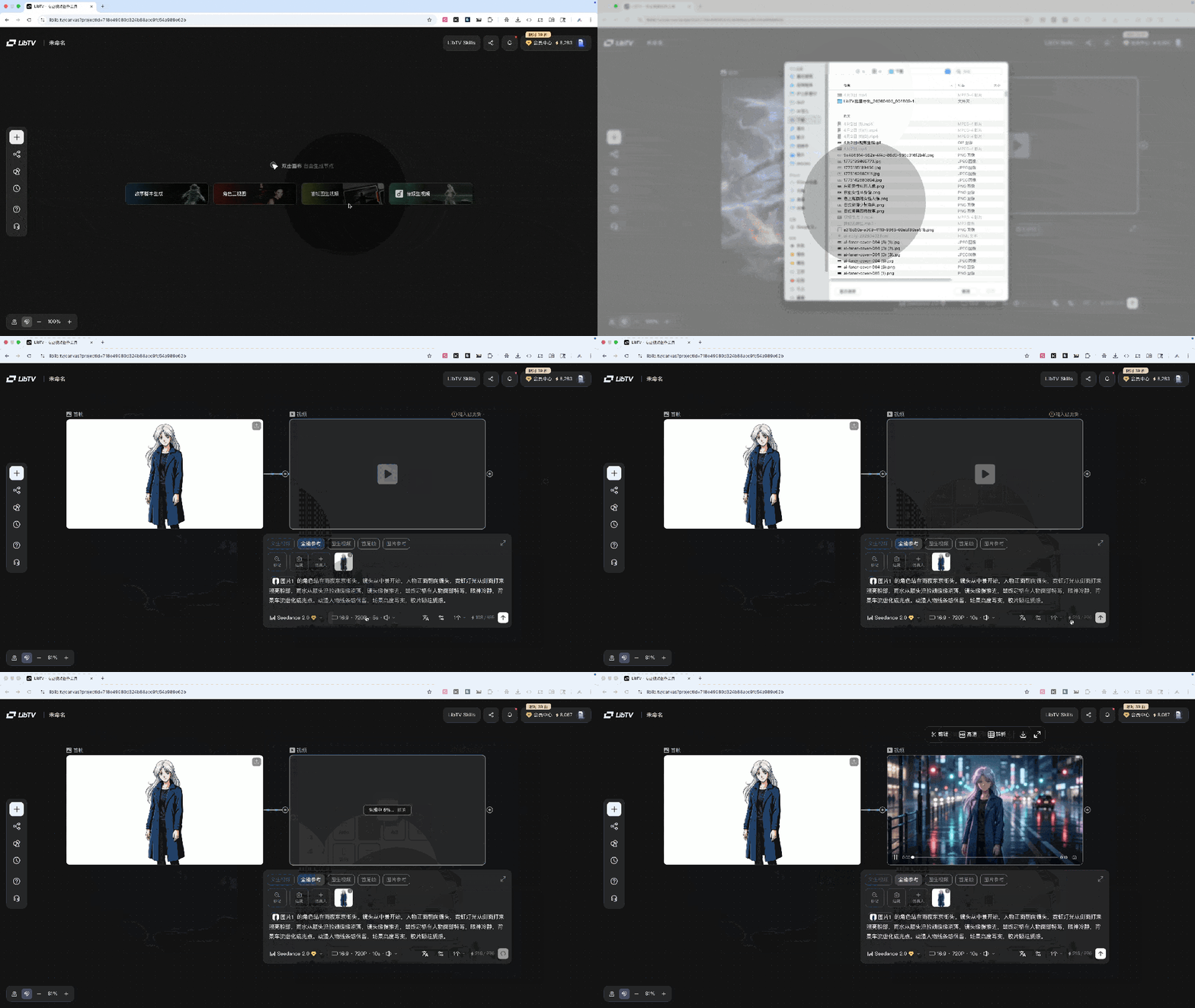
The anime linework is preserved, the background is realistic neon and rain, there's no obvious sense of disconnect, and the lighting direction is correct too.
Mode B: Character Consistency -- One Face, Two Worlds
Generate a female character image with AI, then use that same image to produce two completely different videos (a rainy-day cafe vs. a snowstorm on a mountaintop).
Key finding: across both videos, the character's hair color, contours, and facial features stayed remarkably stable. That means you can genuinely "sign" a virtual character and keep her appearing episode after episode, instead of swapping in a new face every time.
Mode C: Storyboard Table -> Batch Video Generation
Done inside the canvas: generate the script and storyboard frames from the script, batch-generate the videos, then batch-download everything into CapCut for editing.
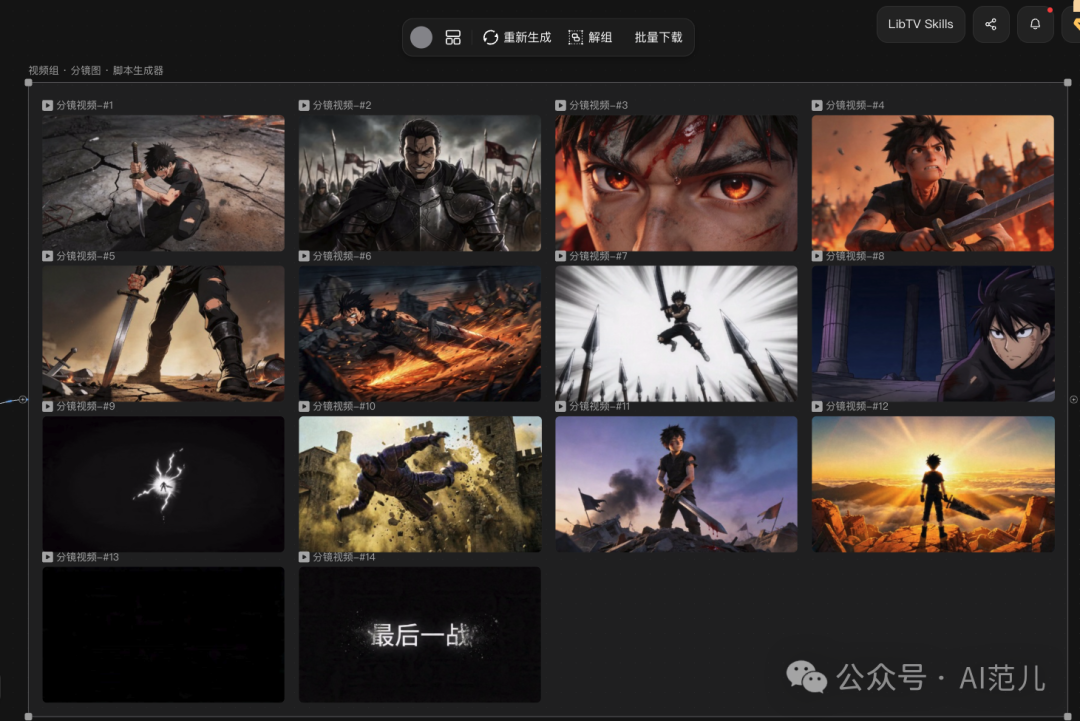
Not happy with a particular clip? Change the prompt right in the canvas and re-run it.
Mode D: Music-Driven Video
Seedance 2.0 can generate videos based on musical beats and sound. The operation is minimal: put an image and an audio file together, connect them to the video generation node, write a prompt, and generate.
Beat-synced videos used to mean manually matching the rhythm frame by frame; now you just throw it in and it lands on the beat by itself.
Step 3: Canvas Management Tips
LibTV's canvas design has several practical features:
- The same asset can be reused over and over
- If a generation disappoints, click the plus sign to tweak the prompt and run it again
- All results sit on the infinitely extending canvas, visible at a glance
- You can drop a comic straight in, and it treats every panel as a storyboard frame when generating video
Going Further: Call It Directly from an AI Agent
If you have OpenClaw / AutoClaw installed, you can have your Agent generate videos for you right in the chat:
- Tell your Agent "help me install the LibTV API Skills"
- Apply for an Access Key on the LibTV website
- Set the environment variable:
export LIBTV_ACCESS_KEY="YOUR_ACCESS_KEY" - From then on, just describe what you need in natural language in the chat, and the Agent will automatically call LibTV to generate the video and return the link
Pitfalls to Avoid
Real-person likeness authorization: Seedance 2.0 has currently disabled uploading photos of real people to generate videos; it is expected to reopen after April 15, but will require consent confirmation. For testing, start with cartoon/anime characters.
Review mechanism: like Jimeng, some prompts get rejected outright without telling you which specific word is the problem. You can only tweak word by word and resubmit repeatedly — patience required.
Storyboard duration bug: the per-clip durations defined in the storyboard table are not enforced during batch generation; you can only pick a uniform length.
Batch generation: when running dozens of clips in batch, a few prompts occasionally violate the rules and need fixing individually, which can break narrative continuity.
Toolin's Take
Who it's for:
- Short-video creators (especially comic-drama and beat-synced video directions)
- Independent creators who want a one-stop video production pipeline
- Series content production that needs character consistency
Who it's not for:
- Professional film production that demands maximum control over image quality
- Users sensitive to review mechanisms (content moderation is fairly strict)
Core strengths: no queuing + canvas workflow + multi-model switching. Those three points combined make for the most efficient creation experience in AI video generation today. No longer "AI generates the material, humans make the video" but "humans supply the idea, AI makes the video directly."
Pricing: LibTV itself is free to register and use; video generation consumes the API credits of the corresponding model. See the platform for exact prices.
Related links:
- LibTV official site: https://liblib.tv
- Seedance 2.0 official (queue required): the Jimeng website
Toolin Editorial Team
Related articles

Xiaomi MiMo UltraSpeed: A Trillion-Parameter Model Running at 1000 tokens/s
Xiaomi's MiMo-V2.5-Pro UltraSpeed delivers 1000 tokens/s on a trillion-parameter model running on generic 8-GPU hardware — and it's the full-strength Pro version, not a dumbed-down Flash variant. The API is live and taking applications.

Tabbit: A Permanently Free AI Browser with 10+ Top Models at Your Fingertips
Meituan launches AI browser Tabbit V1.0 with core features permanently free, 10+ top domestic large models and agent capabilities built in, plus one-click access to 300+ ready-made trick skills.
Finding Overseas Influencers with AI Employees: A Hands-On AhaCreator Guide
A step-by-step walkthrough of the full overseas influencer marketing workflow with AhaCreator — from creator sourcing and content review to cross-border payouts. Ideal for indie developers and teams going global.

AI Long-Video Generation: A Head-to-Head Review of Two Open-Source Frameworks
VideoClaw and JoyAI-Echo, two open-source frameworks released the same day, tackle AI long-video consistency through multi-agent collaboration and cross-modal memory banks respectively — this article compares their technical approaches.

ChatGPT's Memory System Gets a Full Overhaul: Dreaming V3 Is Live
OpenAI ships the new Dreaming V3 memory architecture — ChatGPT now "dreams" in the background to organize what it knows about you. Free access for 1 billion users for the first time, with doubled memory capacity for Plus/Pro.

Cloudflare Integrates Claude Managed Agents: A Developer's Practical Guide
Cloudflare adds support for Claude Managed Agents, letting developers run Claude agents on Cloudflare's platform, connect to private systems, and deploy AI agents securely.