Tabbit: A Permanently Free AI Browser with 10+ Top Models at Your Fingertips
Meituan launches AI browser Tabbit V1.0 with core features permanently free, 10+ top domestic large models and agent capabilities built in, plus one-click access to 300+ ready-made trick skills.

Tabbit: A Permanently Free AI Browser with 10+ Top Models at Your Fingertips
Meituan launches AI browser Tabbit V1.0 with core features permanently free, 10+ top domestic large models and agent capabilities built in, plus one-click access to 300+ ready-made trick skills.
GN06, a team under Meituan, has officially released AI browser Tabbit V1.0, promising that core features will stay free forever. The browser bundles "LLM Q&A + search + Agent" into one package, and supports calling on 10+ leading domestic large models, including DeepSeek-V4, Kimi K2.6, GLM-5.1, and Qwen3.5.
Put simply, this is a product that lets you get real work done with AI inside the browser, rather than opening an AI window next to your browser.
Core Features at a Glance
Free Model Switching
Tabbit supports 10+ leading domestic AI models. You can switch between them as needed, or turn on multi-model selection to have 5 models answer the same question simultaneously — and even have AI produce a comparative summary.
Invocation is convenient too: typing @ lets you reference the currently open tab, tab group, bookmarks, or upload local files, feeding web content into AI tasks as context.
Agent Task Mode
Tabbit ships with an all-purpose Agent that can execute complex tasks for you:
- Automate web operations and generate PDF/PPT/Excel/Word files
- Compatible with mainstream Agent Skills and MCP tools
- Runs in the cloud, so your local machine stays clean
- In Meituan's own benchmark, web operation task success rates rose from 61% to 70%
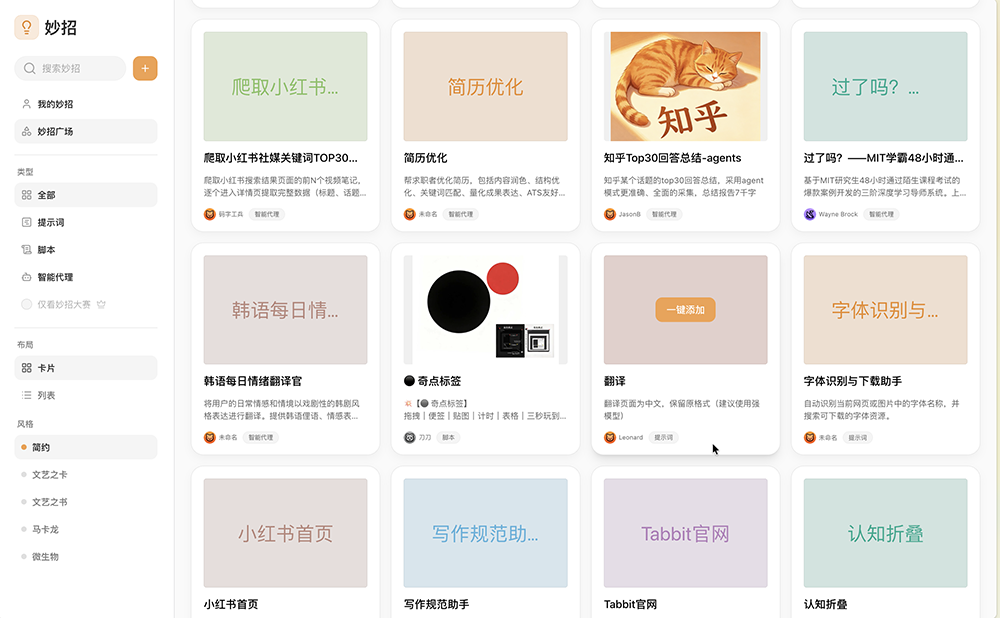
Tricks Plaza: 300+ Ready-Made Skills
Users can save frequently used prompts, scripts, and workflows as "tricks" for one-click reuse. Tricks Plaza already shares 300+ ready-made tricks, such as:
- Closing web pop-ups
- Exporting Bilibili subtitles
- Speeding up video playback
- Exporting RedNote comments
- Generating a table of contents for WeChat Official Account articles
You can also describe what you need in one sentence, have AI execute it, and save the result as a trick for direct reuse next time.
Long-Term Memory
The beta tech preview supports long-term memory, distilling useful information from conversations into memories that can be traced, recalled, and updated. Preferences, background, and plans that recur across past conversations carry over into new ones. If a memory is inaccurate, you can manually correct it.
Pricing and Usage
The Standard edition is permanently free, and a week's free allowance covers roughly:
- 1000 conversations with the latest AI models
- 50 generated images
- 10 Agent tasks completed end to end
- 100 pieces of writing: 10000-character summaries or 1000-character articles
Once the free allowance runs out, you can keep using an unlimited, cost-effective model. The Pro plan offers 10x the usage at ¥9.9 per week.
Supported Platforms
- Desktop: Windows, macOS
- Mobile: iOS and Android beta versions are live
- A HarmonyOS version is in development
Who It's For
- Office workers and knowledge workers who juggle multiple tasks in the browser
- Users who want to compare multiple AI models side by side
- Anyone looking to automate repetitive browser operations
- Scenarios where you need an AI assistant that can "see" the page you're browsing and answer based on that context
Tip: Tabbit's bookmarks save the entire content of a web page (not just the URL), so you can still read it even if the page goes offline — and AI can cite the full article in later conversations.