
Reasonix: Slash DeepSeek API Costs to 20%
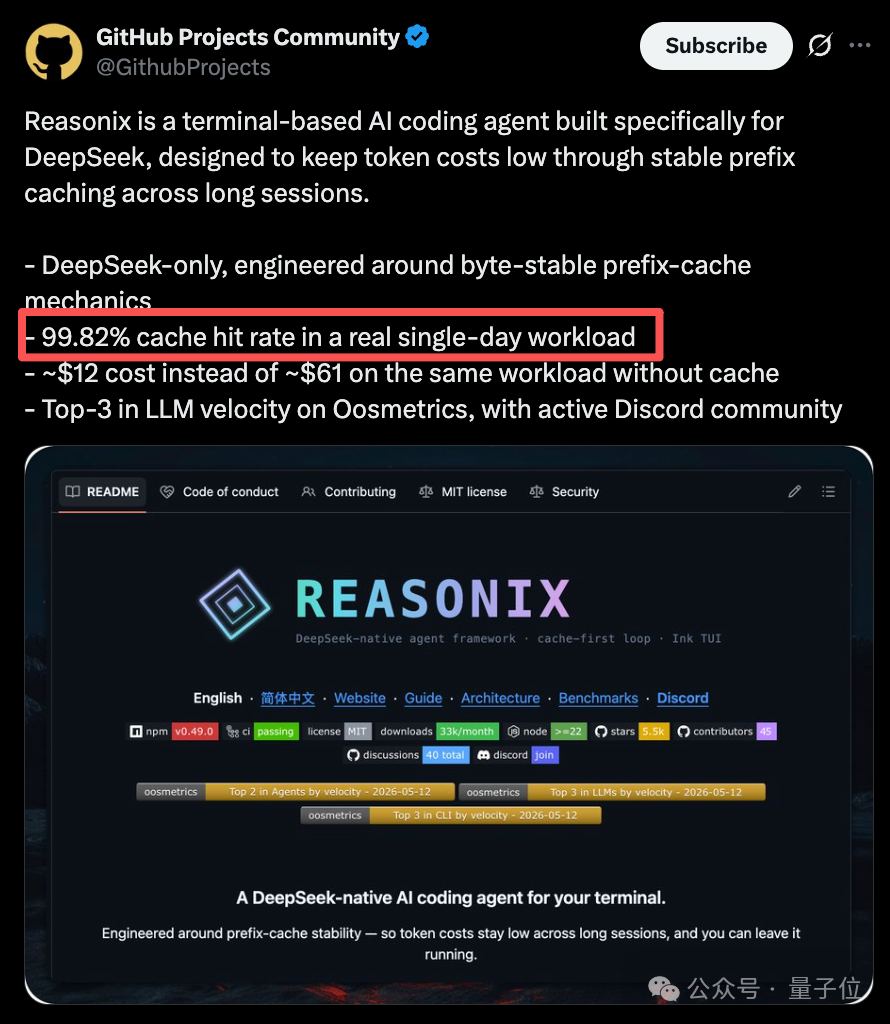
A terminal coding harness built for DeepSeek: its prefix-cache design pushes the cache hit rate to 99.82% and cuts input token costs to 1/5.

Reasonix: Slash DeepSeek API Costs to 20%
A terminal coding harness built for DeepSeek: its prefix-cache design pushes the cache hit rate to 99.82% and cuts input token costs to 1/5.
If you use the DeepSeek V4 API for coding tasks, the token consumption of long sessions can really sting. An open-source project, Reasonix, builds a cache-optimization solution specifically for DeepSeek, pushing the cache hit rate to 99.82% — a bill that was originally 61 USD drops straight to 12 USD, the equivalent of paying just 20%.
This article covers how Reasonix works and how to use it.
- GitHub: just search for "Reasonix" and you'll find it
What Is Reasonix
Reasonix is a terminal coding harness built specifically for DeepSeek. Its core purpose comes down to two words: save money.
Specifically, by optimizing cache hit rates, it cuts the input token cost of long sessions to 1/5 of the original.
Core Technology: The Cache-First Loop
The key design in Reasonix is an append-only run loop built on a byte-stable prefix-cache.
DeepSeek's automatic prefix caching only activates when the exact byte prefix of the current request matches a previous one. Most agent loops reorder, rewrite, or inject new timestamps on every interaction, which invalidates the cache.
Three-Zone Context Division
Reasonix divides the context into three zones:
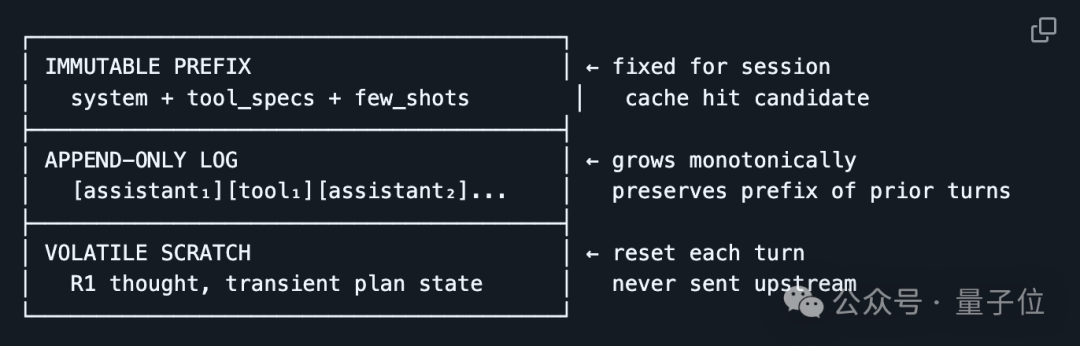
- Fixed prefix zone: system prompts and project context, computed only once per session and never touched again
- History log zone: past messages are append-only and never rewritten, so the byte prefix always matches
- Draft zone: the working space for the current turn; information must be refined through Tool-Call Repair before it is folded into the log
This design keeps the prefix fixed, the history append-only, and the draft modifiable — each of the three zones does its own job to maximize cache hits.
Tool-Call Repair
DeepSeek has several common problems with tool calls:
- Tool-call JSON was generated internally but vanishes from the final message
- Malformed JSON parameters
- The same tool gets called repeatedly with exactly identical parameters
- JSON gets truncated
Reasonix handles these issues with 4 rounds of automatic repair, attempting a fix before actual execution so invalid requests don't waste tokens.
Cost Control Strategies
Reasonix has a three-layer cost control mechanism:
1. Cheap model by default
By default it uses v4 flash first, switching to pro only for hard tasks.
2. Automatic context compression
After each turn ends, the context is compressed automatically to reduce the token count of subsequent requests.
3. Automatic escalation on failure
Users can manually type /pro to switch the next turn to v4 pro. Once that turn finishes, Reasonix automatically switches back to the cheap model. If the failure count reaches the warning threshold, the rest of the current turn automatically switches to v4 pro as well.
Quick Installation
Two steps to get running — no global installation required:
# 1. Enter the project directory
cd your-project

# 2. Start Reasonix
npx reasonix code
A TUI (terminal user interface) opens after launch, and you can start using it right away. On first run, the DeepSeek API key is configured automatically.
Tip: Make sure your DeepSeek API key is set in an environment variable, or enter it when prompted.
Real-World Results
According to Reasonix's test data:
| Metric | Result |
|---|---|
| Cache hit rate | Up to 99.82% |
| Input token cost | Down to 1/5 |
| Long-session cache hit rate | Steady at 90%+ |
| Typical bill (400M+ tokens) | 61 USD -> 12 USD |
Use Cases
- Long-session coding tasks: development work in multi-turn conversations with DeepSeek
- Code refactoring/migration: large code changes that need persistent context
- Continuous integration scenarios: AI coding tasks inside automated pipelines
- Cost-sensitive teams: dev teams that need to keep API spending under control
Related articles

Advanced Codex Playbook: Let an AI Agent Work Around the Clock for You
A member of the OpenAI Codex team shares his complete workflow — long-lived threads, Heartbeats scheduled tasks, Goal mode, and a local knowledge base — to turn Codex from a tool into a full-time AI employee.

BARKOD: Turning 70 Years of Ugly Barcodes into Artwork
Free online tool BARKOD turns ordinary barcodes into beautifully designed SVG artwork with 37 templates, and the exported graphics can still be scanned normally.
AI Desk Card: An E-Ink Display That Lets AI Take Over the Sticky Notes by Your Screen
An open-source Skill that turns a 4.7-inch e-ink display into an AI-driven desk information hub — it auto-syncs your calendar, GitHub PRs, and weather, and the AI decides what to display.

Understanding New Concepts Through Fables: A Prompt Technique from Anthropic
A method from the lead of Claude's personality alignment team: have AI explain any new concept through a fable, with an improved prompt template included

Hands-On Methods for Running 4 High-Frequency Office Scenarios with an Agent
From viral-article breakdowns to business-trip itineraries, from knowledge management to short-video production — build zero-code automation workflows with bit-Agent's "explore-then-solidify" pattern.

OpenAI Codex Advanced Guide: 7 Tips from the Official Team
A member of the official Codex team shares how to push Codex to its limits, combining durable threads, voice input, steering, automations, and goal setting.