
Syll: Tsinghua's Open-Source Multimodal Full-Interaction Agent Framework
Supports GUI, CLI, and MCP operation styles, automatically generates reusable skills from demonstrations, and deploys locally to protect data privacy
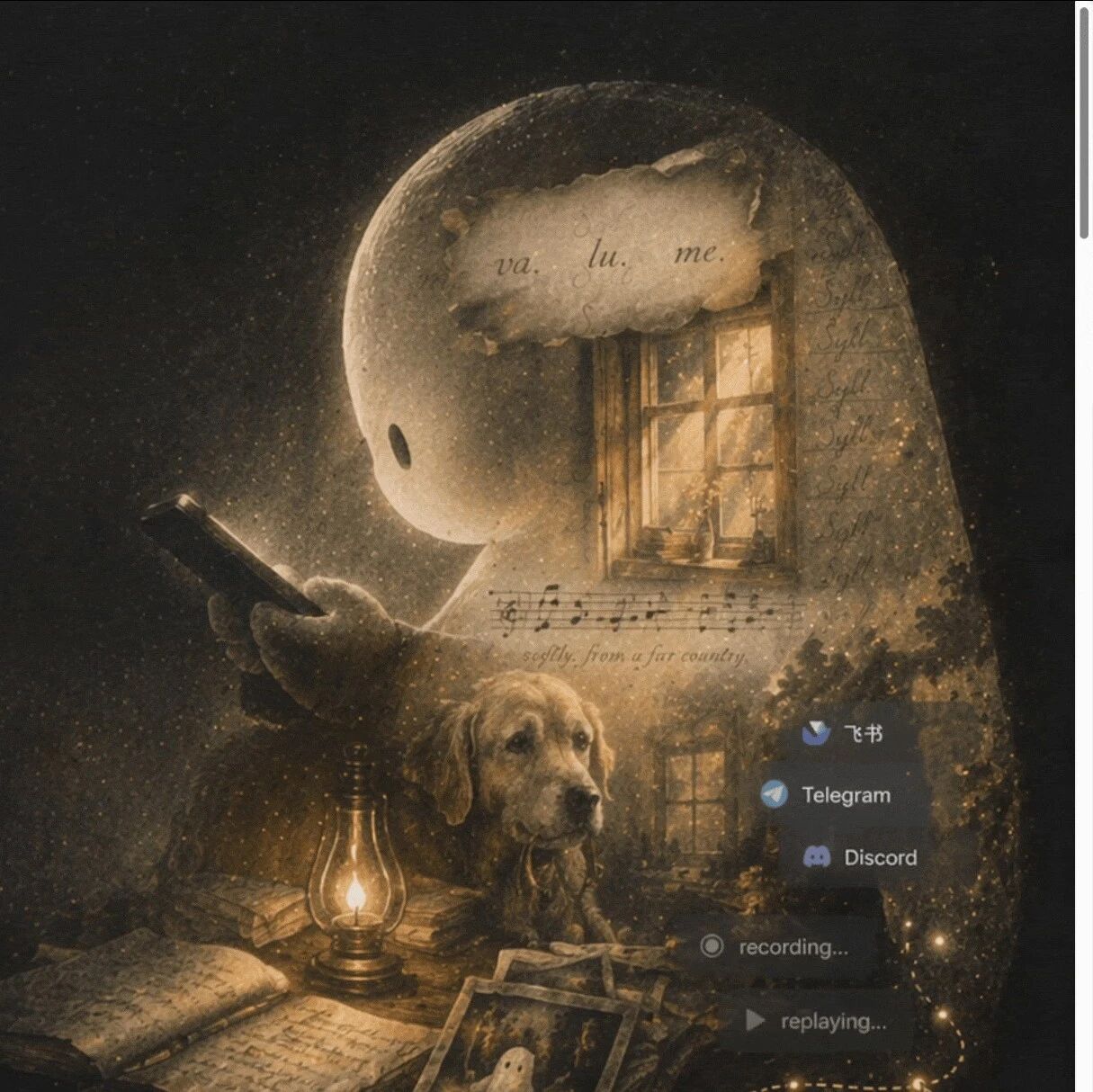
Syll: Tsinghua's Open-Source Multimodal Full-Interaction Agent Framework
Supports GUI, CLI, and MCP operation styles, automatically generates reusable skills from demonstrations, and deploys locally to protect data privacy
Most desktop AI Agents know only one way to operate — either call APIs or click interfaces. When they hit visual software without APIs, like Photoshop or Blender, or real workflows that mix command-line and interface operations, they're stuck. The Syll framework, open-sourced by Tsinghua University's Intelligent Vision Laboratory, unifies GUI, CLI, and MCP/API into one execution loop, and also supports demonstration learning along the lines of "you do it once, and it knows how".
What Is Syll
Syll is a multimodal full-interaction agent framework, jointly developed by Professor Jiwen Lu's team at Tsinghua University and Jiajia Shijie. Its core idea: a complete desktop agent should flow naturally across different "operating surfaces" — it can see the interface, reach the buttons, run the commands, and connect the tools.
- Project page: https://thu-sage.github.io/syll/
- GitHub: https://github.com/THU-SAGE/syll
- Paper: https://github.com/THU-SAGE/syll/blob/main/docs/report/syll-report-v1.pdf
Four Core Capabilities
1. Unifying GUI, CLI, and MCP/API
Syll doesn't choose among the three operation styles — it puts them into the same execution loop:
- GUI: Operates the interface directly when facing visual software like Photoshop, Blender, or Godot
- CLI: Goes to the command line for batch processing, file operations, and environment checks
- MCP/API: Goes through interface calls for structured tools and external services
The agent automatically picks the right execution path for the task at hand. It needs to observe the screen, locate targets, handle pop-ups, wait for state changes — and also switch to the command line at the right moments, instead of turning every problem into clumsy clicking.
2. Demonstration Becomes Skill
This is Syll's most eye-catching feature. You don't need to write scripts, configure rules, or compose prompts — just manually run through the task the way you normally would, and Syll will automatically:
- Record key visual anchors
- Capture mouse, keyboard, and window state changes
- Extract task context
- Distinguish reusable steps from steps that need fresh judgment
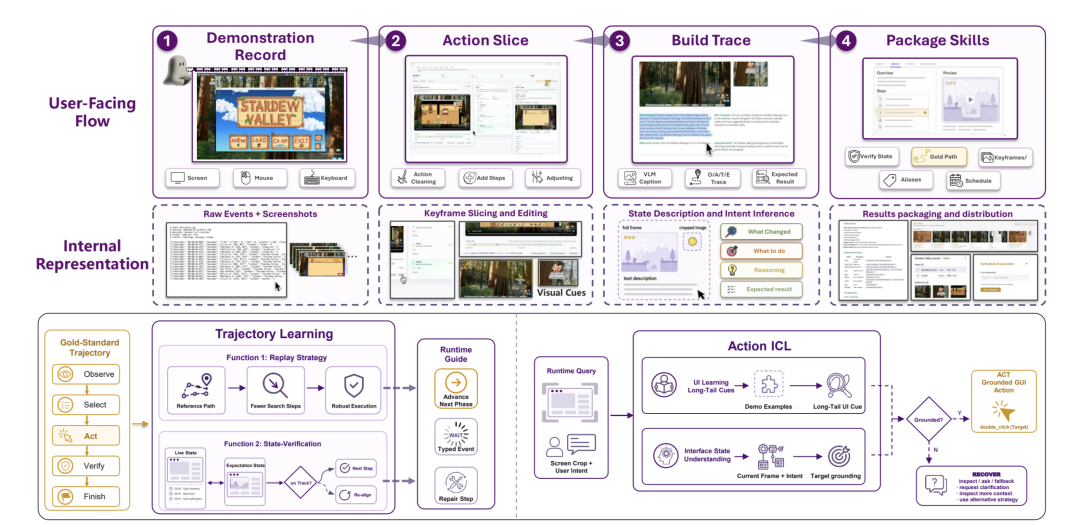
What comes out is not a rigid screen recording but a skill file that can be invoked again and refined further. What it learns is "how you complete this task", not isolated button coordinates.
3. Fully Auditable Traces
Every execution leaves a complete trajectory: what it saw, which tools it called, where it waited, where it retried, why it switched action channels. All screen operations and interface state changes can be recorded, replayed, and audited.
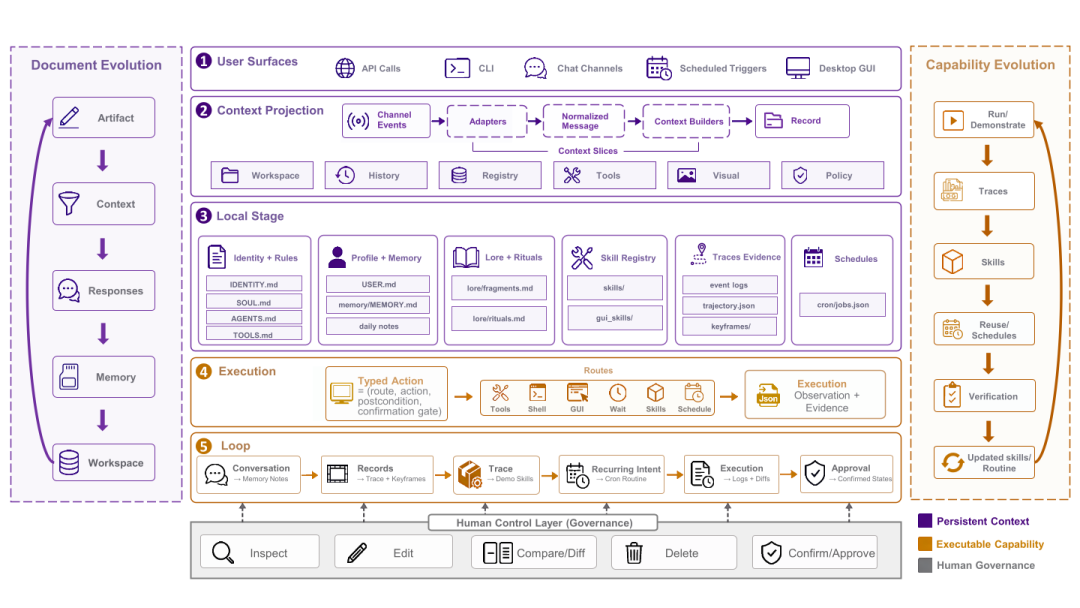
The user always keeps final control over key decisions, forming a "machine executes -> human reviews" verification loop.
4. Local Modular Architecture
Syll's memory, skills, rules, and preferences are all organized as locally editable files:
- Ordinary users can handle model configuration, skill management, and scheduled tasks in the frontend panel
- Developers can plug in their own model providers, swap tool modules, and add skill channels
- The code avoids over-wrapping and redundant logic, with each module offering clear call paths and independent abstraction boundaries
Quick Start
# Clone the repository
git clone https://github.com/THU-SAGE/syll.git
cd syll

# Follow the project README's instructions to install dependencies and configure models
Syll is currently in public alpha, and the team is iterating quickly. You can:
- Use it directly as an out-of-the-box desktop assistant
- Build on it as an extensible research/development framework
- Develop standalone skill plugins for specific scenarios
Use Cases
- Desktop software automation: Operating API-less visual software like Photoshop, Blender, and Godot
- Recording repetitive workflows: Turn daily repetitive operations into reusable skills
- Personal office assistant: File organization, data analysis, report generation
- Developer toolchain: Automated orchestration of code editing, debugging, and deployment
- Privacy-sensitive scenarios: Data never leaves the local machine, controllable and auditable end to end
Syll addresses several core pain points of today's desktop Agents: fragmented operation styles, steep teaching curves, opaque execution, and unsafe data. If you need a personal automation assistant that can operate desktop software, run command lines, and call tools, Syll is worth a try.