
The Tabbit AI Browser: What Browsers Look Like in the Agent Era
Meituan's GN06 team has launched the Tabbit 1.0 AI browser. Core features are free forever, Pro is ¥9.9/week, and it runs multiple models side by side, script tricks, and Agent task management.

The Tabbit AI Browser: What Browsers Look Like in the Agent Era
Meituan's GN06 team has launched the Tabbit 1.0 AI browser. Core features are free forever, Pro is ¥9.9/week, and it runs multiple models side by side, script tricks, and Agent task management.
Meituan's GN06 team has released the Tabbit 1.0 AI browser. Core features are free forever; Pro costs ¥9.9/week. This isn't Chrome with a ChatGPT skin — it's a product that rethinks from the ground up what a browser should look like in the Agent era.
Download: https://www.tabbit.com/ (Windows and macOS supported; the mobile beta is already listed on the Android, Apple, and HarmonyOS app stores)
Why the Agent Era Needs an AI Browser More Than Ever
A counterintuitive conclusion: the stronger agents get, the more important the browser becomes.
Your working context — the pages you're reading, the tabs you have open, the reference material in your bookmarks — lives almost entirely in the browser. A standalone AI chat window can't reach any of it, so you're stuck copy-pasting and shuttling files back and forth.
But if the AI lives inside the browser, it naturally sees everything you're working on.
Core Features
The AI looks at the same screen you do
Open a page, tap "Chat" in the top-right corner, and the AI answers based on the current page's content — no manual copy-pasting of context. Paragraphs and images on the page can be highlighted or screenshotted for direct reference.
What about multiple pages? The chat box supports @-mentions, so the AI can answer questions or run tasks across several pages you're viewing at once. @-mention a local folder and it instantly switches to Agent mode to process files directly.
One question, multiple models running at once
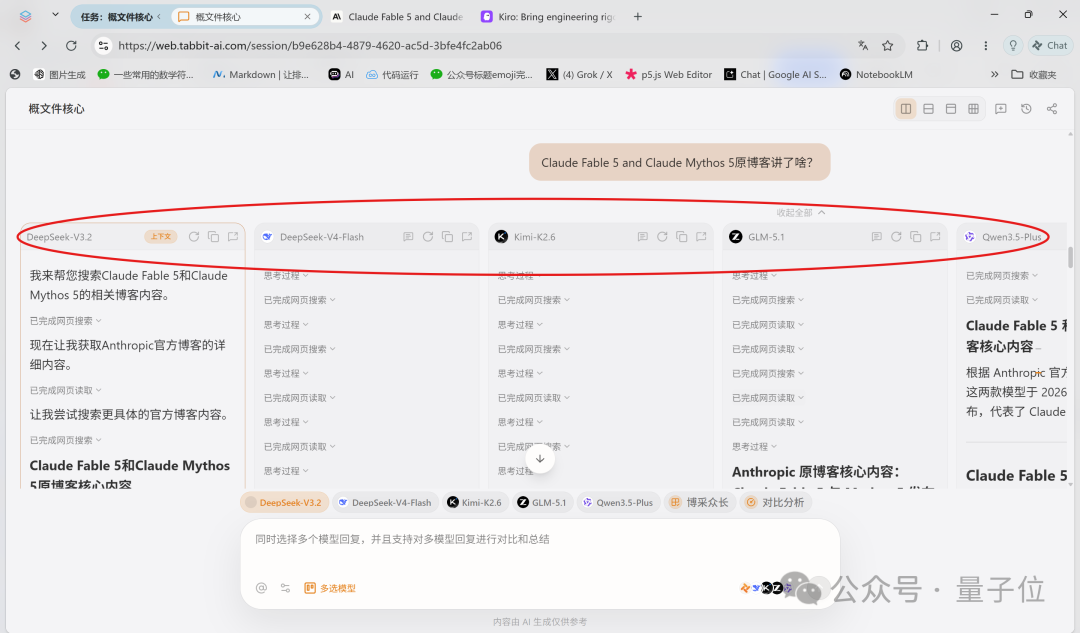
Tabbit supports all the mainstream Chinese LLMs. For the same question, you can freely check which models should answer; they all run simultaneously, and afterward you get a comparative analysis plus a synthesis that takes the best of each.
Script tricks: reshape a web page with one sentence
"Tricks" is Tabbit's most agent-like feature, similar to skills. Script tricks in particular generate code on the spot to modify the page in front of you:
- Disguise the RedNote homepage as an Excel spreadsheet with one click
- Auto-add table-of-contents navigation to long WeChat official account articles
- Block web ads
- Bulk-export comment data
Describe what you need in one sentence, the AI writes the script on the spot, you save it, and it's one-click reusable from then on. There's also a Trick Gallery where you can directly use ready-made tricks shared by the community.
Agent tasks don't steal your screen
When an Agent runs a task, it automatically tucks itself into a separate tab group, fully isolated from the pages you're browsing. It does its thing, you do yours — unlike many desktop agents where "once it starts, all you can do is watch."
Pricing
- Core features: free forever
- Pro: ¥9.9/week (about the price of a cup of Luckin coffee)
Hands-On Impression
Twelve versions shipped in its first 100 days. The interface is clean, and there's no shortage of clever little touches. It won't replace Chrome overnight (habits die hard), but as an entry point for weaving AI genuinely into your browsing, it's worth spending time on.