
Tencent Miora: A Design Agent That Handles Images, Video, and Web Pages on One Canvas
Tencent's first design agent is now fully open — the whole pipeline from brief to delivery, everything built on Skills, with built-in memory and an inspiration library.
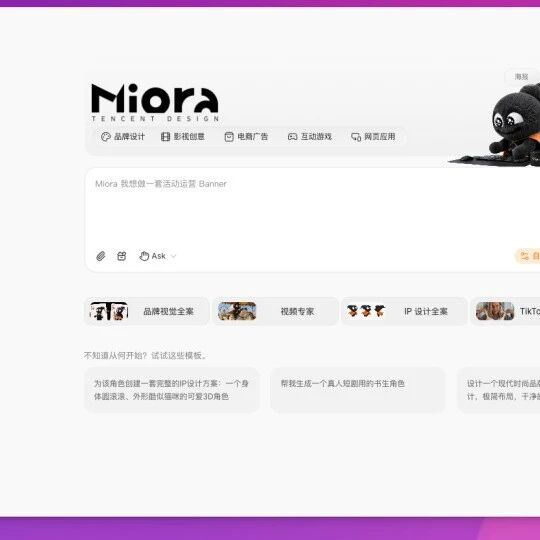
Tencent Miora: A Design Agent That Handles Images, Video, and Web Pages on One Canvas
Tencent's first design agent is now fully open — the whole pipeline from brief to delivery, everything built on Skills, with built-in memory and an inspiration library.
Miora is the first design agent platform built by Tencent's WorkBuddy team — think of it as "the creative version of WorkBuddy." It pulls three kinds of creative output — images, video, and web pages — into a single canvas, aiming to kill the cross-tool pain of "one tool for images, another for video, yet another for web pages." On July 22, 2026 it officially opened to everyone — until then it required an invite code and a waitlist; now you can simply register and use it. This piece combines the official announcement with first-hand testing to tell you what it actually is, how to use it, and who it suits.
Try it at: miora.design
The Core Mechanism: Everything Is a Skill
Every template you see on the Miora canvas (full IP design packages, interactive games, card games, sticker packs, posters) is, underneath, a pre-written Skill. The invocation flow is uniform:
Pick a template → enter a prompt → specify the model in the multimodal model step (e.g. Nanobanana, GPT-image 2)
→ confirm aspect ratio/resolution → a complete set of assets appears directly on the canvas at right
The key differentiator: every image on the canvas is individually editable — background removal, image expansion (stretching several scene images to a consistent aspect ratio), and similar operations hide in the function area to the right of each image. That means what you get is not just a set of finished pictures, but a project you can keep refining.
How the Three Outputs Chain Together
- Images: pick a template + a prompt; the multimodal model can be auto-selected or manually specified.
- Video: pick two images as the first and last frames, type a plain-language prompt, and you can hit "Polish prompt" to translate your phrasing into a full version. Under the hood it calls the
audio-video-agentskill. - Web pages: after running image and video generation, you can go straight on to generate a web page, closing the loop on the whole creative package.
Three Capabilities That Make Miora More Than "Another AI Image Tool"
1. Workflows Persist as Skills + a Marketplace
A complete pipeline you have debugged end to end can be persisted as a Skill and published to the marketplace with one click. Every pit you have stepped in and every parameter combination you have dialed in becomes a reusable asset — for your own one-click reuse next time, and directly callable by others.
2. Memory
You can feed it your habits, workflows, brand guidelines, and project background. Miora does not just remember what you used — it remembers how you create: every collaboration teaches it your aesthetics, brand rules, and touch. The longer you use it, the better it knows you, with no re-explaining the background every session.
3. Inspiration Library
It ships with ready-made cases. When inspiration runs dry, pick one and hit "use prompt," and the prompt flies into the chat box automatically. Especially friendly for beginners — no writing prompts from scratch.
Who It Suits: Game Scene Design Is the Highlight
Miora's "interactive game" skill is its killer feature — what separates it from ordinary image-generation tools. Given a prompt, it generates game assets in layers:
- Distant parallax backgrounds
- Midground decoration layers
- Foreground interaction layers
- Platform and obstacle components
- Collision body data
- Level connection points
Every layer adjusts independently. For example, for the first level ("Dusk Forest") of a pixel-art side-scrolling action game, the same prompt thrown at a bare model (calling Nanobanana directly for images) will inevitably lose to this layered skill — because the skill encapsulates a professional game artist's layering logic.
How to Use It: Four Steps to Your First Creative
Step 1: Register and Claim Credits
Visit miora.design and register an account. New users get 1000 credits per the official announcement — enough to run through a few templates and get a feel.
Step 2: Pick a Template and Enter the Canvas
On the homepage, pick the template closest to your need (full IP design package, interactive game, poster, and so on) and enter the main canvas.
Step 3: Enter a Prompt and Choose a Model
Type your creative description into the chat box. If it is a video, pick the two images for the first and last frames; in the multimodal model dropdown, specify the image model (Nanobanana, GPT-image 2, etc.) and confirm aspect ratio and resolution.
💡 Tip: plain language is fine for the prompt — when you are done, hit "Polish prompt" and let Miora expand it into a full version; output quality becomes noticeably more consistent.
Step 4: Refine on the Canvas and Export
Once the results appear, click any image to enter editing: remove backgrounds, expand, regenerate individually. Export in the format you need when satisfied. For a full asset package (images + video + web page), continue on to generate the web page.
Verifying It Worked
Run one complete "prompt → image → video → web page" chain, and save that chain as a reusable Skill, and you have mastered it. Advanced verification: after feeding brand guidelines into "Memory," check whether the next round of output automatically honors the color and font requirements.
Use Cases
- Indie game development: use the interactive game skill to split out multi-layer game assets in one go, skipping the time of manual layer-splitting by an artist.
- Full brand IP packages: from the main IP character to sticker packs, posters, and promotional materials — a complete set produced on one canvas.
- Short-video content: first/last frames + a plain-language prompt to generate video clips; good for voiceover b-roll and product demos.
- Rapid landing pages: generate the web page right after images and video; good for campaign pages and product introduction pages.
FAQ
- Is an invite code still required?: as of July 22 it is fully open — just register; no invite code or waitlist anymore.
- How do credits work?: new users get 1000 credits; different models and operations consume different amounts — defer to official billing for specifics.
- Can I export to professional software for finishing?: images download directly; video and web page projects are currently edited mainly inside Miora — defer to the official documentation on export capabilities.
- How does it differ from Jimeng or Kling?: Miora's differentiators are "one canvas that finishes images + video + web" and "skill persistence and memory" — it is positioned as a design agent, not a single-purpose image tool.