Tiangong Video Agent Hands-On: Script to Export, a Full Brand Merch Video Set in One Pass
A complete hands-on tutorial for Kunlun Tech's Tiangong Video Agent (an in-browser AI video workbench): 8 stages from a brand prompt to a 1080P finished film, plus design-spec persistence and blind-box series reuse tips.
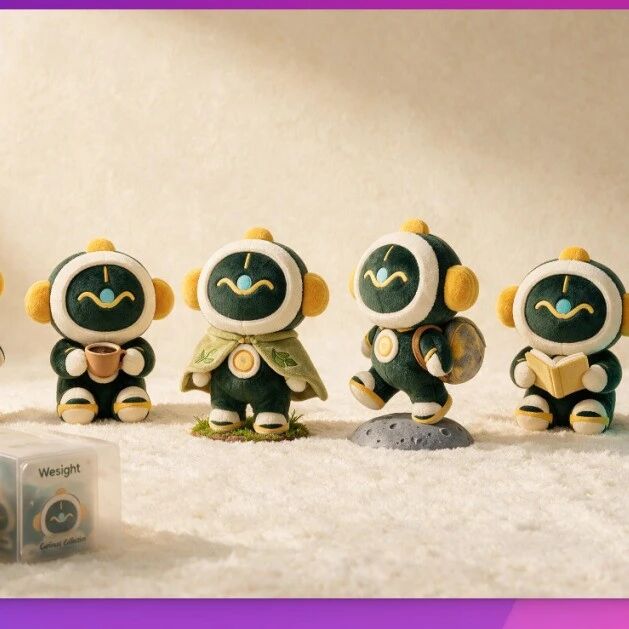
Producing a set of brand merch videos for a product traditionally takes a scriptwriter, storyboard artist, character designer, and editor working together for at least several days. Tiangong Video Agent (from Kunlun Tech) compresses that into "one browser, one afternoon."
It is an in-browser AI video project workbench that covers everything—scriptwriting, storyboard breakdown, character style definition, editing, and export—on one platform. This article follows one real task—producing a brand promo set for the product WeSight (plush-doll key visual, blind-box showcase, short social videos)—through all 8 stages of the workflow. The same method transfers directly to IP merchandise, product-detail page videos, unboxing shorts, and similar scenarios.
Before You Start
- Tool: Tiangong Video Agent (accessed in the browser)
- Materials: your logo, official site link, reference visual style
- Expected output: an Mp4 / 1080P / 30fps finished video + a reusable design spec
- Estimated time: one afternoon
Step 1: Feed in the Requirement Prompt
Open Tiangong Video Agent and describe the brand information, tone, and goals completely. The original prompt for this case is below—swap in your own brand:
Generate a brand promo video combining the WeSight logo with the brand tone of https://wesight.ai/ ,
including doll showcase, packaging details, product highlights, and social-media-oriented shots;
overall a warm-tech style that preserves WeSight's original sense of technology,
building an IP presence users can love and collect,
with consistent IP character styling across the whole film, doll design referencing the soft, cuddly feel of JellyCat plush toys.
💡 Tip: the more specific the prompt, the higher the IP consistency. Be sure to state: (1) brand anchors such as the website / logo, (2) overall tone keywords, (3) the reference object for the character / style, (4) the requirement for consistent styling across the whole film.
Step 2: Choose "Step-by-Step Creation"
The system asks whether you want "one-click video" or "step-by-step creation." Strongly recommend step-by-step creation—every stage can be checked and adjusted individually, keeping both IP consistency and visual quality under control.
Step 3: Generate the Visual Design Spec and Narration Script
Tiangong Video Agent first breaks out all of the following:
- Character design (look, color palette, IP traits)
- Visual temperament (how "warm tech" concretely materializes)
- Narration copy
- Camera flow
Each item can be adjusted individually. In this case the narration didn't fit, so we had it removed—a new version of the script came right back.
💡 This step is the quality watershed: spend the time here adjusting until you're satisfied; only then do the later storyboards and assets matter. Don't rush forward.
Step 4: Storyboard Design
Tiangong Video Agent created close-ups, three-view drawings, and packaging-box designs for WeSight, and auto-composited each scene. Every shot is clearly annotated with:
- Shot type (close-up / medium / wide)
- Action intent
- Time range
Generated assets are stored into the asset library automatically. If a three-view drawing is wrong, replace it in the library and the storyboard updates immediately.
Step 5: Storyboard Preview
At the storyboard stage, you can already see roughly what every shot will look like. Three things to verify here:
- Is the composition sensible
- Does the action feel right
- Does the pacing flow
Not satisfied? Go back to steps 3 and 4 to adjust—the storyboard stage is the last low-cost window for changes.
Step 6: Generate BGM (Using Mureka)
Once the storyboard videos are out, Tiangong Video Agent calls Mureka to generate background music.
💡 Key advantage: BGM generated by Mureka has no copyright issues and can be used directly in commercial releases, eliminating music licensing headaches.
Step 7: Multi-Track Editing and Export
Drag the clips into the editing workspace and refine further on the multi-track timeline:
- Rough cut / fine cut
- Subtitles
- AI audio
- Filters, color grading, animation, transitions
Export settings: Mp4 / 1080P / 30fps.
Step 8: Persisting the Design Spec (The High-Value Step)
This is the most noteworthy step of Tiangong Video Agent. The agent automatically summarizes a design spec, converting the quality assets created during production into reusable assets.
Later, when making blind boxes, figures, product-detail pages, unboxing videos, or holiday materials, you never re-describe the character and style—just reuse this spec.
Derivative Case: Blind Box Design
Reuse the design spec directly and have it design a WeSight blind box set. The system automatically references everything established earlier:
- The character's face
- Primary colors
- Packaging texture
- Overall temperament
It won't randomly generate a set that's completely mismatched. This is where IP consistency comes from—spec first, derivatives after.
Use Cases
This workflow transfers well, and the key is the "persisting the design spec" step:
- Brand merchandise: brand promo → doll key visual → blind box → product-detail page → unboxing video
- IP series content: finalize the character design spec once; subsequent episodes, shorts, and sticker packs all reuse it automatically
- E-commerce asset mass production: use one product visual spec to quickly generate holiday / themed materials
- Social short-video matrices: one product positioning → multiple shorts tuned to different platforms
Overall Impressions
From idea to finished film, no more wringing in between. A video project used to require several people across script, storyboards, and editing; now one person delivers in an afternoon. The real leverage isn't the tool itself—it's "persisting the design spec": do it once, reuse it countless times.