
A Hands-On, End-to-End Guide to Producing AI Short Dramas
From script to finished film: make AI short dramas from scratch with Doubao, Xiaoyunque, Vidu and other tools, with tool comparisons and cost references.
A Hands-On, End-to-End Guide to Producing AI Short Dramas
From script to finished film: make AI short dramas from scratch with Doubao, Xiaoyunque, Vidu and other tools, with tool comparisons and cost references.
AI short dramas are becoming the next big thing in content creation — top creators earning nearly a million a month is no longer just a rumor. But newcomers usually run into four big obstacles: how to write the script, how to choose the models, how to write the prompts, and how to keep characters consistent.
This article gives you a complete workflow from zero to finished film. Every tool has a free or low-cost plan, and no design background is required.
Before You Start
You only need the following tools:
- Doubao (free): generate the script and storyboard prompts
- Xiaoyunque: character consistency management + video generation (based on Seedance 2.0)
- Vidu (56 RMB/month, up to 200 videos): cost-effective video generation
- Jimeng app: backup video generation (powered by Seedance 2.0) + cover typography
Expect a full production cycle of 2-4 hours for a 1-minute short drama, with tool costs kept under 100 RMB.
Step 1: Generate the Script and Storyboard with Doubao
Open Doubao and enter your story setup. A good prompt template should include:
- Story background and character settings
- How many acts in total and how many shots per act
- The shot size, character actions, and dialogue for each shot
Doubao outputs a complete storyboard script within 5 seconds, with a video-generation prompt attached to every shot.
Tip: The more detailed the storyboard script, the higher the success rate of the later video generation. Make sure Doubao spells out the camera movements (push, pull, pan, tilt), shot sizes (close-up/medium/wide), and the characters' expressions and actions.
Step 2: Keep Characters Consistent
This is the step where AI short drama production most often goes wrong. Characters “changing faces” between shots is a common problem.
The workflow:
- Upload the script to Xiaoyunque; it automatically generates prompts for the corresponding characters and scenes based on the script
- Click generate image to create the character reference images
- If you are not happy with the results, generate images individually with Doubao or Nano Banana and swap them in
Xiaoyunque builds a unified visual profile for each character, and every later shot is generated from that profile, which prevents face-changing.
Tip: Simple shots can be generated with Vidu; for complex camera moves and multi-character scenes, Xiaoyunque is recommended — better results, but it burns more credits.
Step 3: Generate Videos in Bulk
Xiaoyunque can automatically generate complete video prompts from the script — covering camera movement, shot size, and character actions and expressions — and produce the video in one click.
Recommended cost allocation strategy:
- Simple shots (single character, fixed camera): generate with Vidu — 56 RMB/month for up to 200 videos, the best value
- Complex shots (multi-character interactions, effects scenes): use Xiaoyunque, the most reliable results
- Rescue shots (buggy frames that keep failing to generate): try Jimeng's Seedance 2.0, which has a built-in “director's mindset” and a high one-pass success rate
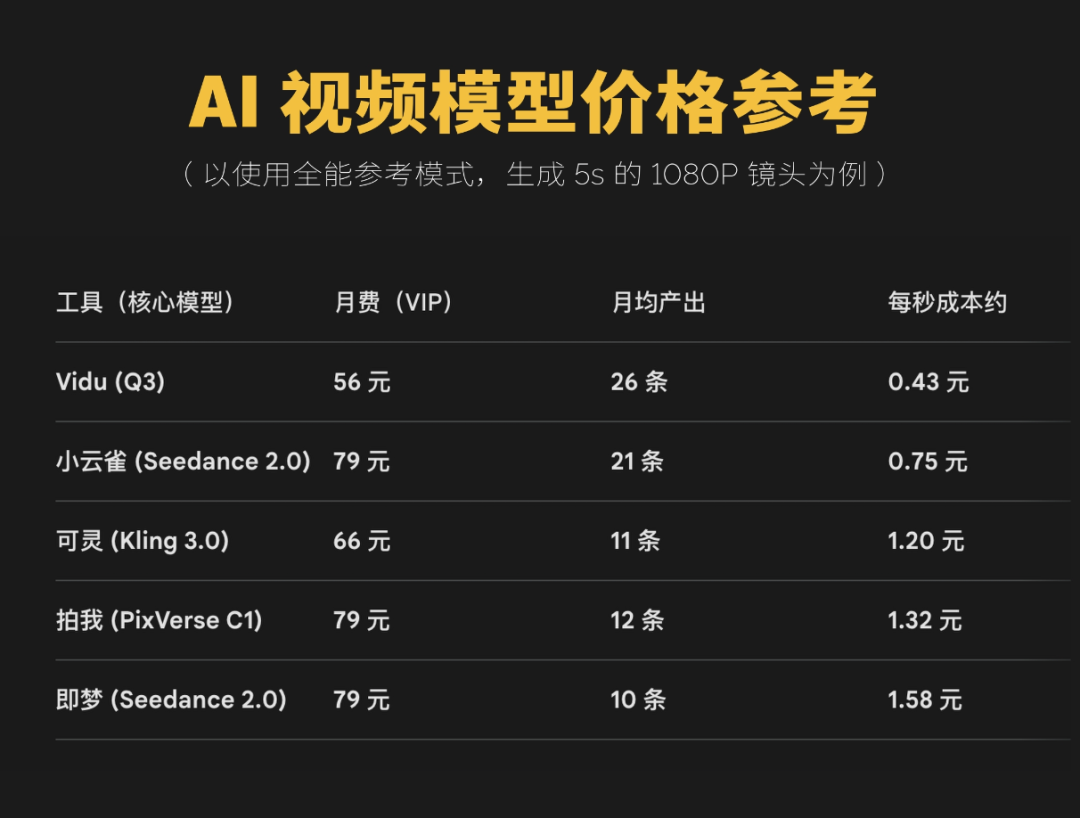
The chart above compares the prices of mainstream AI video generation tools — worth bookmarking for later.
Step 4: Create the Short Drama Cover
You don't need any design background for the cover — the Jimeng app handles it:
- Open the Jimeng mobile app
- Search “short drama fonts” and find a style that fits
- Tap “make one like this” and remove the background
- Combine it with the AI-generated background image from earlier to finish the layout
Tool Cost Overview
| Tool | Price | Use Case |
|---|---|---|
| Doubao | Free | Script and prompt generation |
| Xiaoyunque | Credit-based | Character consistency, high-quality video |
| Vidu | 56 RMB/month (200 videos) | Bulk generation of simple shots |
| Jimeng Seedance 2.0 | Pay per use | Fixing buggy shots, cover design |
FAQ
- What if the character changes face across shots? Use Xiaoyunque first to build the character profile and run all generation against that same profile. You can pair it with standalone image generation in Doubao for fine-tuning.
- A shot keeps failing to generate? Try switching models — Jimeng's Seedance 2.0 has a relatively high one-pass success rate on complex scenes.
- How do you control the overall budget? Go with the “Doubao writes the script for free + Xiaoyunque manages characters + Vidu mass-produces footage” route, and tool costs for a 1-minute short drama stay under 100 RMB.
Related articles
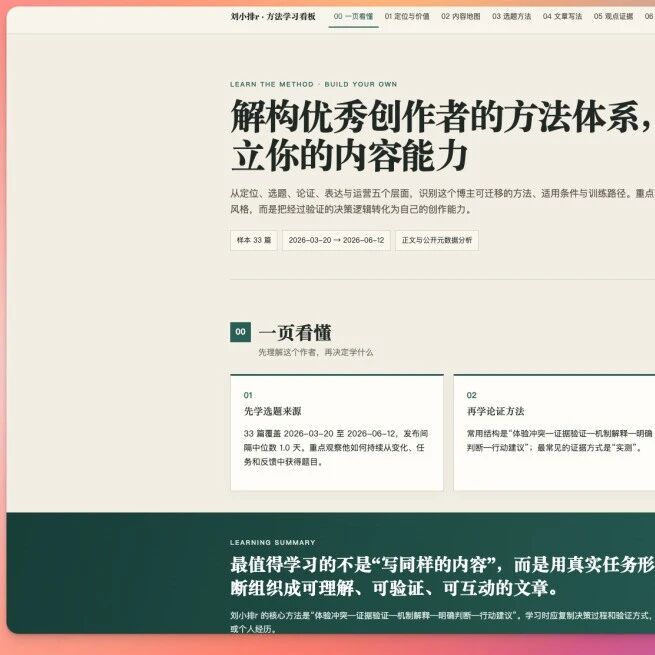
Office Raccoon Desktop 2.0: Decoding Any Blogger's Methodology in 10 Minutes
Office Raccoon 2.0 supports custom Skills and Quick Bar quick actions; it can scrape and analyze WeChat official-account articles and output reusable writing frameworks

Spark Medical LLM V3.5: The AI Clinical Assistant with a 91% Physician Adoption Rate
iFlytek Spark Medical V3.5 hits 91% adoption on generated medical records and cuts writing time 52%, taking first place in both IDC and MedBench, with overall capability surpassing GPT-5.5

Google Gemini Live Translate: Listen and Translate Across 70+ Languages
Google launches Gemini 3.5 Live Translate for real-time speech translation across 70+ languages, preserving your pace and tone with only seconds of delay, now live in Google Translate and Meet.
Claude Fable 5: A Hands-On Guide to Anthropic's Strongest Model
Anthropic ships Claude Fable 5 and Mythos 5 in dual editions — 80.3% on SWE-bench Pro, API pricing at $10 per million input tokens, free for a limited time until June 22.

OpenAI's Official Codex Workflow Guide: From Screenshots to Web Pages to AI-Run Research
OpenAI updates a dozen-plus official Codex real-world workflow cases covering Computer Use, /goal long-horizon objectives, PPT generation, game development, and other practical scenarios — a step-by-step guide to using Codex efficiently.
7 Field-Tested Lessons for Writing Great Claude Skills
Skill-writing lessons straight from Anthropic: trim the context, accumulate a pitfall list, script the stable steps — double your AI collaboration efficiency.