
7 Field-Tested Lessons for Writing Great Claude Skills
Skill-writing lessons straight from Anthropic: trim the context, accumulate a pitfall list, script the stable steps — double your AI collaboration efficiency.
7 Field-Tested Lessons for Writing Great Claude Skills
Skill-writing lessons straight from Anthropic: trim the context, accumulate a pitfall list, script the stable steps — double your AI collaboration efficiency.
Anthropic has published the Skill-writing lessons it accumulated internally while using Claude Code. These lessons apply to anyone using an AI coding assistant — whether you run Claude Code, Codex, or Cursor, the core logic is the same.
This article distills them into 7 checklist items you can apply directly, helping you dodge the classic trap of "wrote a Skill and it's no good."
The Core Insight: Skills Are Course Correction, Not Remedial Schooling
Most people understand a Skill as "an instruction manual for teaching the AI things." That mental model leads to long, inefficient Skills.
The right understanding: Claude is already very strong on its own. A Skill isn't there to school it — it's there to correct its course and cut down trial and error. Every time Claude executes a task, it makes a large number of decisions: which tools, in what order, by what standard. Without a Skill, it guesses from general knowledge — mostly right, occasionally wrong — and a Skill's value concentrates precisely in that "occasionally wrong" slice.
There is only one test: without this line, would Claude get it wrong or do it slowly? If not, delete it.
Lesson 1: The Core Asset Is the Pitfall List, Not the Procedure Write-Up
Anthropic's practice: every time Claude fails at some task, distill the cause of failure into one entry and write it back into the Skill. For example, "this API's field is called user_id, not userId," or "this library's docs are wrong — the actual behavior is X."
Why is this the core? Claude can mostly derive procedures on its own, but pitfalls are experience, and experience can only be accumulated, never reasoned out. A Skill that's three months old with twenty recorded pitfalls is worth far more than a freshly written "perfect" one.
How to do it: keep a fixed "known pitfalls" section in the SKILL.md of every frequently used Skill. Whenever a Skill's output comes out wrong and you correct the AI, mention in passing, "add this to the Skill's pitfalls."
Lesson 2: SKILL.md Is a Table of Contents, Not the Full Text
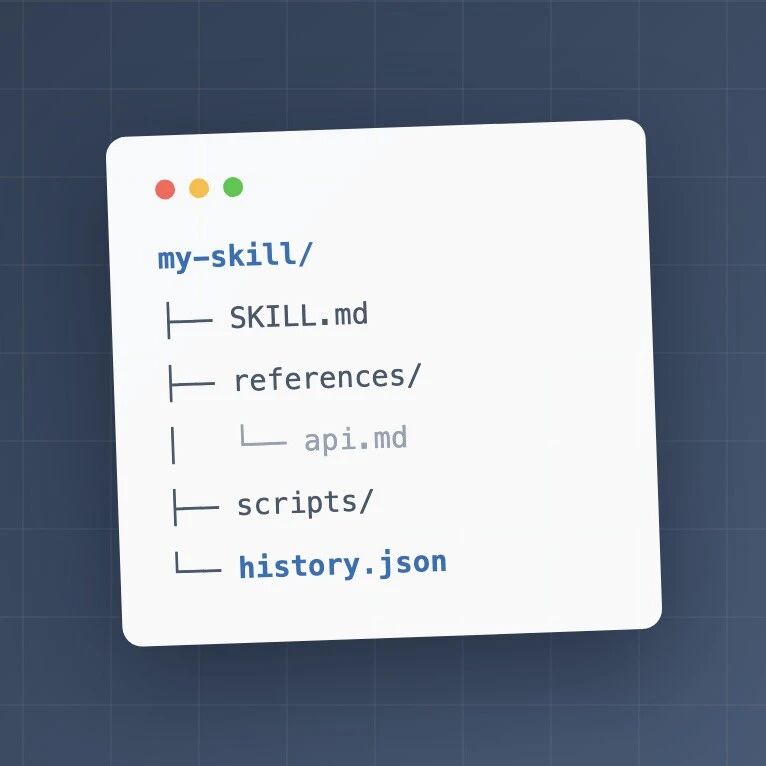
The officially recommended directory structure:
SKILL.md        -- the core procedure, as short as possible
references/     -- detail docs, read only when needed
assets/         -- templates, sample files
scripts/        -- executable scripts
Why? Because when a Skill triggers, SKILL.md gets stuffed into context in its entirety. Filler in context isn't free — it makes the model "lose focus" on the instructions that actually matter.
Self-check standard: open your SKILL.md and ask of every paragraph, "is this needed on every execution?" If not, move it out into the references/ directory and leave one line in the main file: "when handling X, read references/x.md."
Lesson 3: Seed the description with Plain Human Phrases
A Skill's description decides whether it gets triggered at all. The key is to write it for the model, burying "the words users actually say."
A user says "take a look at my weekly report." If the description only says "analyze employee report documents," the match is weak; write in the actual phrasing — "look at the weekly report," "read the daily report," "trim the padding" — and the hit rate jumps immediately.
Also, the description should spell out when not to trigger. Once you have many Skills, mutual false triggers become the new problem. Adding one line like "use only when X; for Y, use the other Skill" saves far more trouble than correcting things after the fact.
Lesson 4: Separate Hard Constraints from Default Preferences
The mistake beginners make most often: writing a Skill as a hard 1-2-3-4-5 procedure. The moment anything varies, the whole flow seizes up.
The right way separates two kinds of content:
- Hard constraints (must be followed): output formats, brand taboos, safety red lines. Write them as "must" and "never."
- Default preferences (can be overridden by circumstances): write as "default to X; if Y happens, you may Z."
Bad: "Step 3: add a progress bar to the video" Good: "The video needs a chapter progress bar, unless the footage is shorter than 1 minute"
The first describes an action; the second describes intent and boundaries. Only with intent in hand can the model adapt.
Lesson 5: Code for the Deterministic Parts, Model for the Judgment Calls
Code the AI writes fresh each time has randomness in its results; a script executes with exactly identical results every time.
Within any task, every part that is "the same every time" — calling APIs, converting formats, uploading files — should be solidified into scripts under scripts/, leaving the model responsible only for "calling the scripts + handling judgment-type work."
Self-check method: look back through the Skill's execution records. Anywhere the AI wrote nearly identical code every single time is where something should be turned into a script. The more steps you script, the faster, cheaper, and steadier it runs.
Lesson 6: Give the Skill Memory
The implementation is simple: put a JSON or log file in the Skill folder, write this run's key information after each execution, and read it first on the next run.
Without memory, every execution is "the first time." With memory, the Skill understands you better the more you use it.
Best-fit scenarios:
- Anything needing cross-period comparison (e.g., a weekly-report Skill that records this week's key figures and anomalies, then auto-compares next time)
- Anything needing deduplication (e.g., a topic-selection Skill that records topics already covered, avoiding repeats)
Lesson 7: Allocate Iteration Effort by Usage Frequency
Once your Skills pile up past twenty, the real situation is always the same: 3-5 get heavy use, and half are barely touched.
- High-frequency: worth a full upgrade — pitfall list, memory, scripting
- Low-frequency but triggered: keep them at their simplest few-line form; don't invest
- Never triggered: either the description doesn't sound like the way you talk (fix the trigger words), or it was a fake need to begin with (delete it)
Pour all upgrade effort into high-frequency Skills — that's the highest return-per-effort path.
Summary: One Checklist
| # | Action | Core rationale |
|---|---|---|
| 1 | Add a "known pitfalls" section and keep accumulating | A Skill's value comes from accumulated experience |
| 2 | Slim down SKILL.md, move details to references/ | Context filler dilutes attention |
| 3 | Add exclusion notes to the description | Prevents false triggers |
| 4 | Write hard constraints and default preferences separately | Write intent, not hardcoded steps |
| 5 | Solidify repeated code into scripts | Scripts have zero randomness |
| 6 | Add a history.json memory | It understands you better with use |
| 7 | Allocate iteration effort by usage frequency | Only high-frequency Skills merit a full upgrade |
Reference source: Anthropic's official blog, Lessons from Building Claude Code: How We Use Skills