
Qwen Table Agent: The Complete Guide to Generating Excel Through Conversation
Qwen's newly launched Table Agent supports generating Excel through conversation, converting photos into spreadsheets, and building tables from web-searched data — free across all channels with zero learning curve.

Qwen Table Agent: The Complete Guide to Generating Excel Through Conversation
Qwen's newly launched Table Agent supports generating Excel through conversation, converting photos into spreadsheets, and building tables from web-searched data — free across all channels with zero learning curve.
The Table Agent launched on Qwen (Qianwen) can generate downloadable Excel files directly through conversation. No formulas, no keyboard shortcuts — just state what you need and the table appears.
What Is the Qwen Table Agent
Simply put, it's an AI assistant that understands what you need and automatically generates Excel files. Unlike AIs that only give you "ideas for a table," it outputs an editable, downloadable .xlsx file directly.
It currently supports five core capabilities: generating tables via conversation, generating from photos, file conversion, building tables from web-searched data, and revising tables through multi-turn conversation.
How to Use It
Free on all channels, with the following entry points:
- Web: qianwen.com
- PC client
- Mobile app
Data is synced across all three — a table you didn't finish on your computer can be continued on your phone.
Core Features in Detail
1. Edit Tables in Plain Language
Upload an existing Excel and describe your changes in natural language. For example:
Delete empty rows, swap the weight and unit price columns, calculate the total price; bold and center the headers with a dark blue background and white text; left-align the name column, right-align the number columns; highlight cells with a unit price above 5 yuan in yellow, and totals above 300 yuan in red bold

The Agent edits your original spreadsheet directly and provides a download when finished. The whole process never requires opening Excel or touching a single keyboard shortcut.
Best for: being on a business trip with only your phone, making quick format adjustments, or polishing a report for a colleague.
2. Build Tables with Web-Searched Data
After you make a request, this feature automatically searches the web for relevant data first, then organizes it into a table.
I want to switch to a phone costing around 4000 yuan. Compare the specs of three phones and put them into an Excel spreadsheet
It searches for information, organizes the specs, and generates a complete comparison table covering core parameters like processor, screen, battery, and camera.
Best for: market research, product comparison, and data consolidation.
3. Build Tables Through Multi-Turn Conversation
Refine the table step by step, like chatting:
- "Make me a 5-day, 4-night Hangzhou itinerary"
- "Change day 2 to Qiandao Lake"
- "Make the last day more relaxed"
- "Add a budget and put it in a table"

The final Excel contains multiple sheets: itinerary, budget breakdown, and things to note, each with structured content.
Best for: project planning, weekly and monthly reports, trip planning, and work retrospectives.
4. Photo/File to Excel
Take a photo or upload an image and it automatically recognizes the content and converts it into a structured table. Supported input types:
- A casually snapped photo of a workout plan
- A printed class schedule
- A crumpled expense form
- A health checkup report
- Business cards and receipts
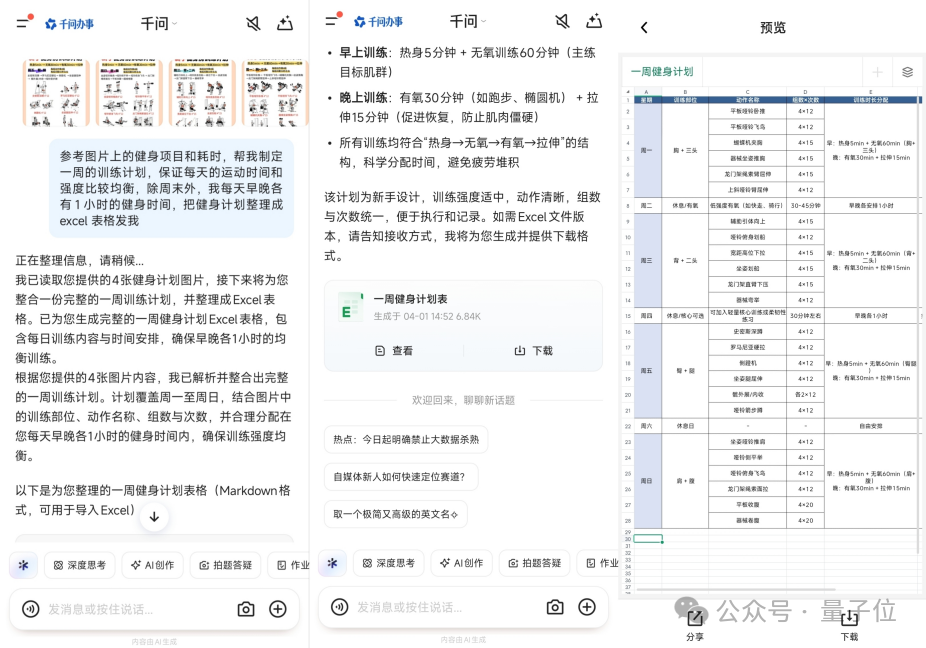
Best for: organizing paper documents and quickly digitizing handwritten content.
How It Works
The Qwen Table Agent has a Planner inside, and its execution flow is as follows:
- Receive the request: you describe the table you want in plain language
- Task planning: the Planner analyzes how many steps are needed and whether web research is required
- Information retrieval: if external data is needed, it automatically searches the web
- Code generation: Python code is generated in an isolated sandbox to process the data, tuned specifically for Excel scenarios
- Render output: once the code finishes executing, a downloadable .xlsx file is generated directly
The whole process runs end to end, with sandbox isolation ensuring security.
Pricing
Free on all channels, including web, PC, and mobile app. No paid membership restrictions.
FAQ
- Can the generated Excel be edited directly?: Yes, once downloaded it's a standard .xlsx file that can be edited normally
- How large a table is supported?: Regular scenarios (hundreds of rows) are fine; very large tables may be truncated
- Will my data leak?: For the specific privacy policy, refer to Qwen's official documentation
Related articles

Baidu DuMate Hands-On Guide: A Homegrown Codex That Lets You Run Office Work by Voice
From installation to automation, a complete breakdown of Baidu DuMate's request -> authorize -> execute -> deliver pipeline: cross-app work, scheduled tasks, and the credits bill, all explained in one article.

DeNovoSWE: The First Long-Horizon Doc2Repo Training Set That Teaches Code Agents to Build Repositories
Renmin University of China releases an open training set of 4818 real task instances targeting repository-level code generation, lifting Qwen3-30B's pass rate from 5.8% to 47.2%.

Google Workspace CLI: One Command Lets AI Agents Take Over Your Mail, Drive, and Calendar
An open-source CLI with nearly 30K stars wraps Gmail, Drive, Calendar, and Sheets into one unified interface, ships 100+ Agent Skills built in, and works for humans and AI alike.

Deemos Hyper3D Rodin Gen-2.5: 3D Generation Enters Its Thinking Era
The world's first 10M-polygon-class 3D generation model: 1M polygons in 4 seconds, 12K high-res textures, five switchable thinking depths, with B2B revenue exceeding the rest of its niche combined.

Xiaomi MiMo-V2.5-Pro-UltraSpeed: A 1T-Parameter Model Running at 1000 tokens/s
Xiaomi's flagship ultra-speed inference model breaks 1000 tokens/s of output on a standard 8-GPU commodity node, with output priced at 18 RMB per million tokens.
Google Ships Two Lightweight Creative Models: Images in 4 Seconds, Video in 10
Google releases the Nano Banana 2 Lite image model and the Gemini Omni Flash video model, built for speed and savings — $0.034 per image and $0.10 per second of video, already embedded in the Gemini App and YouTube Shorts for free.