
Claude Code + Feishu CLI: 5 Hands-On Agent Workflows
The open-source Feishu CLI exposes nearly 120 capabilities; combined with Claude Code it powers meeting knowledge bases, work retrospectives, reconciliation automation, collaborative boards, and automated expense reports — all free to use.

Claude Code + Feishu CLI: 5 Hands-On Agent Workflows
The open-source Feishu CLI exposes nearly 120 capabilities; combined with Claude Code it powers meeting knowledge bases, work retrospectives, reconciliation automation, collaborative boards, and automated expense reports — all free to use.
Since going open source, the Feishu CLI has covered 15 business domains and nearly 120 capabilities. Combined with Claude Code, you can get a large share of office work done without ever opening the Feishu UI. This post shares 5 real-world scenarios that already work end to end, each of which you can drop straight into your own workflow.
Best suited for teams and individuals who use Feishu as their team collaboration tool and are already using Claude Code or another AI agent.
What You Need Before Starting
- Feishu CLI: an open-source project, available directly on GitHub
- Claude Code: requires an Anthropic Max subscription or API access
- Feishu Open Platform permissions: some operations require admin authorization
- Installation command (send it straight to your agent):
Help me install the Feishu CLI: https://open.feishu.cn/document/no_class/mcp-archive/feishu-cli-installation-guide.mdFull list of Feishu CLI capabilities: https://open.feishu.cn/changelog?abilityType=Tool
Play 1: Build a Cross-Session Knowledge Base for Recurring Meetings
The problem: Weekly training sessions, team meetings, and retrospectives get captured in Feishu Minutes and then nobody ever reads them again. Before long, the topics, decisions, and lessons discussed earlier are all lost.
How to do it:
Call the Feishu CLI right from Claude Code and have it pull the history of a given meeting series.

Claude automatically generates a Feishu doc containing: a meeting list, topic-conversion analysis, meeting cadence, decision mechanisms, issues found, and suggestions for improvement.
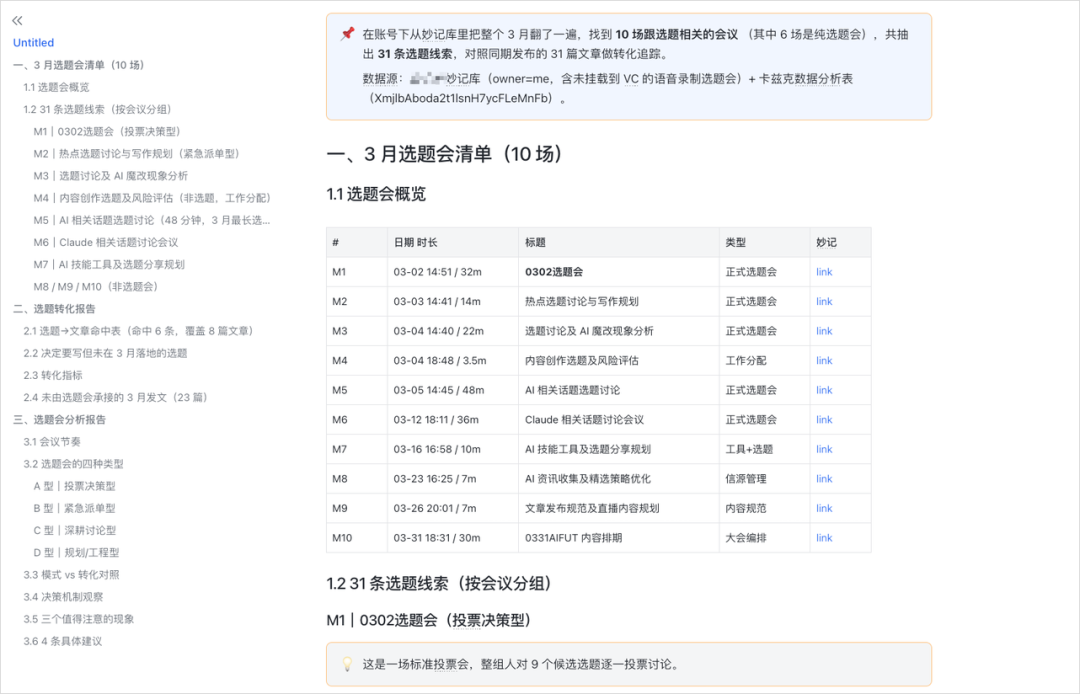
From then on, have the agent periodically pull in new meeting information to keep the knowledge base up to date. For new hires, it also doubles as the best onboarding material.
Tip: For meetings involving private data, work from desensitized historical data.
Play 2: A Full-Picture Work Retrospective by Agent
The problem: Your work data is scattered across a dozen-plus places — DMs, group chats, meetings, docs, OKRs — making a cross-sectional analysis of your own work impossible.
How to do it:
Have the agent pull all of your Feishu data for the past 7 / 30 / 90 days. It fetches along 8 parallel tracks: messages, meetings, Minutes, calendar, tasks, email, docs, and OKRs.
The final output is a document containing:
- A one-sentence summary
- How your time was spent
- A collaboration analysis
- Major projects and outputs
- Insights and suggestions (for example, spotting a project whose schedule slipped through)
You can go further and turn the retrospective into a web page, a slide deck, or a Base dashboard. The whole flow can even be packaged as a Skill and shared across the team.
Play 3: Automating Repetitive Coordination (a Reconciliation Bot)
The problem: Reconciling accounts with partners at a fixed time every month means heavy manual communication and lots of repetitive steps.
How to do it:
- Create a Feishu bot (via the CLI — extremely low effort, no API knowledge needed)
- Add the bot and your partners to the same group chat
- @ the bot in the group: "let's reconcile the accounts"
- The bot automatically looks up the data in Base, lists the line items, and sends them to the partner for confirmation
- Once the partner responds, the bot routes the feedback automatically: wrong amounts go to sales, missing orders go to finance, and confirmations go to the owner
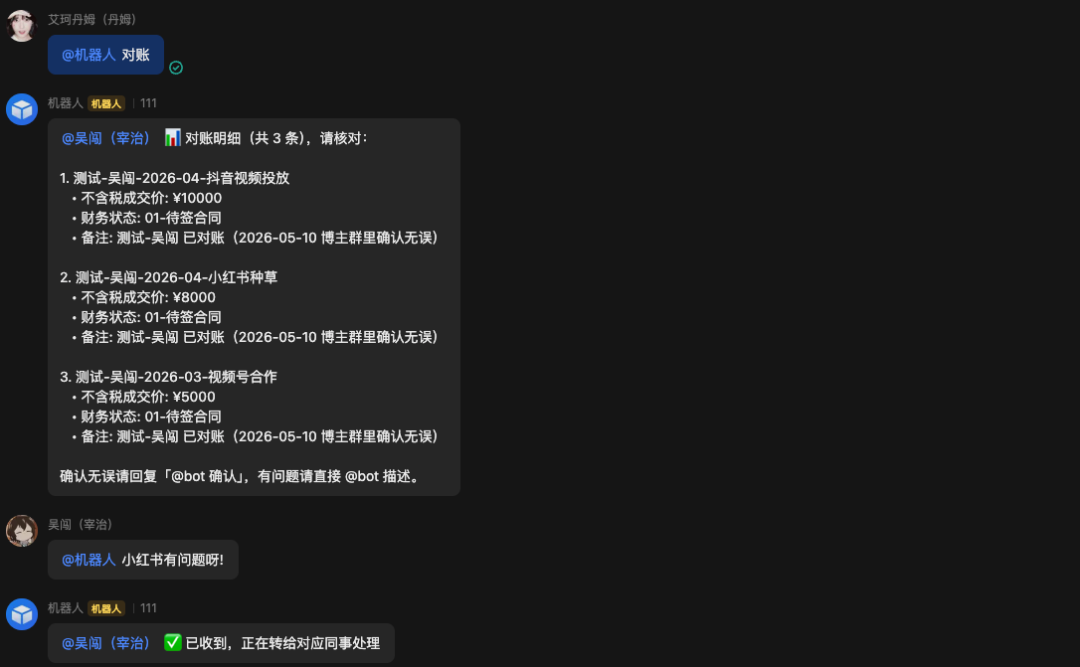
This skeleton transfers directly to scenarios like customer payment verification, order exception handling, contract renewal reminders, and year-end bonus data checks.
Play 4: Generating Collaborative Feishu Boards
The problem: Diagrams generated with an agent are usually HTML or images, which the team cannot edit together in real time.
How to do it:
Describe the diagram you want in plain language — say, "draw the architecture we just discussed" — and the agent generates a native Feishu Board (not an image or HTML).
Every node on the board can be dragged, edited, and re-wired by team members. Good use cases:
- Turn an architecture discussed out loud in a meeting into a board on the spot, so everyone edits while discussing
- Convert text-based processes into visual flowcharts
- Quickly produce team-editable slide decks
Play 5: Automated Expense Reports and Approvals
The problem: Expense reporting is tedious — collecting invoices, organizing them, filling out forms, submitting, getting approval. Every step is repetitive.
How to do it:
- Tell Claude Code which inbox receives the invoices (set it to your Feishu email)
- Have it find the expense-report SOP in the knowledge base
- The agent automatically searches the inbox for invoices and organizes the information
- It fills out the expense claim in Feishu following the SOP, checking with you before submitting
- The approval side can be handled by the agent too — verifying the details and summarizing for confirmation
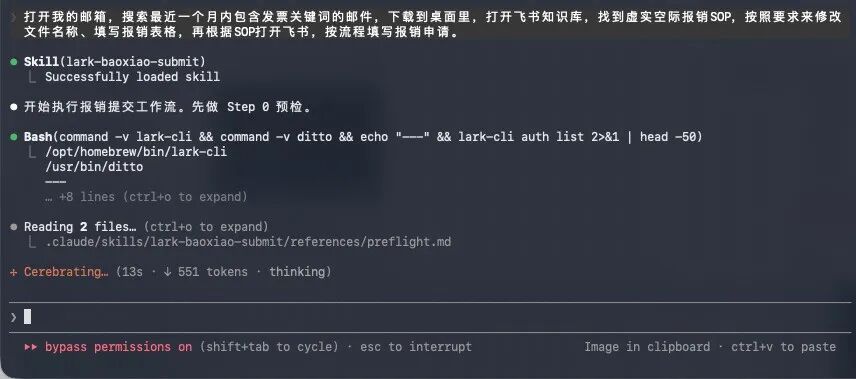
The entire expense process, from invoice organization to completed approval, happens in conversation with Claude Code — Feishu never needs to be opened. Swap the template and the same flow works for travel requests, purchase requests, and more.
Wrapping Up
The common thread across these 5 plays: no API knowledge, no code — natural language plus the Feishu CLI is all it takes. The Feishu CLI is now open source, covering 114 capabilities and still growing. For companies whose collaboration runs deeply on Feishu, this may be the most efficient agent setup for office work available today.
Toolin Editorial Team
Categories
Related articles

Doubao Pro Goes Paid: A Breakdown of the Three Tiers — and Whether They're Worth It
Doubao Pro has launched in three tiers at 68 / 200 / 500 RMB, built around an Office Task Mode powered by Doubao 2.1 Pro. This piece breaks down the pricing, the quotas, and the value.
Codex Security Plugin: Scan Your Code for Vulnerabilities in One Click with OpenAI
OpenAI's Codex Security plugin scans your code for vulnerabilities inside Codex, verifies exploitability, and proposes fixes — with a complete getting-started walkthrough.

Seedream 5.0 Pro: ByteDance's Most Powerful Image Model, Now Live via API
ByteDance's Seedream 5.0 Pro image model is now available on Volcano Engine's API, headlining precise local editing, native text rendering in 14 languages, and layer separation.
Baidu Open-Sources Unlimited OCR: An Entire Book in One Pass with 32K Context
Baidu has open-sourced Unlimited OCR, which builds on DeepSeek OCR with an R-SWA attention mechanism, letting the model parse dozens of pages in a single forward pass within a 32K standard context — scoring 93.23% end-to-end SOTA on OmniDocBench v1.5.
Doubao Audio Generation Model 1.0: Film-Grade Audio Straight from One Prompt
Volcano Engine has released Doubao-Seed-Audio 1.0, packing dialogue, score, sound effects, and ambience into a single Prompt delivered in one pass — with multi-character dialogue, 2-minute long-form consistency, and reference-voice continuation, it's being called the speech model's Seedance moment.

FineVLA: Which Hand, Where to Grasp — One Sentence Sets It All
HKU's XLANG Lab and Alibaba's Qwen team have open-sourced FineVLA, a framework that refines language supervision in robot policy learning from "what to do" to "how to do it," reaching 86.8% success in RoboTwin simulation (+15) and 62.7/100 on a real dual-arm robot, with code, models, and benchmark all open-sourced.