
A Practical Guide to Claude Code in Large Codebases
Translated from Anthropic's official documentation: how Claude Code works in million-line codebases, how to configure the five extension points, and three deployment patterns that succeed.
A Practical Guide to Claude Code in Large Codebases
Translated from Anthropic's official documentation: how Claude Code works in million-line codebases, how to configure the five extension points, and three deployment patterns that succeed.
Claude Code has proven itself in monorepos with millions of lines of code, legacy systems decades old, and microservice architectures spanning dozens of repositories. This guide is translated from Anthropic's official documentation and summarizes the hands-on patterns that get the most out of Claude Code in large codebases.
How Claude Code Navigates a Large Codebase
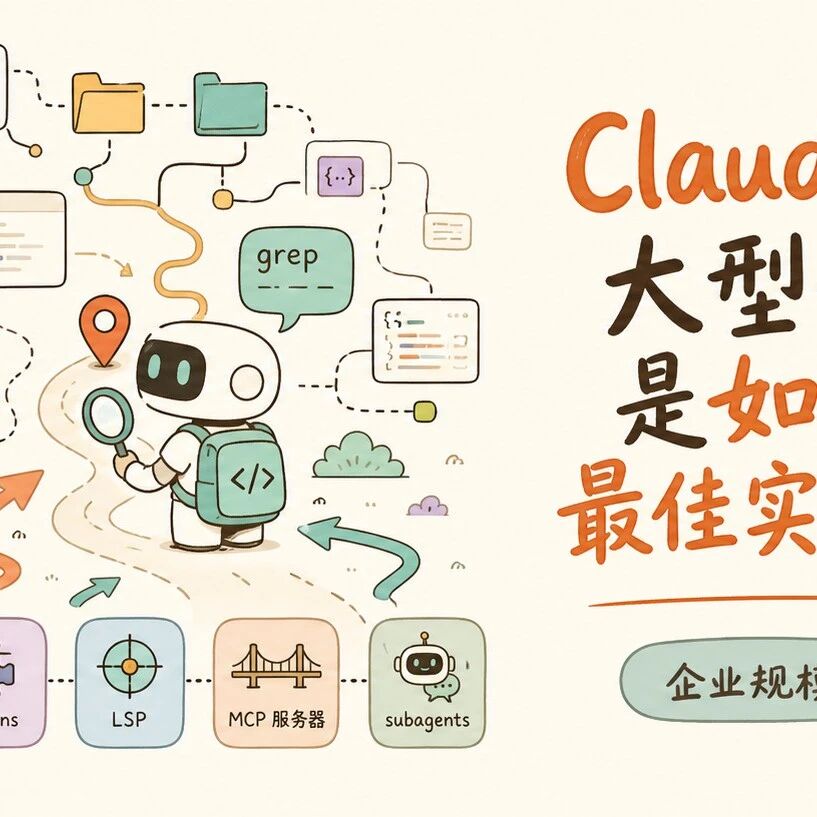
Claude Code explores a codebase the way an experienced engineer does: moving through the file system, reading file contents, using grep to zero in precisely, and tracing references. It runs directly on your local machine, with no pre-built codebase index and no need to upload code to the cloud.
Traditional RAG-based AI coding tools embed code into vectors and then retrieve it, but on a huge codebase the embeddings cannot keep up with the commit pace, and retrieval may surface functions that have since been renamed or modules that were deleted. Claude Code's agentic search sidesteps this problem, at the cost of needing enough "initial context" to navigate efficiently.
Five Extension Points: The Infrastructure Matters More Than the Model
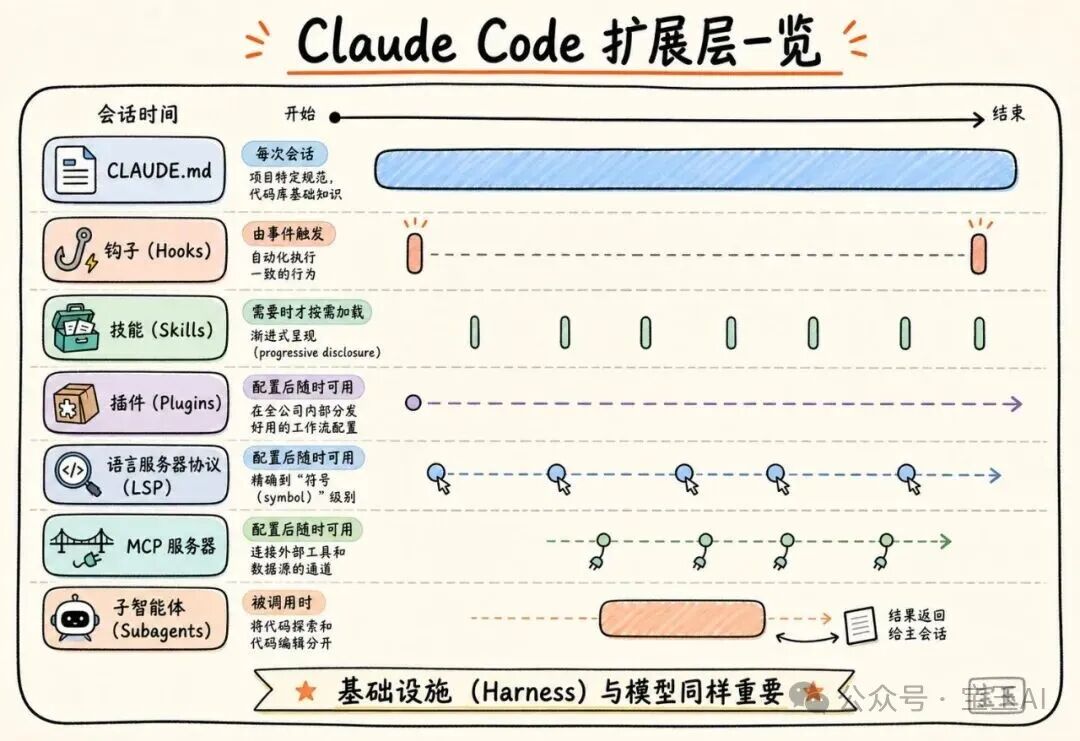
The infrastructure (harness) built around the model plays a far more decisive role in final performance than the model itself. That infrastructure consists of five extension points, and the order you build them in matters a great deal, because each layer builds on the one before it.
Layer 1: CLAUDE.md Files
CLAUDE.md is a context file Claude automatically reads at the start of every session. The file at the root covers global concerns; files in subdirectories cover local conventions.
Key principle: keep it lean. Because these files get loaded every single time, keep only the most broadly applicable information. Do not stuff in reusable expertise that belongs in a skill.
Layer 2: Hooks
Hooks give the whole setup the ability to evolve itself. Most teams think of hooks as scripts that stop Claude from making mistakes, but their more important value is continuous improvement:
- Stop hook: reflects on what just happened at the end of a session and suggests CLAUDE.md updates
- Start hook: dynamically loads a specific team's context
For automated work like linting and formatting, hooks are far more dependable than relying on Claude to remember instructions.
Layer 3: Skills
Skills resolve a core tension: not every task needs all the expert knowledge loaded. Through progressive disclosure, skills package that knowledge separately and load it only when a task calls for it.
Skills can also be bound to specific paths. For example, the payments team binds its "deployment skill" to the payments directory, so it does not auto-load when working in other directories.
Layer 4: Plugins
Plugins bundle skills, hooks, and MCP configuration into a single installable unit. A newly hired engineer installs the plugin on day one and immediately has the same contextual knowledge as the veterans. Enterprises can distribute updates through an internal marketplace.
Layer 5: MCP Servers
MCP servers are Claude's channel into internal tools, data sources, and APIs. The most hardcore teams wrap structured search into a tool and let Claude call it directly through MCP.
Two Extra Capabilities
- LSP integration: gives Claude symbol-level code navigation (jump to definition, find all references). For polyglot codebases, this is one of the highest-value investments available.
- Subagents: independent Claude instances that handle exploring and recon, after which the main agent makes global edits based on the results. It separates "exploring" from "editing."
Extension Point Cheat Sheet
| Component | When it loads | Best for | Common pitfall |
|---|---|---|---|
| CLAUDE.md | Every session | Project conventions, codebase fundamentals | Stuffing in content that belongs in a skill |
| Hooks | Event-triggered | Automated execution, capturing lessons learned | Using prompts instead of scripts |
| Skills | On demand | Reusable expert knowledge | Cramming everything into CLAUDE.md |
| Plugins | Available once configured | Distributing workflow config company-wide | Great configs that never get shared |
| LSP | Available once configured | Precise symbol-level navigation | Assuming it works out of the box |
| MCP servers | Available once configured | Connecting internal tools | Rushing to build MCP before the basics are solid |
| Subagents | On invocation | Separating code exploration from editing | Exploring and editing in the same session |
Three Successful Deployment Patterns
Pattern 1: Make the Codebase Easy to Navigate
This is the most fundamental and most important pattern:
- Keep CLAUDE.md lean and layered: the root file holds only core guidance and the absolute landmines to avoid
- Initialize in a subdirectory, not the root: Claude automatically climbs the directory tree and reads every CLAUDE.md along the way
- Keep test and lint commands scoped to the subdirectory level: avoid editing one microservice and running the whole project's tests
- Use
.ignorefiles to hide generated files and third-party code: commitpermissions.denyrules in.claude/settings.json - Build a "map" of the codebase: create a lightweight Markdown file at the root listing what each top-level folder is for
- Run LSP servers: let Claude search by "symbol" rather than by "string"
Pattern 2: Keep CLAUDE.md Updated
As models evolve, rules written for older models can become shackles for newer ones. Audit your configuration every 3-6 months, and re-review it after major model releases.
Pattern 3: Assign a Dedicated Owner
Technical configuration alone will not drive broad adoption. Organizations that succeed invest real effort on the management side:
- Dedicate people to building the infrastructure before opening up access broadly
- Appoint a DRI (Directly Responsible Individual) to own Claude Code configuration, permission policies, and plugins
- Form a cross-functional working group (engineering, security, compliance) to define requirements and set a rollout roadmap
Key Reference Links
- CLAUDE.md docs: https://code.claude.com/docs/en/memory
- Hooks guide: https://code.claude.com/docs/en/hooks-guide
- Skills docs: https://code.claude.com/docs/en/skills
- Plugins docs: https://code.claude.com/docs/en/plugins
- LSP code intelligence plugin: https://code.claude.com/docs/en/discover-plugins#code-intelligence
- Subagents: https://code.claude.com/docs/en/sub-agents
Toolin Editorial Team
Categories
Related articles

Ruoyu Lanyue 01: The World's First AI Explosion-Proof Robot Fuels Real Cars by Itself
Driven by the Ruoyu Jiutian robot brain, the explosion-proof Lanyue 01 robot autonomously runs the full workflow at gas stations 24/7 — opening the fuel door, grabbing the nozzle, fueling, returning the nozzle — bringing embodied intelligence into high-risk environments.
TRIAD: Teaching AI Agents Not Just to Refuse, but to Repair Dangerous Plans
The open-source Agent safety framework TRIAD replaces binary guardrails with three-way decisions (proceed/update/refuse), preserving the user's original task even under prompt injection attacks.

Volcano Engine's Full Agent Infra Upgrade: The 1+N+X System, AgentKit, and ArkClaw Enterprise
From the Seedance 2.0 moment to enterprise-grade Agent infrastructure, Volcano Engine uses the 1+N+X system, AgentKit, and ArkClaw Enterprise to move Agents from personal tools into organizational workflows for real.
Baidu DuMate Hands-On Guide: A Homegrown Codex That Lets You Run Office Work by Voice
From installation to automation, a complete breakdown of Baidu DuMate's request -> authorize -> execute -> deliver pipeline: cross-app work, scheduled tasks, and the credits bill, all explained in one article.
DeNovoSWE: The First Long-Horizon Doc2Repo Training Set That Teaches Code Agents to Build Repositories
Renmin University of China releases an open training set of 4818 real task instances targeting repository-level code generation, lifting Qwen3-30B's pass rate from 5.8% to 47.2%.
Google Workspace CLI: One Command Lets AI Agents Take Over Your Mail, Drive, and Calendar
An open-source CLI with nearly 30K stars wraps Gmail, Drive, Calendar, and Sheets into one unified interface, ships 100+ Agent Skills built in, and works for humans and AI alike.