
Hands-On Tutorial: Edit Exactly Where You Point! Make Local Edits to 3D Models with Hyper3D Edit
A step-by-step guide to Hyper3D Edit: use natural language and box selections to make precise local edits to 3D models while preserving the original details.

Hands-On Tutorial: Edit Exactly Where You Point! Make Local Edits to 3D Models with Hyper3D Edit
A step-by-step guide to Hyper3D Edit: use natural language and box selections to make precise local edits to 3D models while preserving the original details.
💡 Tutorial Goal
Solve the classic pain point of 3D model generation where "change one thing and the whole model changes". Learn how to modify only the parts you are unhappy with (such as thickening the shoulder armor or reshaping the tail) while perfectly preserving all the other details you like.
🛠️ What You Need
- Tool: Hyper3D.AI
- Feature: Hyper3D Edit
- Cost: Credit-based (uses fewer credits than regenerating the whole model)
🚀 Step-by-Step Walkthrough
Step 1: Get a Base Model
You can generate an initial model with Hyper3D's text-to-3D feature, or import a third-party model (formats such as obj and fbx are supported).
💡 Tips: It's fine if only part of the model looks good; we can refine it step by step afterwards.
Step 2: Select the Area to Modify
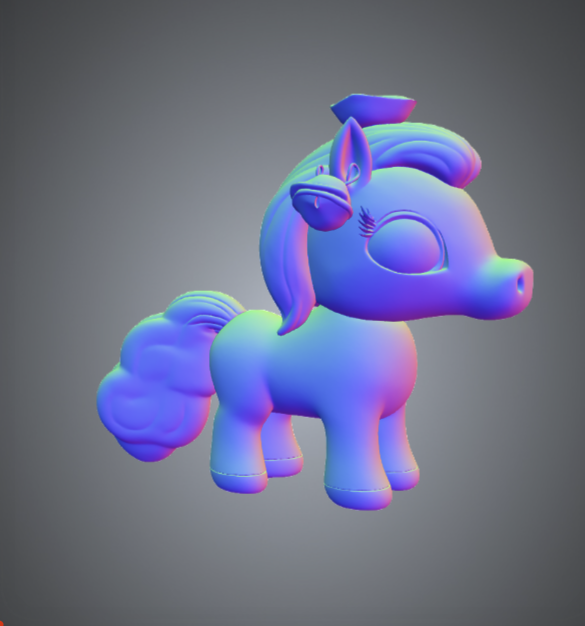
In the Hyper3D Edit interface, use the cube selection tool to box-select the specific part you want to change. For example, we want to add bells to the pony's ears.

Step 3: Enter the Modification Prompt
In the input box below, describe the change you want in natural language. It's best to modify only one specific element at a time.
Prompt example:
Attach a shiny gold bell to each ear of the horse... (add a shiny gold bell to each of the horse's ears...)
Step 4: Iterate on the Edits
The AI will generate a preview. If you are not satisfied, you can redo it. Once satisfied, you can continue modifying other parts. For example, change the horse's tail into the shape of an auspicious cloud.
🎯 Advanced Case: Stylized Rework
Beyond adding elements, you can also perform style transfer. For example, turn the front half of a sports car into a chibi cartoon style.
How to do it: Select the front section of the car and enter a prompt asking for "chibi cartoon style, short and bulbous nose...".
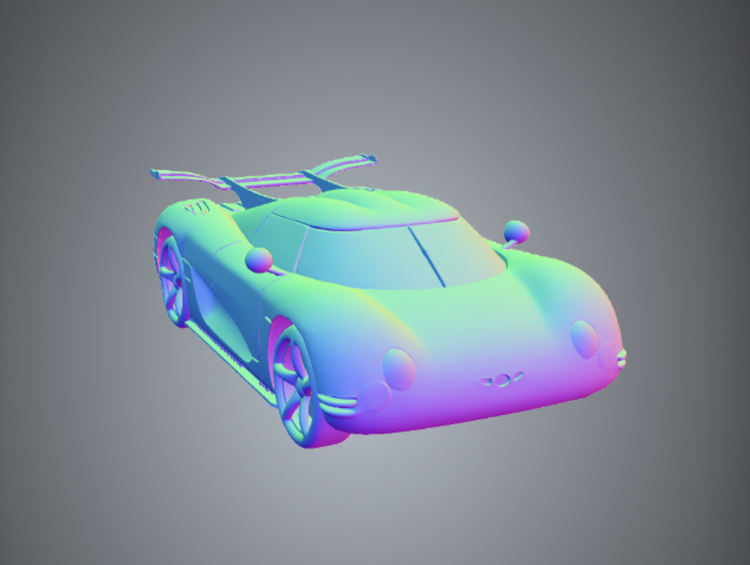
As you can see, the front of the car has become a rounded, toy-like design while the rear stays exactly as it was. Hyper3D Edit turns the creative process into controlled, step-by-step iteration rather than a gacha-style gamble.
🔗 Link
Related articles
ARS: Run the Full Paper-Writing Pipeline with Claude Code
The open-source project academic-research-skills ships 4 skills covering research, writing, review, and finalization, with built-in citation verification and anti-sycophancy mechanisms — a 15,000-word paper costs about $4-6.

A Practical Guide to Claude Code in Large Codebases
Translated from Anthropic's official documentation: how Claude Code works in million-line codebases, how to configure the five extension points, and three deployment patterns that succeed.