
LibTV Launches a Skill Store: 100+ Director-Grade Skills That Let Agents Shoot Video Autonomously
LibTV, LiblibAI's professional AI video platform, has launched the world's largest video Agent Skill Hub, packaging 100+ director-grade Skills for agent invocation — from script to finished film in a single sentence.
LibTV Launches a Skill Store: 100+ Director-Grade Skills That Let Agents Shoot Video Autonomously
LibTV, LiblibAI's professional AI video platform, has launched the world's largest video Agent Skill Hub, packaging 100+ director-grade Skills for agent invocation — from script to finished film in a single sentence.
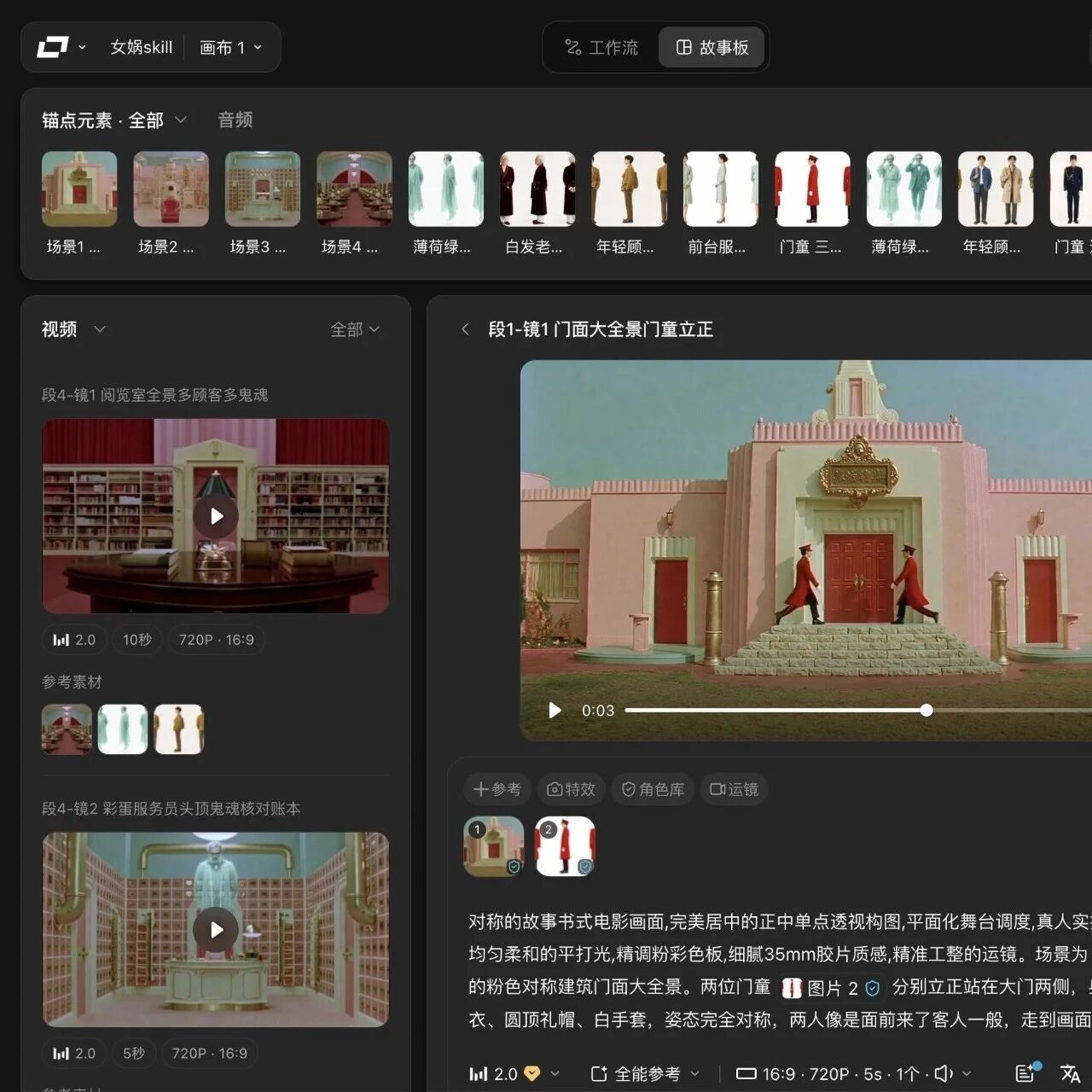
If you want an AI agent to turn a text script into a deliverable video short, the traditional approach is having the agent stitch together "text-to-image → image-to-video → voiceover → editing" step by step, while handling character consistency, shot transitions, and pacing yourself. On July 14, LiblibAI turned that whole job into a "Skill store" — LibTV Agent officially launched, debuting 100+ director-grade Skills that package complete creative methodologies, covering six major scenarios: professional film/TV, commercial advertising, short dramas and animated series, anime and games, music MVs, and self-media. QbitAI and TMTPost have called it "the world's largest professional video Agent Skill Hub."
This tutorial clarifies two things: what the Skill store actually packages, and how to hook it into your own agent workflow to run an end-to-end "script → finished film" pipeline.
What Problem It Solves
LibTV itself is an infinite-canvas AI video platform for professional creators (site at liblib.tv), supporting the full chain of script, storyboard, image, video, and audio. It composes multiple models through node wiring and has been used to produce shorts longer than 5 minutes. But a node canvas is unfriendly to both ordinary users and agents — humans find it complicated, and agents can't operate it reliably.
The core idea of the Skill store: package the workflows professional creators have repeatedly validated on the canvas into individually callable Skills, where each Skill corresponds to a professional creative method rather than a prompt template. The same product now has two entrances — humans keep using the canvas for fine-grained control, while agents call Skills directly for full automation.
What's in the Skill Store
Per QbitAI and TMTPost coverage, the first Skill Hub distills the experience of 200+ professional creators into 100+ callable Skills across six major scenarios:
- Professional film/TV: cinematic narrative direction, feature-film shot language
- Commercial advertising: brand ads, e-commerce marketing spots
- Short dramas / animated series: serialized plots, character consistency
- Anime and games: 2D anime aesthetics, character design
- Music MVs: beat-matched cutting, visual expression
- Self-media: talking-head delivery, image-text-to-video
Each Skill has visual style, narrative pacing, and shot-transition logic built in. With a single Access grant, an agent can invoke the full capability set — no more worrying about which model to pick or what parameters to tune.
Which Underlying Models Are Integrated
Behind the Skill store sits LibTV's platform model pool. Per the official GitHub README and the Skill package notes on ClawHub, supported models currently include:
- Video: Seedance 2.0, Kling 3.0 / O3, Wan 2.6, Nano Banana
- Image: Midjourney, Seedream 5.0, Lib Nano Pro
- Storyboarding and understanding: GVLM 3.1 (used to auto-generate professional storyboard sheets)
Using characters, objects, and scenes as "anchors" for consistency is the key to LibTV's ability to produce long films reliably; Skill calls reuse this mechanism automatically.
Step 1: Get an Access Grant from LibTV
To hand this to an agent, you first need a grant that can call the OpenAPI.
- Open liblib.tv and register an account.
- Find the OpenAPI / Access Token entry in the account console and generate an Access grant.
- Keep the grant safe — whether you use the CLI or the Skill packages later, this one credential is all you need.
Tip: Officials state plainly that "an agent with one Access grant can invoke the full capability set" — no per-Skill applications needed.
Step 2: Choose an Integration Path
LibTV offers three mainstream integration paths for agents; pick one based on your agent runtime.
Option A: Official Skill Packages (GitHub)
The official repository libtv-labs/libtv-skills is a set of skill packages for AI agents, providing AIGC capabilities such as AI image generation and AI video generation through LibLib.tv's OpenAPI. Through these Skills an agent can create sessions, send creative instructions, and orchestrate workflows automatically. Suited to self-built agents and runtimes like Claude Code and Cursor that can load local Skill packages.
Option B: LibTV Skill Pro on ClawHub
The community-maintained advanced Skill package Qiuxiangxiang/libtv-skill-pro is distributed through ClawHub and supports explicitly specifying models and parameters (aspect ratio, resolution, duration), covering Seedance 2.0 / Kling 3.0 O3 / Wan 2.6 / Nano Banana / Midjourney / Seedream 5.0 / GVLM 3.1 and more. Suited to loading in agent runtimes like OpenClaw, Claude Code, and Cursor.
Option C: One-Line CLI into the Workflow
If you would rather not manage Skill packages by hand, the official CLI is the easiest route. Open liblib.tv/zh/cli and follow the prompts to wire LibTV into your agent workflow. The official compatibility list includes:
- Kimi Code / Claw
- MiniMax Agent
- Trae
- Tongyi Lingma
- Baidu Comate
- Tencent Cloud Code Assistant
Step 3: Run an End-to-End "Script to Finished Film" Pipeline
Using OpenClaw as an example, here is the shortest viable pipeline:
- Load the Skills: add
libtv-skillsorlibtv-skill-proto your agent configuration. - Feed in the script: give the agent your text script or one-line request, and have it invoke the
agent-imsession skill to start a creation session. - Pick a creative method: let the agent automatically choose a suitable director-grade Skill from the store based on content (the short-drama Skill for a short drama, the MV Skill for an MV).
- Automatic orchestration: the Skill automatically runs storyboarding (GVLM 3.1) → image / video generation (Seedance 2.0 / Kling 3.0) → voiceover → editing, all on LibTV's node canvas.
- Collect the result: the finished film can be previewed and downloaded directly on the LibTV platform, and the agent gets the link back.
Tip: If you are not happy with a generated cut, have the agent adjust a Skill's parameters (duration, aspect ratio, for instance) instead of rebuilding the whole workflow.
Who It Suits
- AI content studios: distill the team's creative methodology into Skills and have agents reuse them at scale.
- Agent developers: give your agent out-of-the-box professional video capability and skip the engineering of integrating five or six models yourself.
- Self-media creators and brands: produce videos with "one sentence + pick a Skill," no need to learn the node canvas.
FAQ
- Does the Skill store cost extra?: The official wording is "one Access grant invokes the full capability set"; actual billing defers to the credit policy on your LibTV platform account page.
- How long can videos be?: The LibTV platform supports films longer than 5 minutes; per-call duration depends on the chosen model's single-generation cap and the Skill's orchestration strategy.
- Do you have to use OpenClaw?: No. Any agent runtime that can load Skill packages or call HTTP APIs can integrate; the CLI route also supports mainstream tools like Kimi, MiniMax, and Trae.
References
- Official site: liblib.tv
- Official Skill package: github.com/libtv-labs/libtv-skills
- Advanced Skill package: github.com/Qiuxiangxiang/libtv-skill-pro
- QbitAI coverage: 100+ director-grade experts on call at any time
- TMTPost coverage: LibTV packs 100+ AI video tricks into the world's largest Skill store