
Neat.Skill: An Open-Source Tool That Makes AI Agents Smarter the More You Use Them
An open-source Agent documentation maintenance tool that automatically reviews and iteratively updates a project's documentation system, supporting four platforms: Claude Code, Codex, OpenCode, and OpenClaw.
Neat.Skill: An Open-Source Tool That Makes AI Agents Smarter the More You Use Them
An open-source Agent documentation maintenance tool that automatically reviews and iteratively updates a project's documentation system, supporting four platforms: Claude Code, Codex, OpenCode, and OpenClaw.
Developers who build projects with Claude Code or Codex have most likely run into this problem: the code has gone through seven or eight rounds of iteration and countless new features have shipped, but the project documentation is still stuck at the original 1.0 version. The Agent seems to get dumber the more you use it -- the root cause is not a weak model, but rotted context. The open-source tool "Neat.Skill" targets exactly this pain point: run /neat once after finishing each task, and it automatically reviews and updates the project's entire documentation system.
Where the Problem Lies
An Agent's context has three layers, and a problem in any one of them will make the AI make mistakes:
- Memory system: past chat history and the project's tacit knowledge
- CLAUDE.md: project conventions, structure, red lines, routing lists (for the AI to read)
- docs/ directory and README: onboarding guides, architecture notes, ops manuals (for humans to read)
A typical failure scenario: you migrated the database from SQLite to PostgreSQL but forgot to update CLAUDE.md. The next time you build a new feature, Claude is still writing SQLite syntax. You think the model is dumb -- in fact, the documentation has expired.
A stale memory is worse than no memory at all. With no memory, the AI at least knows that it doesn't know. But once it reads a stale piece of information, it assumes it is correct and acts on a false premise.
What Neat.Skill Does
Every time you run /neat, it does five things in order:
Step 1: Forced inventory
It lists every md file in the project and reads each one through, preventing key documents from being missed.
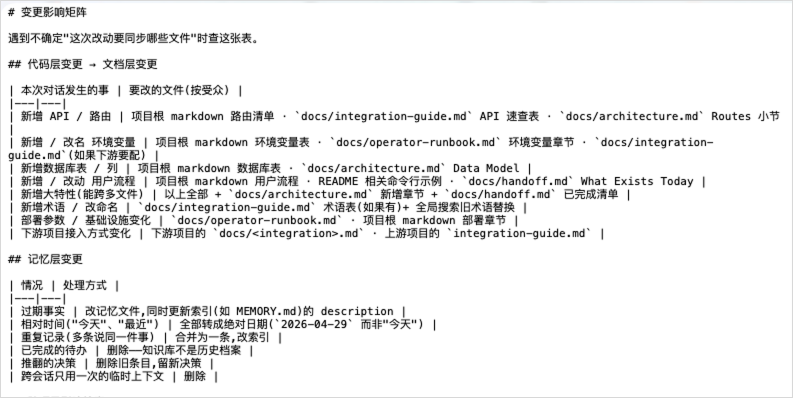
Step 2: Change impact matrix
It does not just look at what new facts appeared in the conversation -- it also looks at which documentation layers those facts ripple into. There is one crucial check as well: is this change cross-project? If you changed project A and project B depends on it, project B's docs must change too.
Step 3: Edit in order
First docs/, then CLAUDE.md, and finally tidy the memory. The order matters, because the edits themselves set off chain reactions.
Step 4: Self-check list
It checks whether newly added environment variables appear in both the runbook and CLAUDE.md, whether relative-time references were left behind, and similar issues.
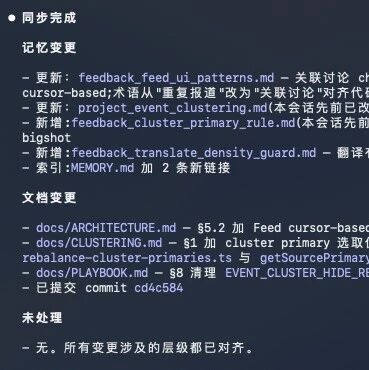
Step 5: Output a change summary
It tells you what was changed, what was deleted, and what was merged this time.
Core Principle
Neat.Skill's design philosophy is a single line: merging beats appending, and deleting beats keeping.
In AI collaboration, having more information is not the advantage -- having accurate information is. Delete what is stale, merge what is duplicated, clarify what is vague. Keep your knowledge base holding only the most accurate truth as of this moment.
Installation and Usage
Open source: github.com/KKKKhazix/khazix-skills
Supported platforms:
- Claude Code
- OpenAI Codex
- OpenCode
- OpenClaw
How to use it:
The simplest way is to type /neat after finishing a task, or just say in natural language "give it a review" or "tidy it up".
Recommended cadence:
- After completing a feature or fixing a bug, run
/neat - Check the change summary output and confirm the edits match expectations
- When the conversation context reaches around 400K, run
/neatto archive, then open a new window and continue
Recommended Workflow
Treat /neat like a game's "save" mechanic:
Start a new conversation -> finish the task -> /neat save -> close the conversation -> open a new conversation and continueThe benefit of working this way: conversations can be closed at any time, but the documentation is always there. A new session needs no warm-up at all -- the Agent can start working immediately from accurate, documented context.
Related articles

TRAE SOLO Mobile Getting Started Guide
ByteDance's TRAE SOLO mobile app is now fully open with three-way sync across devices—direct AI Agents from your phone for data analysis, document generation, and automated tasks
Video-to-Blog: Rebuilding Karpathy's Workflow with Agents and Multimodal Models
A four-step workflow that turns videos into illustrated blog posts automatically, pairing the Doubao Seed 2.0 Lite omnimodal model with an Agent — solving the visual information lost by traditional ASR+LLM pipelines.

How to Choose an AI Image Model: A Style Comparison of Image-2, Doubao, and Kling
The same prompt fed to different AI image models produces wildly different styles. This article compares the visual traits of Image-2, Nano Banana 2, Doubao/Jimeng, and Kling to help you pick the right model fast.

DeepSeek-TUI: A DeepSeek Coding Agent in the Terminal
DeepSeek-TUI, with 2.3k GitHub stars, is a terminal coding tool written in Rust. Optimized for DeepSeek V4, it supports a 1M-token context, parallel sub-agents, and three operation modes.
Convert GPT-image-2 Images to PSD in One Click: An Open-Source Skill Put to the Test
Use the open-source bggg-creator-image2psd Skill to split GPT-image-2's merged images into 12 editable PSD layers, with text and graphics layered automatically and no ghosting.