
OpenCLI: The Open-Source Tool That Turns the Entire Web into a Command Line
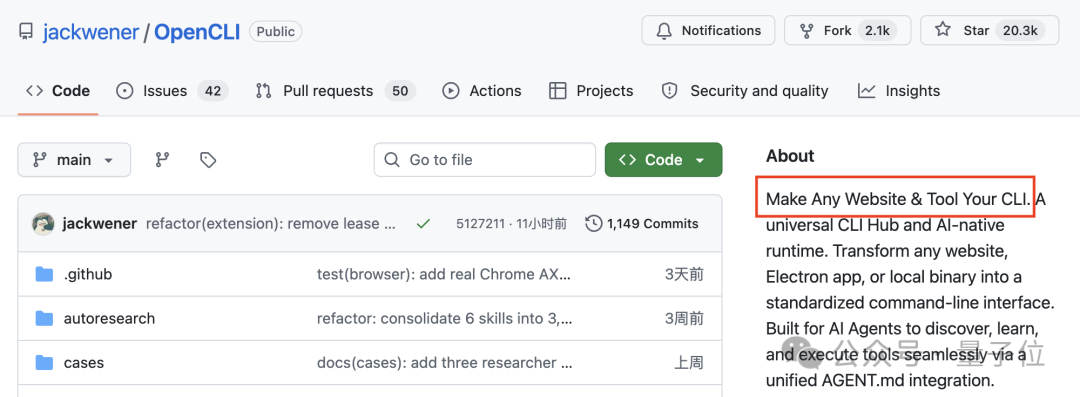
OpenCLI, a 20k-star GitHub open-source project, turns 100+ websites plus private data from WeChat, Feishu, and more into command-line operations, executed in your local browser with zero token consumption.

OpenCLI: The Open-Source Tool That Turns the Entire Web into a Command Line
OpenCLI, a 20k-star GitHub open-source project, turns 100+ websites plus private data from WeChat, Feishu, and more into command-line operations, executed in your local browser with zero token consumption.
Every time you ask an AI to read information from an external website, the reply is always "Sorry, I can't directly access those sites". OpenCLI is an open-source command-line tool built to solve exactly this problem; it has already accumulated 20k+ stars on GitHub.
Its core idea is simple: turn everything you normally do in a browser into one-line commands in the terminal. What's more, the commands execute directly in your local browser without going through LLM inference, so you can run them as many times as you like without spending a single token.
What Is OpenCLI
OpenCLI is an open-source command-line toolkit with 100+ built-in site adapters, covering mainstream platforms such as Xiaohongshu, Bilibili, Zhihu, Douban, Hupu, Reddit, HackerNews, and Google Scholar. Beyond web data, it can also tap private chat and office data from WeChat, Telegram, Discord, Feishu, WeCom, DingTalk, and more.
Project URL: https://github.com/jackwener/OpenCLI
Core Features
Scrape the Whole Web with One Command
No need to manually copy cookies or assemble request headers — OpenCLI directly reuses your Chrome login state:
# Search Zhihu
opencli zhihu search "AI Agent"

# Download a Zhihu article
opencli zhihu download --url "article URL" --output ./zhihu

# See what Reddit is discussing
opencli reddit search "AI"

# See Bilibili trending
opencli bilibili trending
Output formats include JSON, CSV, and Markdown, making it easy to feed results straight into a knowledge base or a data-analysis pipeline.
Unified Access to Private Chat Logs
OpenCLI unifies chat logs from WeChat, Telegram, and Discord under command-line access:
# Search WeChat chat logs
opencli wx search "keyword"

# Search Telegram messages
opencli tg search "keyword"

# Check recent Discord messages
opencli discord recent
WeChat uses the separate wx-cli tool; the install command:
npm install -g @jackwener/wx-cliFirst use requires wx init to initialize (sudo wx init on macOS); it automatically detects the WeChat data directory and scans the database key from memory. After that, wx session pulls the conversation list and wx history searches past messages.
Chat log output supports JSON and CSV and can plug into knowledge-management tools like Obsidian, turning fragments scattered across apps into a continuously updated personal information stream.
The Full Office Suite
opencli lark-clicovers 200+ Feishu commands (messages, docs, calendar, tasks)opencli wecom-climanages WeComopencli dwsmanages DingTalk
Desktop App Automation
Via the CDP protocol, OpenCLI can directly drive Electron desktop apps: Cursor, the ChatGPT macOS app, Notion, the Discord desktop client, and more — no manual mouse clicking needed.
Quick Start
Installation
Requires Node.js 21+; one command does it:
npm install -g @jackwener/opencliAfter installing, run opencli list to see every available command.
Install the Chrome Extension
Download the OpenCLI extension from the Chrome Web Store and enable developer mode. No manual cookie configuration needed — OpenCLI reuses your Chrome login state directly.
Your Site Isn't Supported?
With the opencli-adapter-author skill, an agent can write adapters for you automatically:
npx skills add jackwener/opencli --skill opencli-adapter-authorThere is also a community plugin system: opencli plugin install installs adapters others have written with a single command.
The Secret to Zero Token Consumption
The biggest difference between OpenCLI and "letting an LLM operate the browser itself" is that CLI commands execute directly in your local browser without passing through LLM inference. The same command yields consistently structured results — pipeable, scriptable, and CI/CD-friendly.
Essentially, it pulls browser automation back from AI inference to system calls.

Who It's For
- Content creators: batch-download assets, scrape comment data, analyze audience profiles
- E-commerce practitioners: export customer-service chat logs in one click, archive user feedback in bulk
- Developers: wire website data into automation pipelines, CI/CD-script friendly
- Data analysts: unified multi-platform data collection, structured output straight into your database
Note: OpenCLI as an open-source project provides tools and ideas; actually accessing and deploying private data is a personal matter — assess compliance risks and privacy boundaries before use.
Toolin Editorial Team
Categories
Related articles

Mashangfei: Open an AI Shop in 30 Seconds and Run a Full Vibe Business
Mashangfei generates a complete business system from natural language, covering the full chain of product creation, promotional customer acquisition, and AI customer service. It includes 200 yuan in trial-operation credit, suited to one-person companies closing the business loop fast.

GitHub Cuts Agent Token Costs 62% with Daily Audits
GitHub's gh-aw CLI tool builds an audit-optimize loop through daily token audits and MCP pruning; the Auto-Triage task has sustained a 62% reduction in equivalent token cost.
PawBench: An Open-Source Agent Benchmark with 4050 Test Cells to Help You Pick Models and Frameworks
PawBench v1.0 builds an agent evaluation set of 150 tasks and 4050 test cells, putting base models and runtime harnesses into the same system to help you find the best model + harness combination.

Codex from Install to Real-World Use: A Complete Beginner's Guide for Non-Programmers
A step-by-step tutorial for mastering the OpenAI Codex desktop app from scratch, covering installation and setup, a tour of the interface, creating projects, using skills and plugins, and remote control from your phone.

Coze 3.0: Put a Team of AI Agents to Work for You
Coze 3.0 is officially out, with multi-agent collaboration, remote control of your computer from your phone, one-click import of local agents, and the ability to turn a story idea straight into video.
Kimi Work Beta: From an Agent That Writes Code to an Agent That Does Work
Moonshot AI launches Kimi Work Beta, a general-purpose local agent for knowledge workers supporting 300 sub-agents in parallel, 13-hour long-running tasks, browser control, and skill installation.