
ToolCUA: Teaching Agents to Route Correctly Between GUI and Tools
An open-source CUA training paradigm from Fudan University and Tongyi's MobileAgent team: an 8B model hits 46.85% accuracy on OSWorld-MCP, surpassing Claude-4-Sonnet, with code and model weights open-sourced.
ToolCUA: Teaching Agents to Route Correctly Between GUI and Tools
An open-source CUA training paradigm from Fudan University and Tongyi's MobileAgent team: an 8B model hits 46.85% accuracy on OSWorld-MCP, surpassing Claude-4-Sonnet, with code and model weights open-sourced.
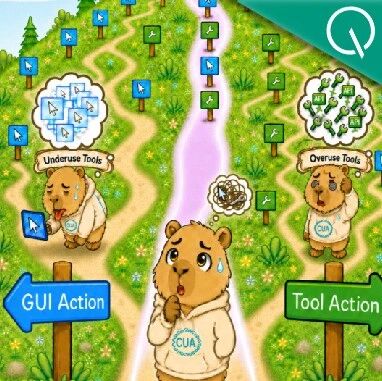
Give an agent both GUI operations and tool calls, and accuracy actually drops — it calls an API when it should click a button, then grinds away at menus when it should call the API, thrashing between the two. ToolCUA, jointly open-sourced by Fudan University and the MobileAgent team at Tongyi Lab, exists to solve exactly this: teaching the model when to go through the GUI, when to switch to tools, and when not to call tools at all.
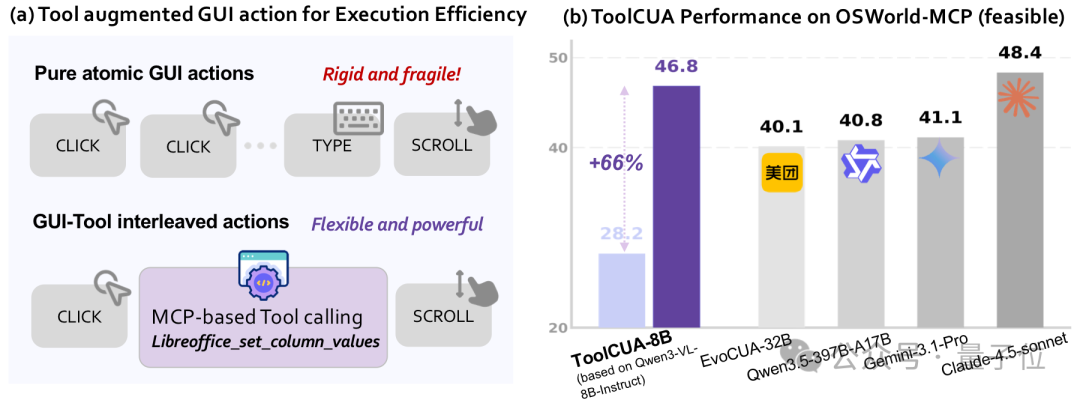
ToolCUA-8B scores 46.85% accuracy on OSWorld-MCP, beating Claude-4-Sonnet's 43.54% and closing in on Claude-4.5-Sonnet's 48.35%. Code and model weights are fully open-sourced.
The Problem: Path Confusion in a Mixed Action Space
Traditional CUAs (Computer Use Agents) rely mainly on GUI operations — clicking, typing, dragging, scrolling. That generalizes well, but the sequences are long and errors compound. Tool calls are often more efficient and precise — batch-processing a spreadsheet in LibreOffice, for instance, where one API call can replace a long chain of menu clicks.
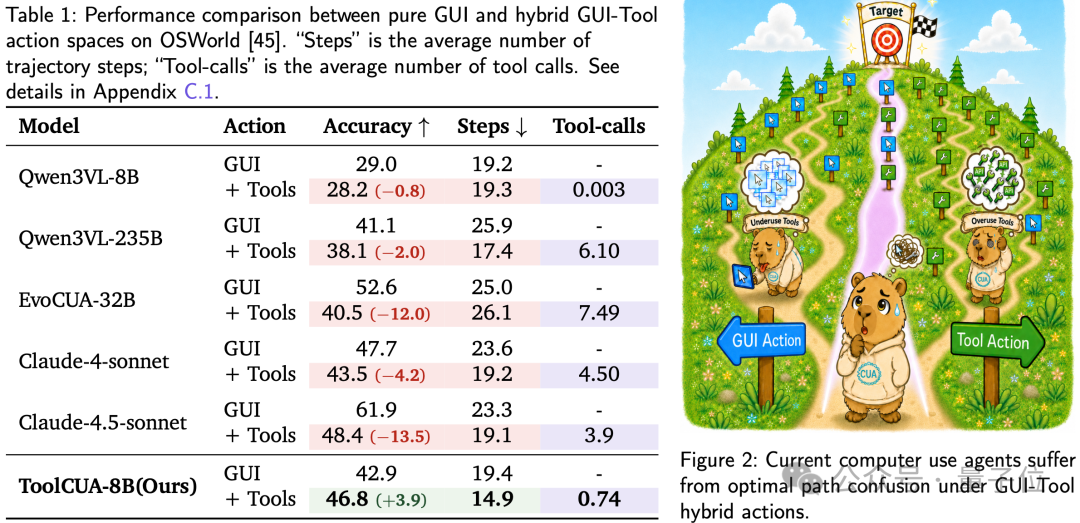
The seemingly natural solution is to give the agent both GUI and Tool. But experiments revealed a counterintuitive fact:
| Model | Accuracy without tools | Accuracy with tools | Change |
|---|---|---|---|
| Qwen3VL-8B | 29.0% | 28.2% | -0.8% |
| Qwen3VL-235B | 41.1% | 38.1% | -3.0% |
| Claude-4-Sonnet | 47.7% | 43.5% | -4.2% |
| Claude-4.5-Sonnet | 61.9% | 48.4% | -13.5% |
The stronger the model, the worse the drop after adding tools. Claude-4.5-Sonnet loses a full 13.5 percentage points. The problem is not whether tools exist — it is that the model cannot route between GUI and Tool.
A Two-Stage Training Recipe
Stage 1: Data Synthesis and Tool-Bootstrapped RFT
High-quality interleaved GUI-Tool trajectory data is extremely scarce. ToolCUA's answer: put existing GUI-only data to work and automatically synthesize mixed trajectories.
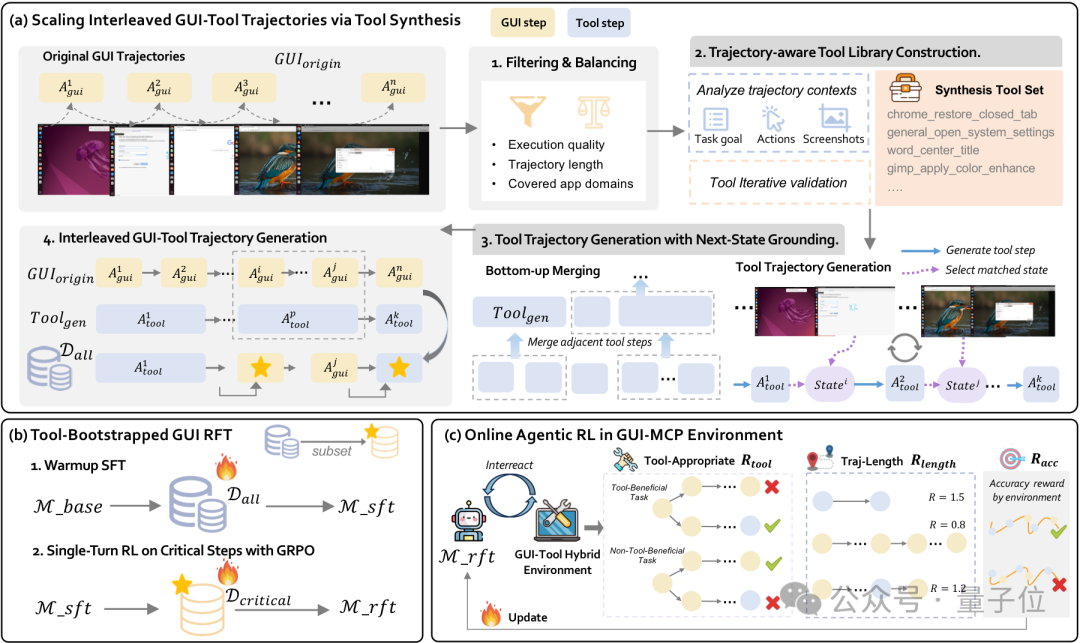
The pipeline has three steps:
- Abstract a tool library from GUI trajectories: analyze each GUI trajectory's task goal, action sequence, and screenshot descriptions, abstracting callable tools from real operation flows. For example,
chrome_open_language_settingscan be abstracted from a Chrome settings flow. - Generate equivalent tool trajectories: given the synthesized tool library and the original GUI trajectory, generate functionally equivalent tool-only trajectories, and verify via next-state grounding that tool steps match the state changes.
- Generate interleaved mixed trajectories: rather than blindly replacing every GUI operation with a tool, randomly sample some tool calls and swap them back to the corresponding GUI sub-sequences, producing multiple trajectories where GUI and Tool interleave. This exposes the model to switch points under different decision boundaries.
The final output is warmup SFT data with about 4k unique tools and 180k steps, plus single-turn RL data covering 5k critical steps.
Stage 2: Online Agentic RL
Stage 1 solves "knowing how to use tools"; stage 2 solves "learning trajectory-level path selection in a real environment."
At its core is the Tool-Efficient Path Reward, which bundles two targeted rewards:
- R_tool (tool appropriateness reward): rewards are not for calling more tools, but for exact behavior — tasks suited to tools actually use them, and tasks unsuited to tools do not misuse them.
- R_length (path efficiency reward): performs a group-relative comparison, granting a linear bonus when a successful trajectory is shorter than the group average. This encourages the model to discover more efficient execution paths.
Key design: both rewards activate only on successful trajectories, preventing the model from learning wrong preferences from failed executions.

Evaluation Results
Main Evaluation on OSWorld-MCP
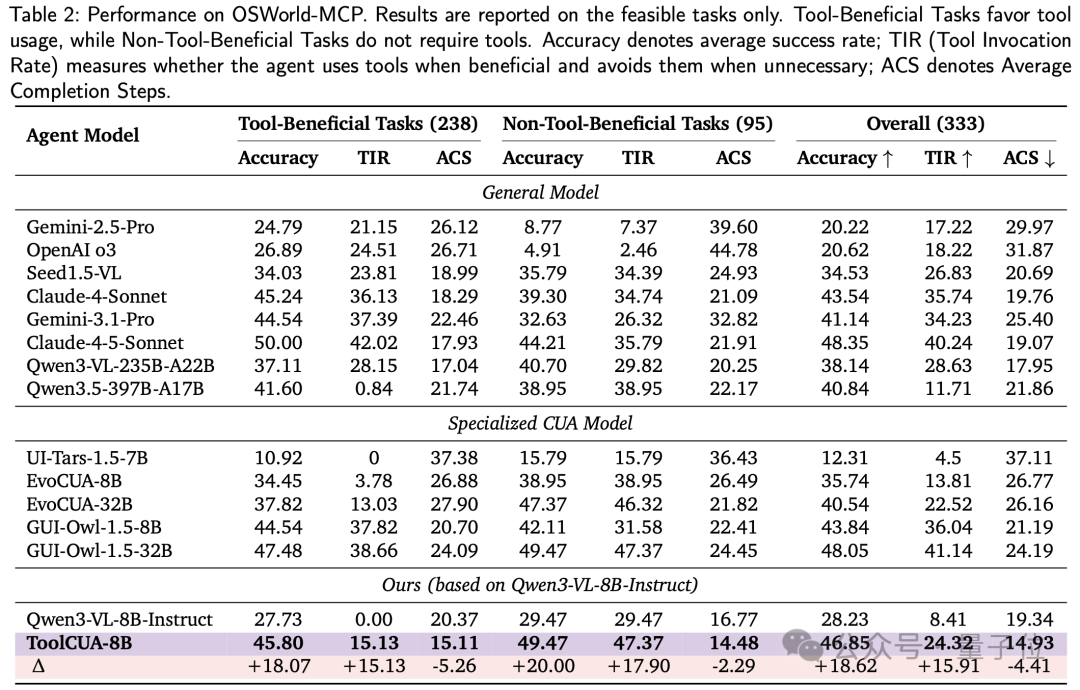
| Model | Accuracy | ACS (average steps) |
|---|---|---|
| Qwen3-VL-8B (baseline) | 28.23% | 19.34 |
| GUI-Owl-1.5-8B | 43.84% | - |
| Claude-4-Sonnet | 43.54% | - |
| ToolCUA-8B | 46.85% | 14.93 |
| Claude-4.5-Sonnet | 48.35% | - |
ToolCUA-8B's ACS is just 14.93 steps — the lowest of any model tested. It not only completes more tasks, it also learns to finish them along shorter paths. That is a relative gain of roughly 66% over the baseline.
Cross-Platform Transfer
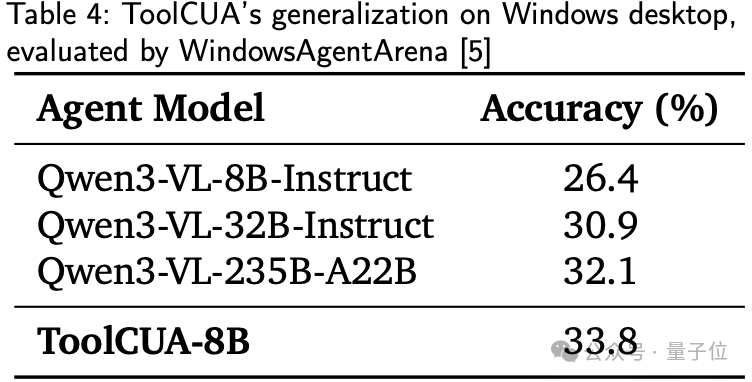
On WindowsAgentArena, even though all training data comes from Linux desktop environments, ToolCUA reaches 33.8% accuracy on unseen Windows desktop applications, beating Qwen3-VL-8B (26.4%), Qwen3-VL-32B (30.9%), and Qwen3-VL-235B (32.1%). What it learns is not task-specific templates, but a transferable capacity for mixed-action orchestration.
Ablations: Why ToolCUA Genuinely Learns to Route
Three key conclusions:
1. Without interleaved data, online RL cannot learn stable tool calling
When online agentic RL starts directly from the baseline, TIR (tool invocation rate) stays persistently low — only about 15% even late in training, with tool calls hovering near 0 for most of the run. The model first needs to acquire tool knowledge and switching priors through interleaved supervision.
2. Without the Tool-Efficient Path Reward, paths are unstable
Remove R_tool and R_length, and the accuracy curve turns visibly unstable, dipping around training steps 8-11 and ending roughly 7 points below full ToolCUA.
3. Hybrid training beats pure GUI training
A GUI-only pipeline takes the baseline from 29.03% to 42.05% after agentic RL; in the GUI+Tool pipeline, RFT already reaches 38.13%, and full ToolCUA pushes further to 46.85%.
Real Cases: GUI and Tools Working Together
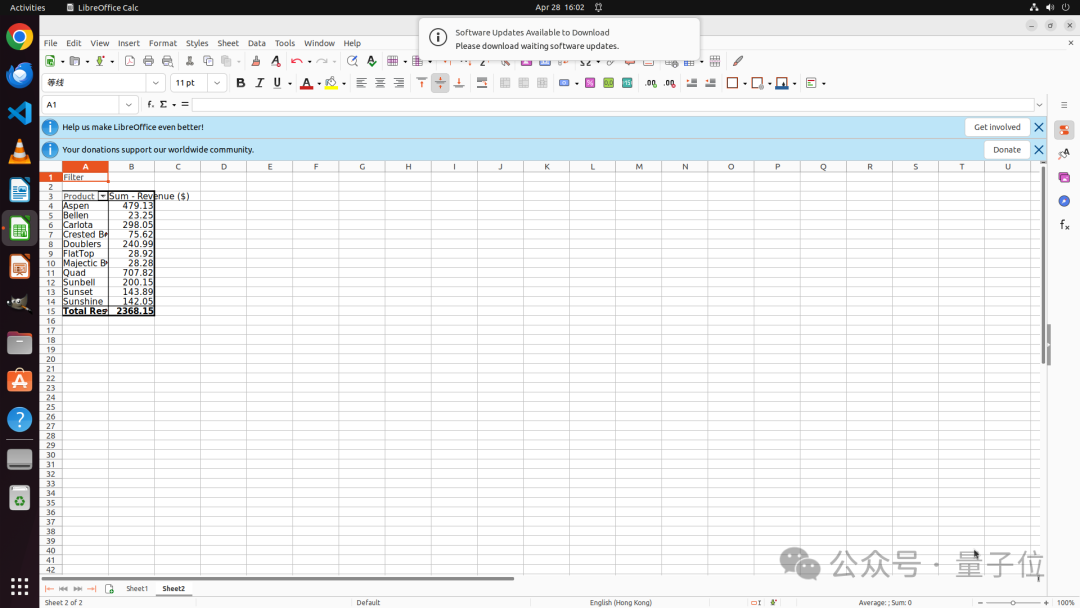
Case 1: Creating a pivot table in LibreOffice Calc
The GUI-only approach requires selecting the data range, opening menus, configuring fields, and confirming parameters — a long, error-prone sequence. ToolCUA first calls tools to read the workbook information and sheet contents to identify the data structure, then directly calls create_pivot_table to generate the pivot table — replacing brittle step-by-step GUI navigation with a structured tool.
Case 2: Adding a folder to a workspace in VS Code
ToolCUA first uses the add_folder tool to add two directories to the workspace. But once done, VS Code pops up a "Do you trust the authors?" dialog — a state that a tool call cannot close the loop on. ToolCUA automatically switches back to a GUI action and clicks the confirm button to finish the last step.
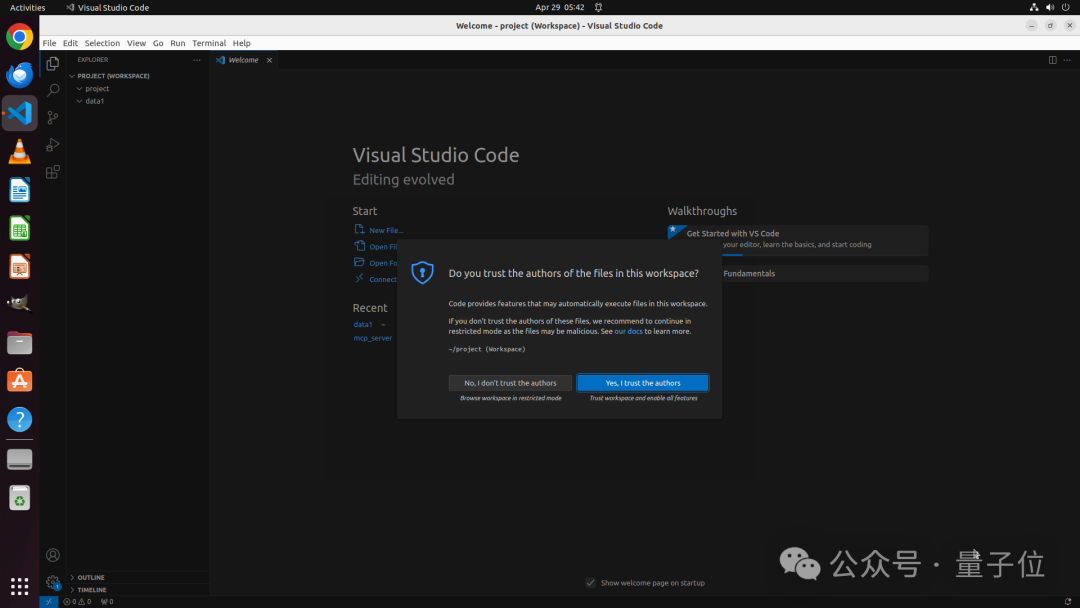
This is precisely ToolCUA's core capability: not replacing all GUI with Tool, nor retreating to pure GUI operation, but learning in real environments how the two action spaces cooperate and hand off.
Where to Get It
- Project site: https://x-plug.github.io/ToolCUA/
- Code repository: https://github.com/X-PLUG/ToolCUA
- Model weights: https://huggingface.co/mPLUG/ToolCUA-8B
- Mobile-Agent series: https://github.com/X-PLUG/MobileAgent
Who Should Use It
- CUA/Agent researchers: academic and engineering teams studying Computer Use Agents and GUI automation
- Desktop automation developers: engineers who need GUI + tool hybrid operation in real desktop environments
- Open-source model users: developers who want an 8B-parameter small model delivering desktop-operation performance close to Claude-4.5-Sonnet level
ToolCUA surfaces a key phenomenon: in a mixed action space, existing CUAs and strong base models show pronounced path confusion. The core of solving it is not handing the model more tools, but teaching it to route.