
WeChat "Xiaowei" in Gray-Scale Testing, Hands-On: 12 Entry Points That Tuck AI into Your Information Feed
A hands-on look at WeChat's native AI assistant "Xiaowei" in gray-scale testing. The main model is WeLM, and 12 entry points cover high-frequency scenarios like chat history retrieval, document summaries, Official Account digests, and local life services.

WeChat "Xiaowei" in Gray-Scale Testing, Hands-On: 12 Entry Points That Tuck AI into Your Information Feed
A hands-on look at WeChat's native AI assistant "Xiaowei" in gray-scale testing. The main model is WeLM, and 12 entry points cover high-frequency scenarios like chat history retrieval, document summaries, Official Account digests, and local life services.
WeChat's native AI assistant "Xiaowei" is rolling out in gray-scale testing. Its main model is WeLM, developed in-house by the WeChat team, with some answers completed in combination with DeepSeek. Unlike the standalone chatbots on the market, WeChat's approach is to embed AI into entry points people already use at high frequency — Moments, Official Accounts, group chats, and files all gain a "Ask Xiaowei" entry.
This hands-on piece maps out 12 Xiaowei entry points inside WeChat, grouped into four categories by use case, and flags which capabilities are most practical today and which still require a second confirmation.
Entry 1: the "green eyes" main entry in the top-left corner
Once you get beta access, a pair of green eyes appears in the top-left corner of the WeChat home screen (where the "Starred" page used to sit); tapping it opens Xiaowei's main interface. Voice input is the default at the bottom and can be switched to text, and the "+" in the bottom-right corner supports uploading photos, taking pictures, and attaching files.

This master entry covers at least these capabilities:
- Social information: Moments updates, Official Account updates, article search and summarization
- Native WeChat actions: sending red packets, checking to-dos, system settings
- Local life services: navigation, ride-hailing, nearby restaurants
- AI creation: image generation, image editing
- AI app generation: creating mini tools from a single sentence
The most distinctly WeChat-flavored of these are the Moments and Official Account capabilities. Ask "catch me up on what's new in my Moments over the past couple of days" and it sorts posts by topic first (AI and agents, autonomous driving, quantum computing, and so on) rather than dumping your feed post by post.
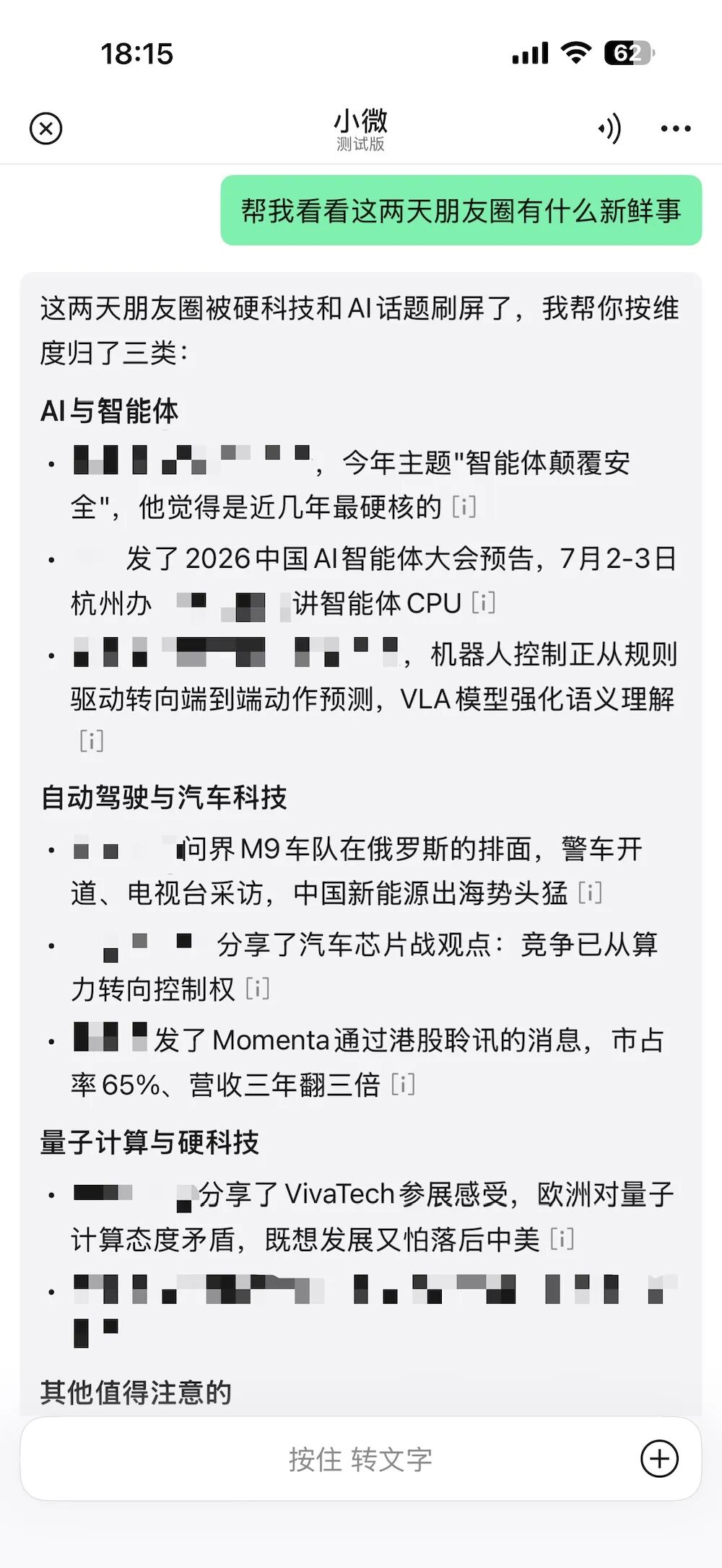
💡 Tip: For sensitive operations like payments, contacts, and sending messages, Xiaowei will not complete the final step for you — nearly all of them require a second confirmation. That is necessary design for a platform carrying over a billion users and an entire payment system.
Entry 2: three spots inside the chat interface
These three spots carry the chat context and are where Xiaowei's most valuable capabilities live today:
- Long-press a chat message: works on a single message — explain it, summarize it, rewrite it, or generate a reply
- The "+" button in the bottom-right of a one-on-one chat
- The "+" button in the bottom-right of a group chat
Ask directly "what was that remote control ID he sent me earlier" and Xiaowei will find the relevant record in the current chat history, extract the device ID and verification code, and ask which instance you are looking for. Compared with traditional search's reliance on keywords, this context-based way of asking is clearly more direct.
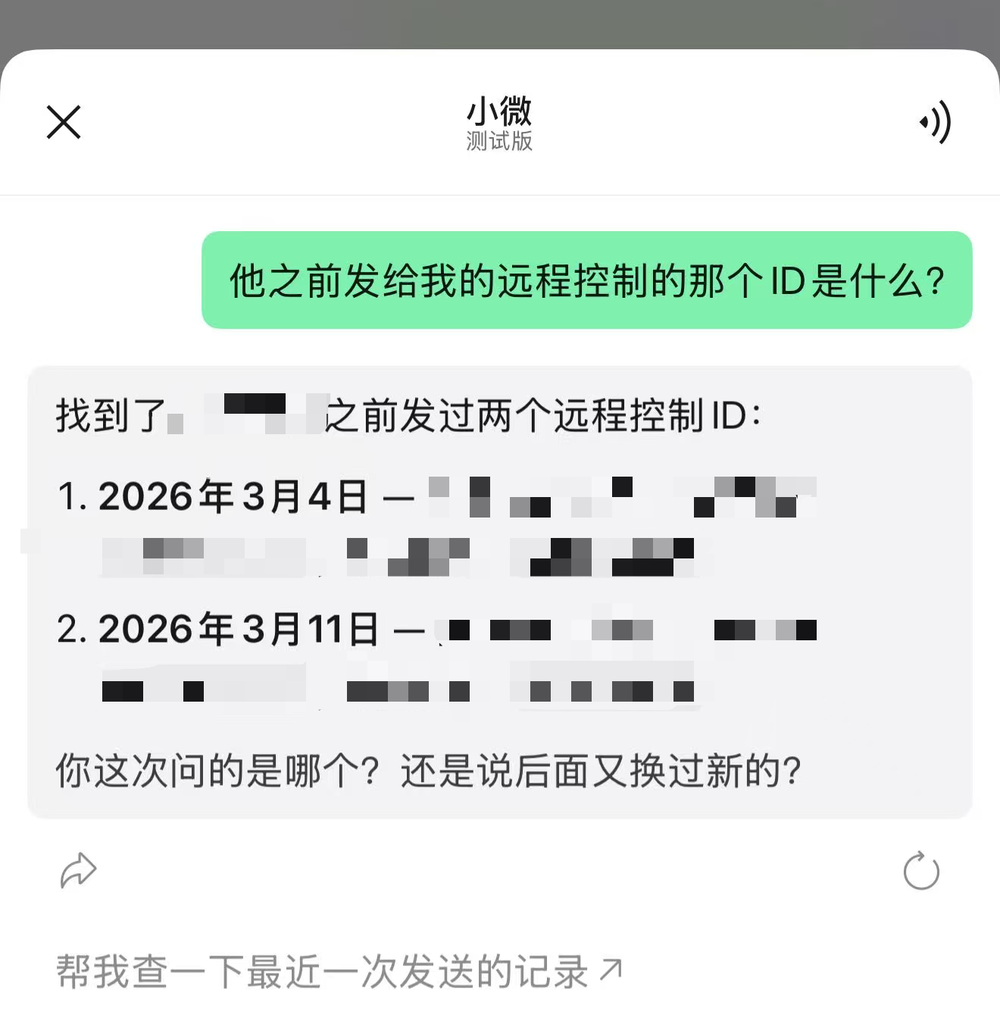
In group chats, it can also recognize "who @-mentioned me," filter important messages, draft replies based on the conversation, and organize to-dos, presenting them as to-do cards.
Entry 3: Official Account articles and Channels
Open an Official Account article and tap share, and you will see "Ask Xiaowei"; Channels videos are likewise handed to Xiaowei at share time.
In testing, having it summarize an article about WeCom's AI agent produced an outline of the product form and core application scenarios; sending it a 50-minute conversation video, it pulled out the three major reasons and the core viewpoints. It amounts to a "preview summary" — let Xiaowei screen it first, then decide whether to open the original.
Entry 4: documents (images / PDF / TXT / the Office trio)
Long-press an enlarged image to ask Xiaowei about it; PDF, TXT, Word, PPT, and Excel files can be invoked the same way via share after opening. Available functions:
- Image understanding: long-press an image to ask about its contents directly
- Document processing: read, summarize, and organize
Very often we only want to know roughly what a file says and whether it is worth a close read. Xiaowei handles that first screening round inside WeChat, cutting the cost of dealing with files noticeably.
Bonus capability: Mini Tools (apps from one sentence)
Xiaowei's settings include a "Mini Tools" entry where you describe a need in natural language to generate a simple app. In testing we built a "diet recipe book" mini tool with interactive modules for today's picks, a seven-day weekly menu, and adding new recipes.
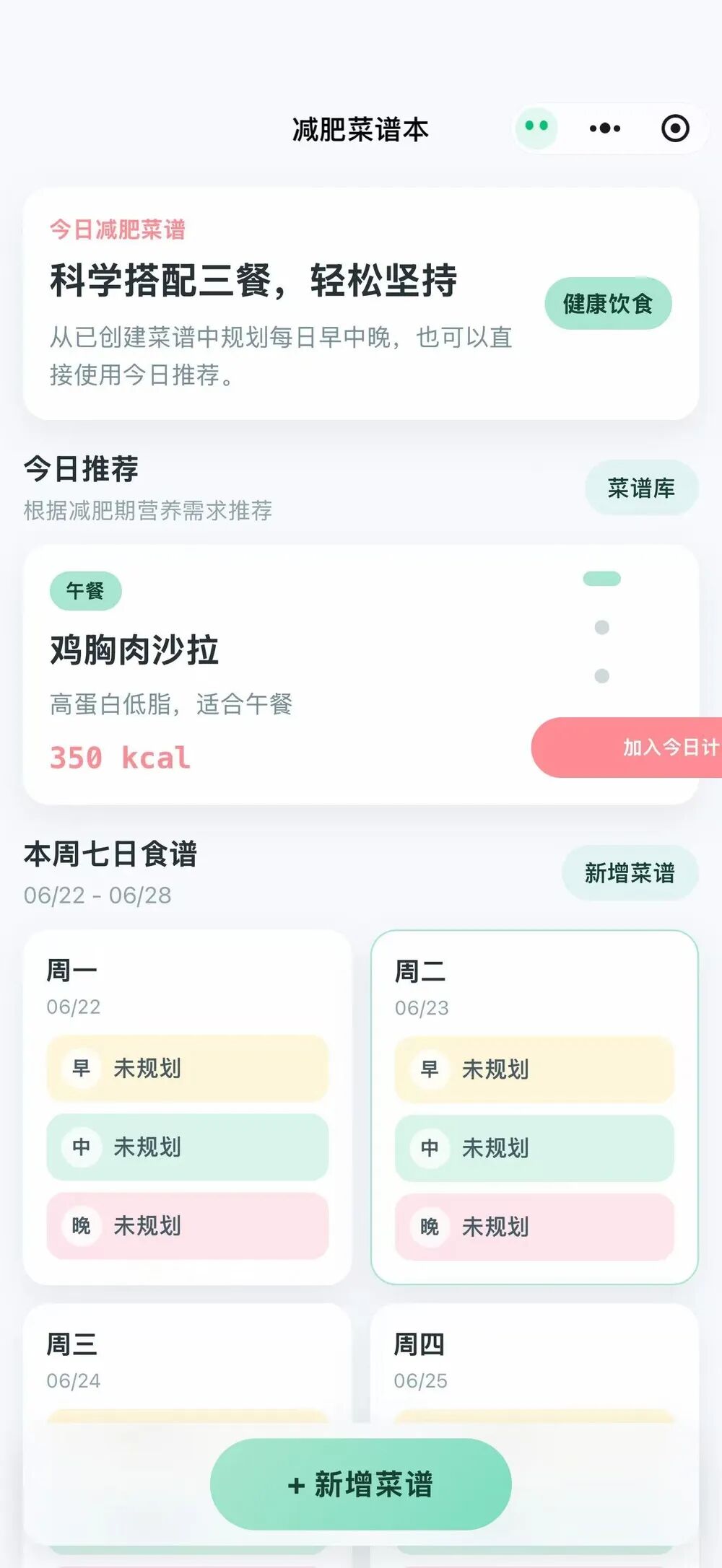
💡 Tip: Mini Tools currently cannot be shared with other users, publishing is not open, and they cannot freely read WeChat context (automatically reading group content to tally votes is not supported yet). But the underlying layer is the WeChat Mini Program system, and there is plenty of room to imagine once distribution opens up.
Use cases and value
After spending time with it, Xiaowei's most valuable capabilities at this stage are: summarizing group messages, recalling chat history, and understanding conversational context. By comparison, capabilities like sending messages or making WeChat calls show no clear advantage yet.
For heavy WeChat users with large friend lists and cluttered chat records, smart retrieval across chat history is a particularly big must-have — the treasures buried in "File Transfer" can now be dug out too.
Xiaowei may not yet be the strongest AI assistant, but it is already the AI that comes closest to WeChat's own form.