Inside Anthropic: How to Double Your Claude Code Productivity with Skills
Firsthand experience from a Claude Code team engineer, revealing how Anthropic classifies, writes, and distributes the hundreds of Skills used internally
Inside Anthropic: How to Double Your Claude Code Productivity with Skills
Firsthand experience from a Claude Code team engineer, revealing how Anthropic classifies, writes, and distributes the hundreds of Skills used internally
Skills have become one of the most widely used extension points in Claude Code. They're flexible, easy to build, and simple to distribute. But precisely because they're so flexible, it's hard to know how to use them well.
The author, Thariq Shihipar, is an engineer on Anthropic's Claude Code team and one of the core driving forces behind the Skills feature. What makes this article valuable is that it's a battle-tested summary from Anthropic's internal team. Anthropic actively uses several hundred Skills internally, and the taxonomy and writing techniques in this piece are distilled from that real internal practice.
Skills Aren't Just Markdown Files
We often hear a misconception that Skills are "just markdown files." But the most interesting thing about Skills is precisely that they're more than text files — they're folders that can contain scripts, assets, data, and more, all of which the agent can discover, explore, and use.
In Claude Code, Skills also come with rich configuration options, including registering dynamic hooks. We've found that the most interesting Skills in Claude Code are often the ones that creatively exploit these configuration options and the folder structure.
The 9 Types of Skills
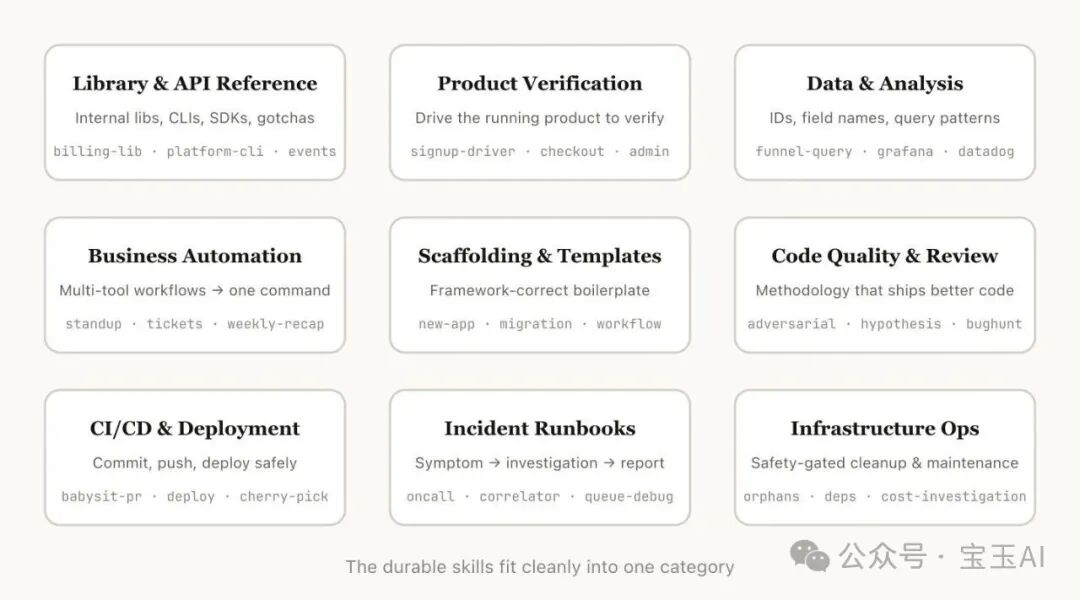
After going through all of our Skills, we noticed they fall into a handful of recurring categories. The best Skills land cleanly within one category; the confusing ones tend to straddle several.
1. Library and API References
Skills that help you use a particular library, CLI tool, or SDK correctly. They can target internal libraries or widely used ones that Claude Code occasionally gets wrong. These Skills usually include a folder of reference code snippets plus a list of pitfalls Claude should avoid when writing code.
Examples:
- billing-lib: your internal billing library — edge cases, common gotchas, and so on
- internal-platform-cli: every subcommand of your internal CLI tool with examples of when to use it
- frontend-design: helping Claude better understand your design system
2. Product Verification
Skills that describe how to test or verify that code actually works. They typically pair with external tools like Playwright or tmux to carry out the verification.
Verification Skills are extremely useful for ensuring the correctness of Claude's output. It's worth having an engineer spend a full week polishing your verification Skills.
Examples:
- signup-flow-driver: drives the signup → email verification → onboarding flow in a headless browser, with hooks for state assertions at every step
- checkout-verifier: drives the checkout UI with Stripe test cards and verifies the invoice ends up in the right state
- tmux-cli-driver: for testing interactive command-line programs that need a TTY
3. Data Access and Analysis
Skills that connect to your data and monitoring stack. They may include credential-carrying data-fetching libraries, specific dashboard IDs, and the like, along with documentation of common workflows and data-retrieval patterns.
Examples:
- funnel-query: which events do you need to join to see signup → activation → payment conversion? Plus the one table that actually holds the canonical user_id
- cohort-compare: compares retention or conversion between two user cohorts and flags statistically significant differences
- grafana: datasource UIDs, cluster names, and a problem-to-dashboard lookup table
4. Business Processes and Team Automation
Skills that turn repetitive workflows into a single command. Their instructions are usually simple, but they may depend on other Skills or MCP (Model Context Protocol).
Examples:
- standup-post: aggregates your task tracker, GitHub activity, and recent Slack messages → generates a formatted standup update
- create-ticket: enforces a schema (valid enum values, required fields) plus a post-creation workflow
- weekly-recap: merged PRs + closed tickets + deploy records → a formatted weekly report
5. Code Scaffolding and Templates
Skills that generate boilerplate for specific features in your codebase. They're especially useful when your scaffolding has natural-language requirements that code alone can't cover.
Examples:
- new-workflow: scaffolds a new service/workflow/handler using your annotations
- new-migration: your database migration file template plus common gotchas
- create-app: creates a new internal app with your auth, logging, and deployment config preconfigured
6. Code Quality and Review
Skills that enforce code quality standards across the team and assist with code review. They can include deterministic scripts or tools for maximum reliability.
Examples:
- adversarial-review: spins up a fresh-perspective subagent to poke holes, applies fixes, and iterates
- code-style: enforces code style, especially the conventions Claude doesn't get right by default
- testing-practices: guidance on how to write tests and what to test
7. CI/CD and Deployment
Skills that help you pull, push, and deploy code. They may reference other Skills to gather data.
Examples:
- babysit-pr: monitors a PR → retries flaky CI → resolves merge conflicts → enables auto-merge
- deploy-service: build → smoke test → progressive traffic shifting with error-rate comparison → automatic rollback if metrics degrade
- cherry-pick-prod: isolated worktree → cherry-pick → resolve conflicts → create a PR from a template
8. Operations Runbooks
Skills that take a symptom (say, a Slack message, an alert, or an error signature), walk you through a multi-tool triage process, and finish with a structured report.
Examples:
- service-debugging: maps symptoms to tool → query patterns for your highest-traffic services
- oncall-runner: pulls alerts → checks the usual suspects → formats the triage conclusions
- log-correlator: given a request ID, pulls matching logs from every system the request might have passed through
9. Infrastructure Operations
Skills that perform routine maintenance and ops tasks — some of which involve destructive operations and need safety guardrails. These Skills make it easier for engineers to follow best practices when performing critical operations.
Examples:
- cleanup-orphans: finds orphaned Pods/Volumes → posts to Slack → waits and observes → user confirms → cascading cleanup
- dependency-management: your organization's dependency approval workflow
- cost-investigation: why did our storage/egress bill suddenly jump, with the specific buckets and query patterns
8 Tips for Writing Skills
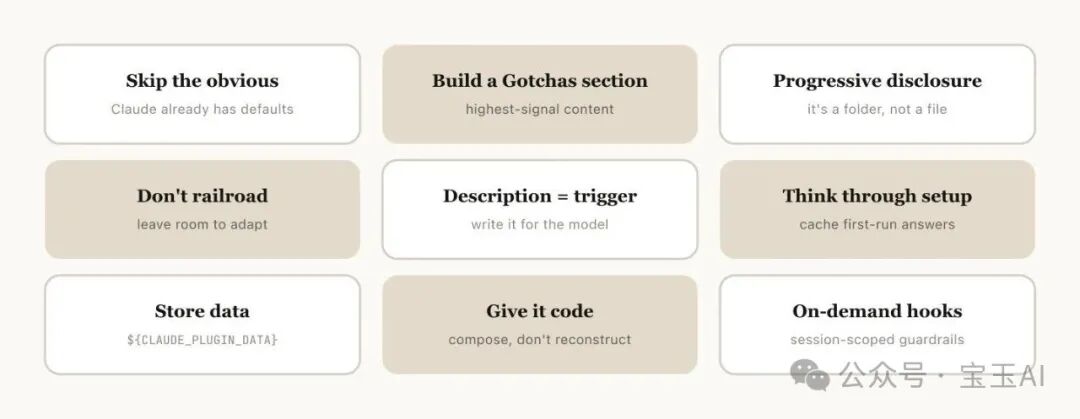
1. Don't State the Obvious
Claude Code already knows your codebase well, and Claude itself is good at programming. If the Skill you're publishing mainly provides knowledge, focus on information that breaks Claude out of its default patterns of thinking.
For example, Anthropic's frontend-design Skill specifically steers away from the typical clichés, like the Inter font and purple gradients.
2. Keep a Gotchas Section
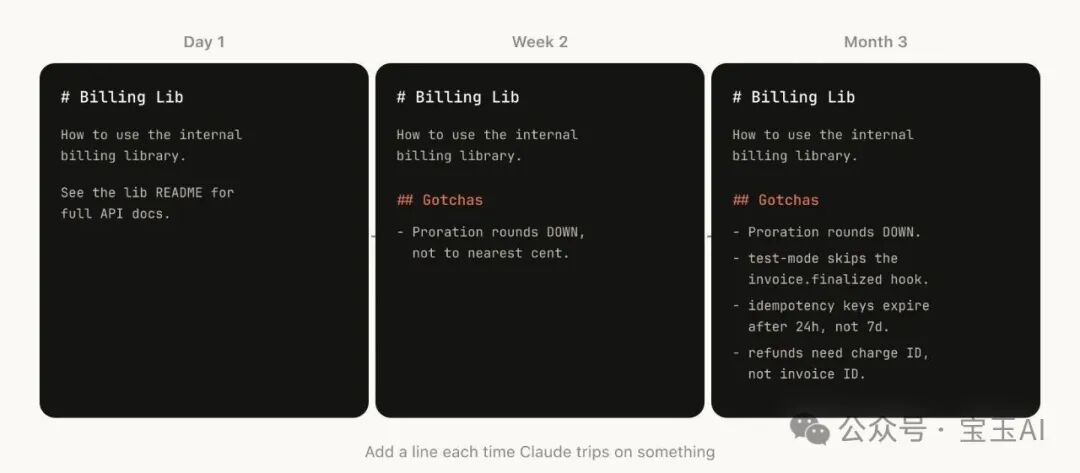
The most information-dense part of any Skill is its gotchas section. These sections should build up over time from the failure points Claude actually hits while using your Skill. Ideally, you keep updating the Skill to record them.
3. Leverage the File System and Progressive Disclosure
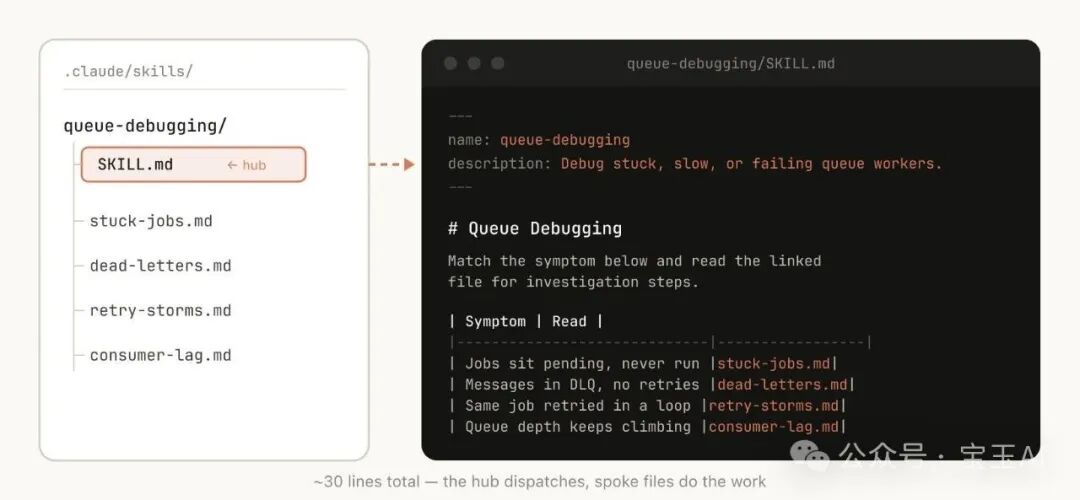
A Skill is a folder, not just a markdown file. You should treat the entire file system as a tool for context engineering and progressive disclosure. Tell Claude what files live in your Skill, and it will read them at the right time.
The simplest form of progressive disclosure is pointing Claude at other markdown files to consult. For example, you can split detailed function signatures and usage examples into references/api.md.
4. Don't Over-Constrain Claude
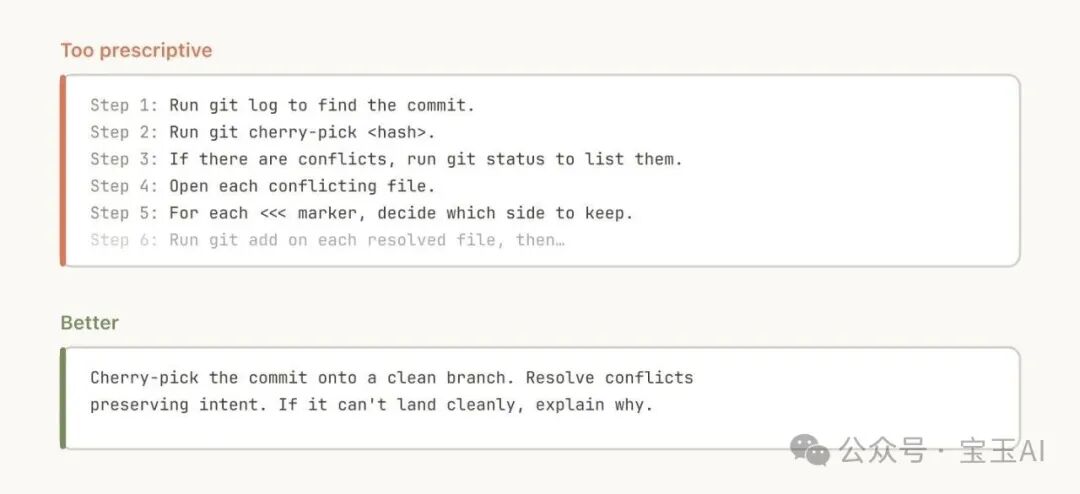
Claude generally works hard to follow your instructions, and because Skills get reused a lot, you need to be careful not to make the instructions too specific. Give Claude the information it needs, but leave it the flexibility to adapt to the situation at hand.
5. Think Through Initial Setup
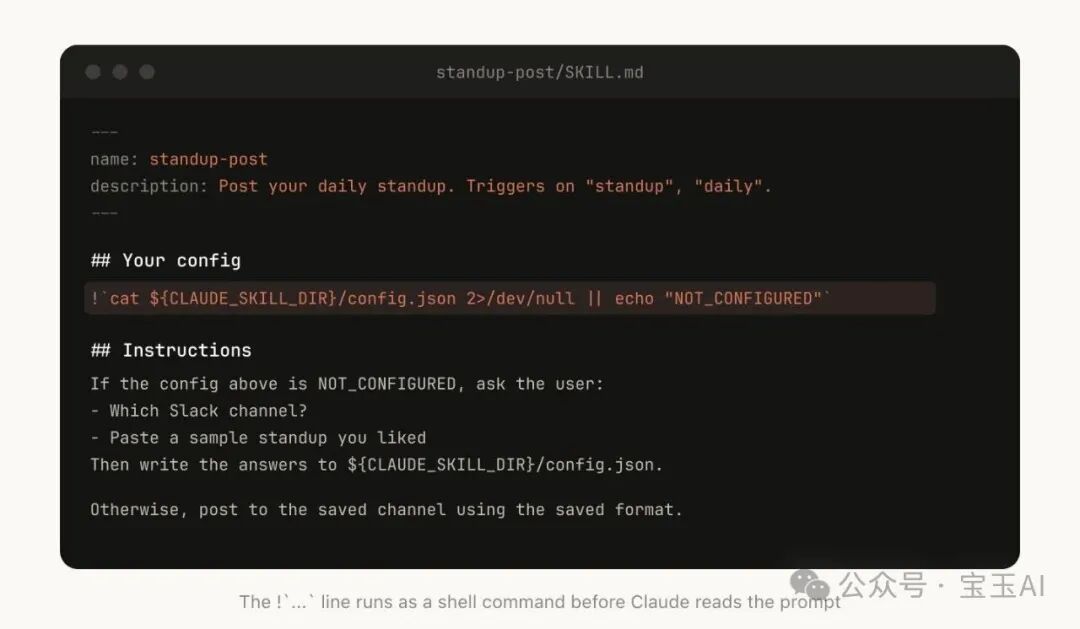
Some Skills may need the user to provide context to complete initial setup. A good pattern is to store that setup information in a config.json file inside the Skill directory. If the configuration isn't set up yet, the agent asks the user for the relevant details.
6. The description Field Is for the Model
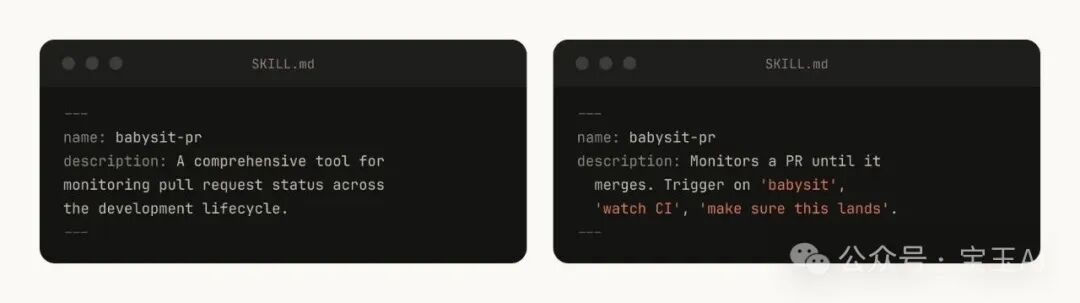
When Claude Code starts a session, it builds an inventory of all available Skills and their descriptions. Claude scans that inventory to decide "is there a Skill for this request?" So the description field isn't a summary — it describes when this Skill should trigger.
7. Memory and Data Storage
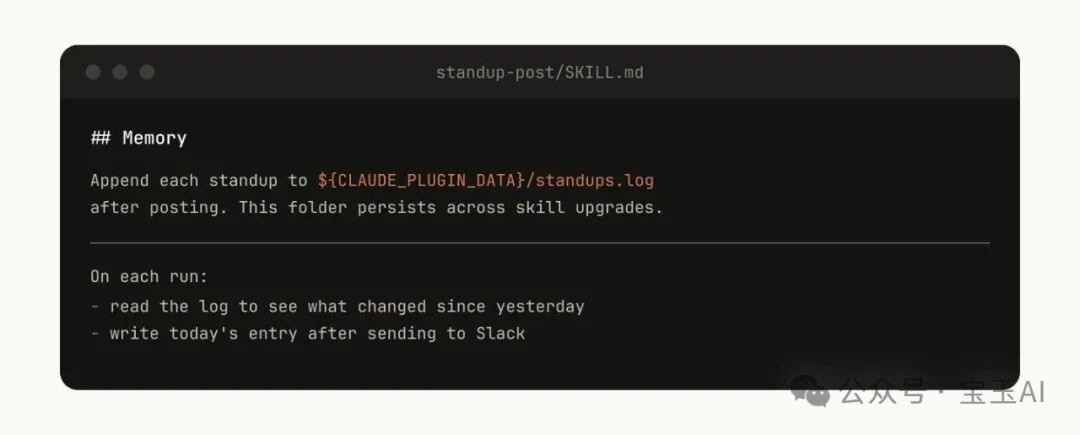
Some Skills can implement a form of memory by storing data internally. You can do this the simplest way — an append-only text log or JSON file — or something more elaborate, like a SQLite database.
For example, a standup-post Skill could keep a standups.log recording every standup update it has written. The next time it runs, Claude reads its own history and knows what has changed since yesterday.
8. Store Scripts and Generated Code
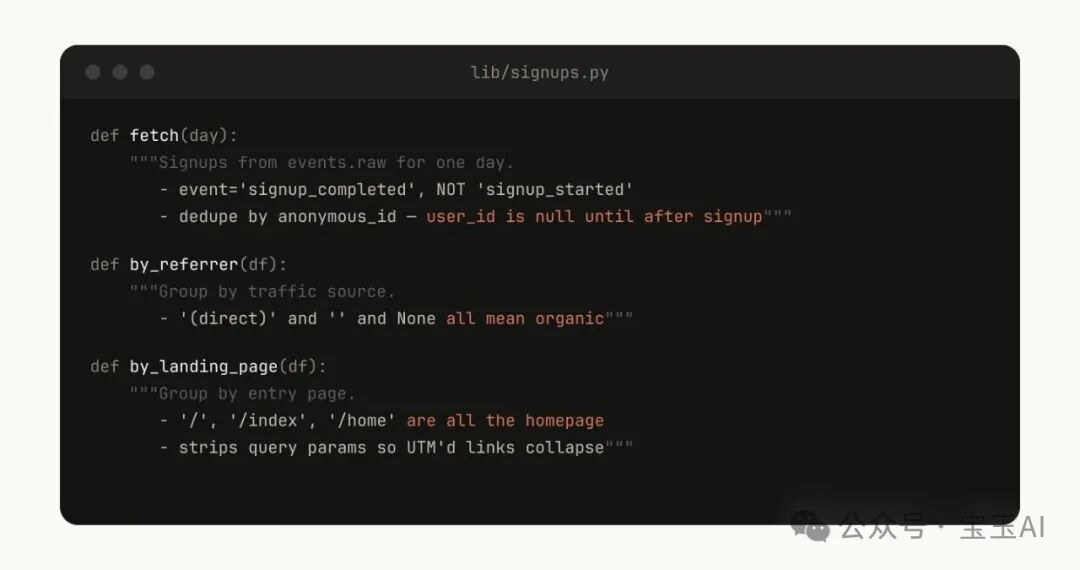
One of the most powerful tools you can give Claude is code. Provide Claude with scripts and libraries so it spends its effort on composition and orchestration — deciding what to do next — rather than rebuilding boilerplate.
For example, in your data science Skill you could include a library of functions for pulling data from event sources. Claude can then generate scripts on the fly that compose those functions to perform higher-level analysis.
Distributing Skills
One of the biggest benefits of Skills is that you can share them with the rest of your team.
You can share Skills in two ways:
- Commit the Skills to your code repository (under ./.claude/skills)
- Package them as plugins and run a Claude Code plugin marketplace where users can upload and install plugins
For small teams collaborating across a handful of repositories, committing Skills to the repo is enough. But every Skill you commit adds a little weight to the model's context. As you scale, an internal plugin marketplace lets you distribute Skills while letting team members decide for themselves which ones to install.
Toolin's Hands-On Review
Who is it for?
- Teams that develop with Claude Code
- Organizations that need to standardize their development process
- Developers looking to get more out of AI-assisted coding
Core value:
- Encodes team knowledge and best practices so the same pits aren't hit twice
- Improves the reliability of AI-generated code through verification Skills
- Automates repetitive workflows and frees up developer time
- Supports team collaboration and knowledge sharing
Implementation advice:
- Start with the biggest pain points: build 1-2 Skills that solve the team's most painful problems first
- Iterate continuously: keep adding gotchas based on how Claude actually behaves in use
- Set up a sharing mechanism: encourage team members to contribute and improve Skills
- Measure the impact: use PreToolUse hooks to log how Skills are being used
Caveats:
- More Skills isn't better — every Skill consumes context
- The description field should spell out the trigger conditions, not describe features
- Verification Skills are worth extra polishing time
Skills are an enormously powerful and flexible tool for AI agents, but all of this is still early days. The best way to understand Skills is to start building, keep experimenting, and see what works for you. Most Skills start as a few lines of text plus one gotcha, and only get good over time as people keep adding the new edge cases Claude runs into.