
GLM-5V-Turbo Visual Coding Hands-On: Drop In a Screenshot, Get Code Out
A hands-on test of Zhipu's GLM-5V-Turbo, a natively visual coding model: screenshot replication, PDF chart extraction, and cover art style transfer, plus three integration paths — AutoClaw / OpenClaw / Claude Code.
GLM-5V-Turbo Visual Coding Hands-On: Drop In a Screenshot, Get Code Out
A hands-on test of Zhipu's GLM-5V-Turbo, a natively visual coding model: screenshot replication, PDF chart extraction, and cover art style transfer, plus three integration paths — AutoClaw / OpenClaw / Claude Code.
If you are a developer or content creator looking for an AI model that can “read a screenshot and write code straight from it,” this article will tell you what GLM-5V-Turbo can do, how to integrate it, and how it actually performs.
What Is GLM-5V-Turbo
In one sentence: a natively multimodal coding base model released by Zhipu. Not a “chatbot that can see pictures,” but a coding foundation model whose visual and text capabilities were deeply fused from the pre-training stage onward.
Core capabilities:
- Screenshot -> frontend code (94.8 on Design2Code, beating Kimi K2.5's 91.3)
- PDF -> extract data and generate charts (measured 100% data accuracy)
- Design mockup -> style transfer into an AI image-generation prompt
- UI -> autonomous GUI agent operation (75.7 on AndroidWorld, 32 percentage points ahead of competitors)

Integration Tutorial (Three Ways)
Option 1: AutoClaw (simplest)
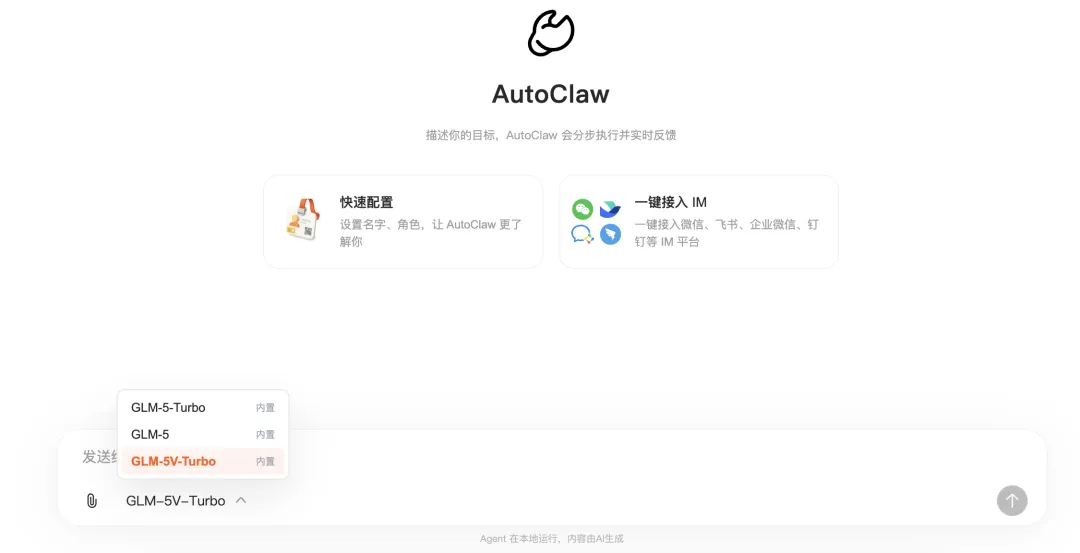
AutoClaw ships with GLM-5V-Turbo built in — just switch to it in the model selector at the bottom. It runs on AutoClaw credits, so there is no extra API configuration to do.
To use your own API key: Settings -> Models & API -> Add custom model:
- Provider: Zhipu
- Model ID:
glm-5v-turbo - Base URL:
https://open.bigmodel.cn/api/paas/v4
Option 2: OpenClaw
Configuration works like AutoClaw's custom model setup. The recommended shortcut: hand the official integration docs straight to your AI agent and let it figure things out.
Official integration docs: https://docs.bigmodel.cn/cn/guide/models/vlm/glm-5v-turbo
Option 3: Claude Code
Configure it in ~/.claude/settings.json:
{
  "env": {
    "ANTHROPIC_DEFAULT_HAIKU_MODEL": "glm-5v-turbo",
    "ANTHROPIC_DEFAULT_SONNET_MODEL": "glm-5v-turbo",
    "ANTHROPIC_DEFAULT_OPUS_MODEL": "glm-5v-turbo",
    "ANTHROPIC_AUTH_TOKEN": "Your Zhipu API Key",
    "ANTHROPIC_BASE_URL": "https://open.bigmodel.cn/api/anthropic",
    "API_TIMEOUT_MS": "3000000",
    "CLAUDE_CODE_DISABLE_NONESSENTIAL_TRAFFIC": 1
  }
}
Restart your terminal window and enter /status to confirm the model switched over. You can also switch temporarily mid-conversation with /model glm-5v-turbo.
Hands-On Scenarios
Scenario 1: Benchmark screenshots -> Economist-style interactive charts
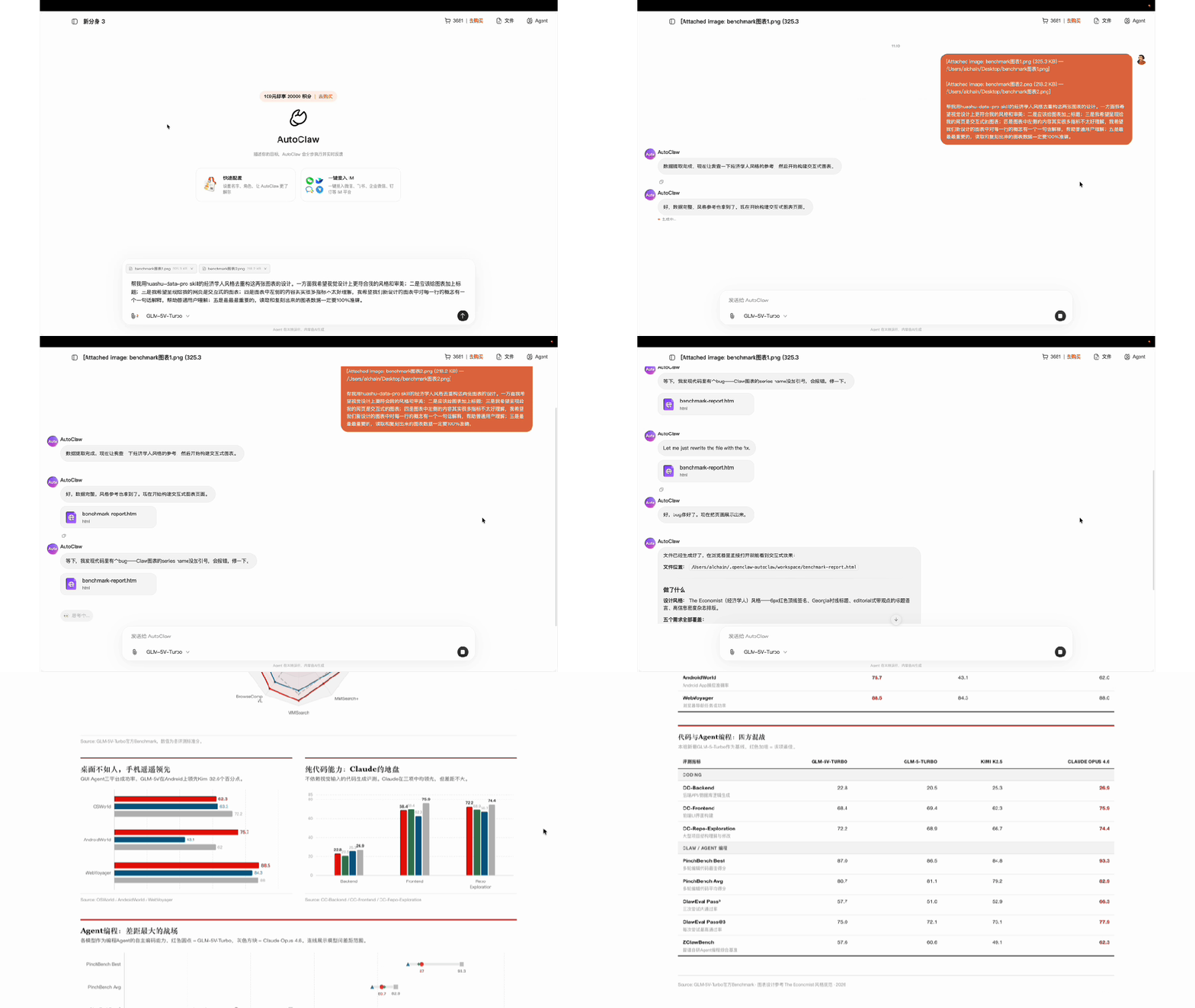
I threw the two official benchmark screenshots straight at 5V-Turbo inside AutoClaw and asked for a rebuild in Economist style.
19 metrics, 3-4 models, more than 60 values — all read correctly, zero errors. It even generated a Chinese explanation for each metric row, paired with the visualized chart output.
Scenario 2: Replicating a PPT screenshot
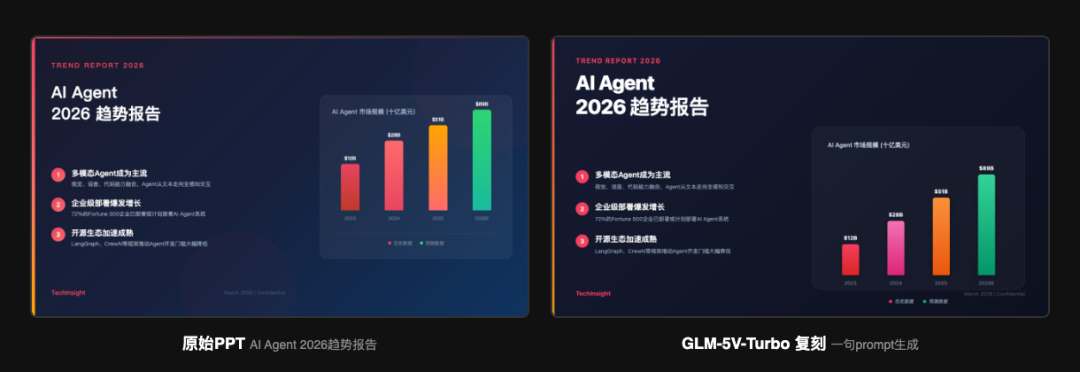
Given a slide screenshot from an “AI Agent 2026 Trends Report,” 5V-Turbo output an HTML replica directly.
Fidelity highlights:
- Overall layout (text left, image right, dark background, red accent color) faithfully reproduced
- Bar chart color gradient direction correct
- Zero OCR errors — every number, Chinese and English string, and punctuation mark recognized correctly
Scenario 3: 40MB PDF -> financial-report Sankey diagram replication
The test conditions were brutal: a 40MB, 62-page PDF, with no hint given about which page Nike was on.
The full pipeline the model completed on its own:
- Found the PDF exceeded a tool limit -> automatically switched to a command-line tool
- Flipped from page 34 to page 52 without finding it -> doubled back and kept flipping
- Located the Nike page on page 7
- Extracted the information for a complex Sankey diagram with 20+ data nodes
- Generated a complete HTML page reproducing the chart's structure and styling
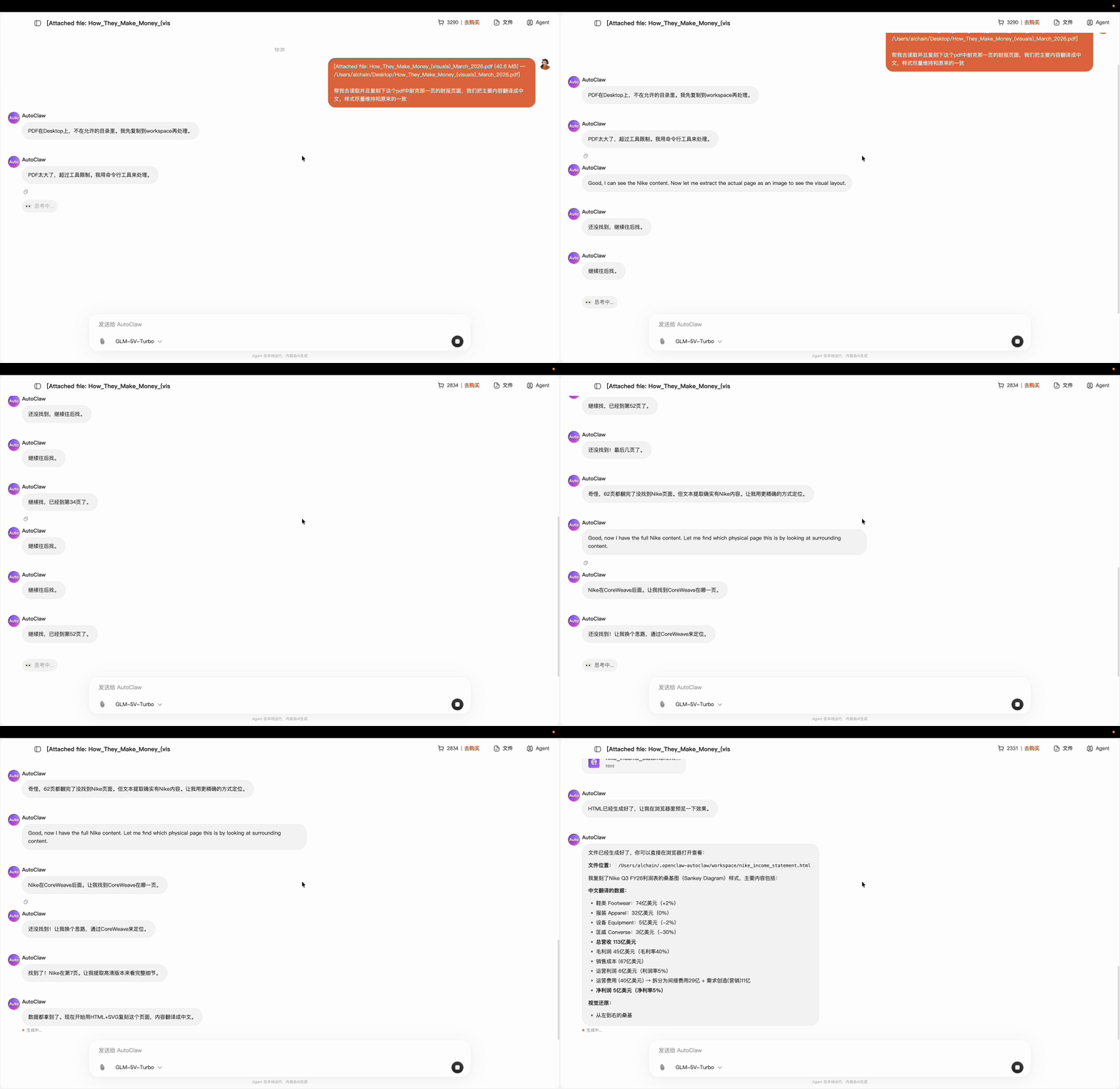
The key point: no human intervention at any step. The model handled intermediate problems like “file too large, switch tools” and “not found, keep flipping” entirely on its own. That is what separates an agent foundation model from an ordinary vision model.
Scenario 4: Cover art style transfer
It analyzes Bilibili tech-channel cover art, extracts the color palette, typography style, composition ratios, and character features, and turns them directly into an AI image-generation prompt.
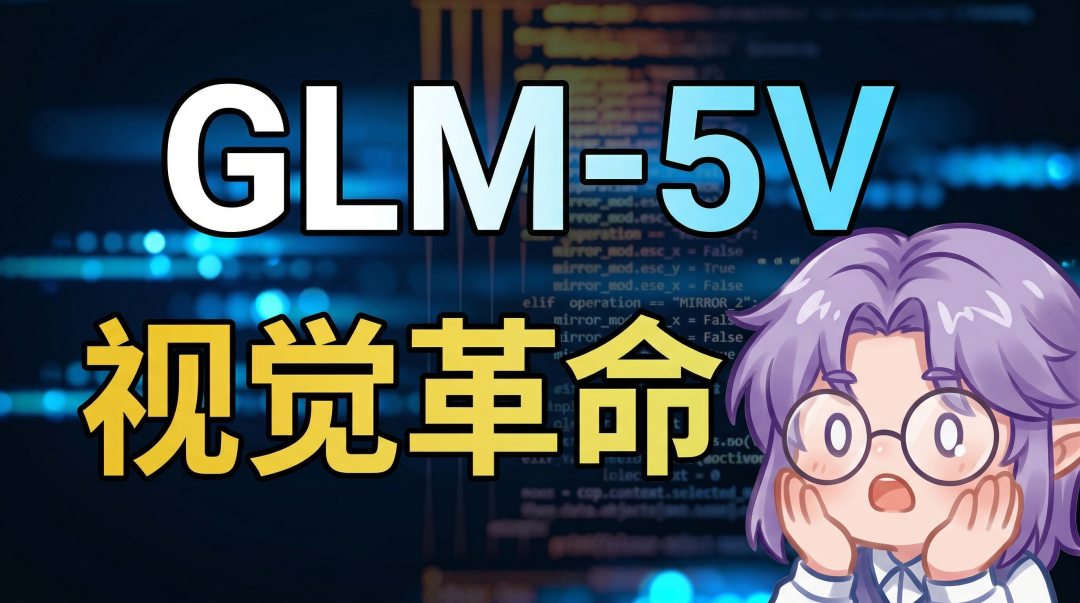
Zero text errors, style reproduced almost 1:1. In this pipeline, 5V-Turbo plays the “design translator,” breaking the visual information in an image down into describable parameters.
Did Pure-Text Capability Regress?
Official data answers that: GLM-5V-Turbo holds steady across all three core CC-Bench-V2 benchmarks — Backend, Frontend, and Repo Exploration. Its coding ability took no hit from gaining vision.
Toolin's Take
Who it's for:
- Frontend developers whose workflow is full of “look at an image -> write code” tasks
- Automation scenarios where an agent needs to understand an interface and then act on its own
- Users who want a Chinese-built model as a Claude replacement for visual coding
Who it's not for:
- Pure backend code work (the vision goes unused; the GLM-5-Turbo text model is the better pick)
- Complex engineering that demands top-tier code quality (Claude Opus 4.6 is still the benchmark)
Core strengths: the multimodality is native, not bolted on — there is no gap between “can see it” and “can write it.” Once wired into AutoClaw/Claude Code, vision and execution connect deeply, and the efficiency jump is obvious.
Pricing: runs on AutoClaw credits; standalone API access is purchased through the Zhipu open platform or Z.ai.
Related links:
- Zhipu open platform: https://open.bigmodel.cn
- AutoClaw download: https://autoglm.zhipuai.cn/autoclaw/
- Official integration docs: https://docs.bigmodel.cn/cn/guide/models/vlm/glm-5v-turbo
- Official Skills collection: https://clawhub.ai/jaredforreal/glm-master-skill
Toolin Editorial Team
Related articles

Claude Code + Feishu CLI: 5 Hands-On Agent Workflows
The open-source Feishu CLI exposes nearly 120 capabilities; combined with Claude Code it powers meeting knowledge bases, work retrospectives, reconciliation automation, collaborative boards, and automated expense reports — all free to use.

Mureka V9: The First AI Music API to Clear the Production-Readiness Bar
With its MusiCoT chain-of-thought architecture, Mureka V9 delivers publish-on-generation music quality; Sondo doubled its business after switching over entirely, and the API is now officially open.
Hermes Agent: The Open-Source AI Agent That Gets Smarter the More You Use It
The open-source agent that topped OpenRouter's global usage chart, with self-learning, persistent memory, and skill evolution -- deployable with a single command.

YoooClaw C.ONE: The AI Message Butler That Sticks to the Back of Your Phone
An AI memory card that sticks to the back of your phone and automatically aggregates messages from WeChat, Feishu, and every other app, with smart summaries, scheduled pushes, and custom light-effect alerts -- say goodbye to message bombardment.