
GPT-Image-2 Deep Dive: From Marketing Graphics to Game UI, One Sentence Does It
GPT-Image-2 is officially released. It generates high-quality marketing posters, knowledge cards, game UI, and web design mockups without complex prompts — fully tested across 6 major scenarios.
GPT-Image-2 Deep Dive: From Marketing Graphics to Game UI, One Sentence Does It
GPT-Image-2 is officially released. It generates high-quality marketing posters, knowledge cards, game UI, and web design mockups without complex prompts — fully tested across 6 major scenarios.
OpenAI has officially released GPT-Image-2, its first image model capable of thinking. It has two modes: Instant mode, open to all users and built for speed; and Thinking mode, which requires a Plus/Pro/Business account and searches the web, plans the structure, and self-checks before generating.
The most delightful surprise: you don't need to write complex prompts. A few casual words produce extremely high-quality results. This article walks through 6 real scenarios to show you what it can actually do.
Scenario 1: Marketing promo graphics
Day-to-day work constantly calls for operational graphics like product update announcements and event posters. This used to take a designer at least half a day; now it takes seconds.
Apple-style promo graphic, the prompt only needs to be:
Use gpt-image-2 to generate an Apple-style Chinese-language card promo image for this product
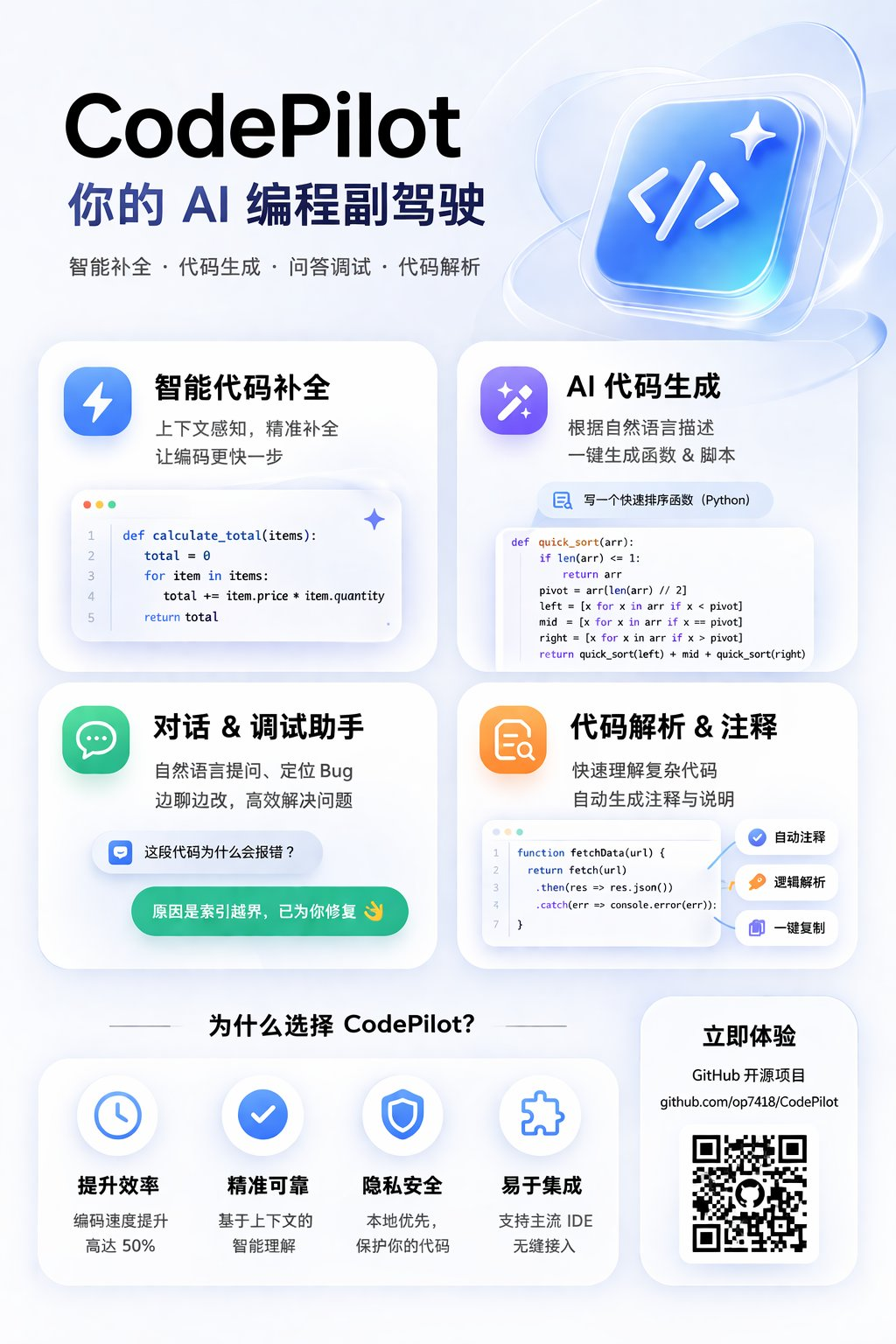
Beautiful layout, crisp Chinese font rendering, no extra adjustment needed.
Brand-style promo graphic, give it a product update link:
Based on this article, generate an introduction poster for this product update. The style should match OpenAI's past design language — Apple-esque, card-based, and premium overall
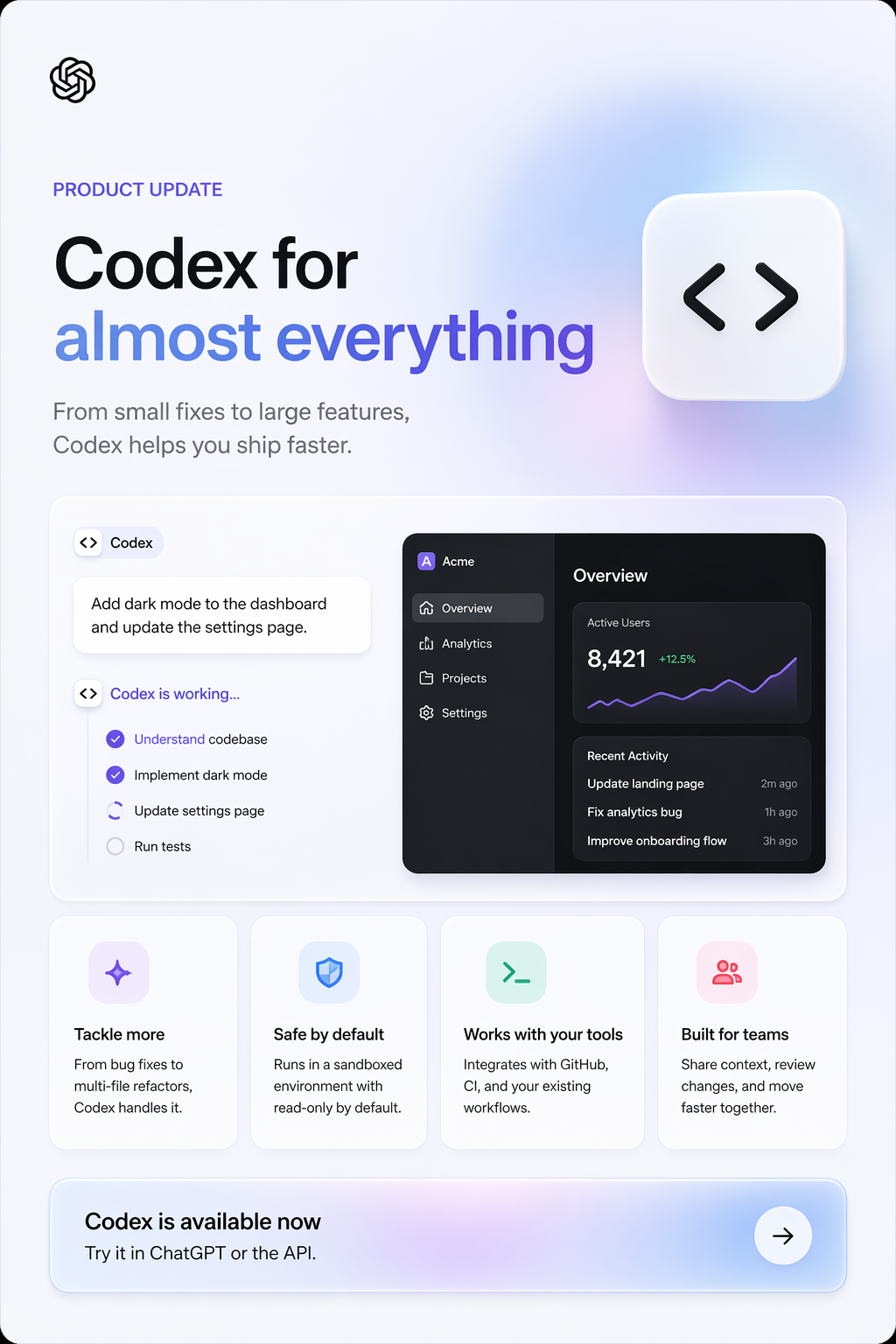
Gradient color palette, clean design sensibility — the style carries over beautifully.
Scenario 2: Knowledge explainer cards
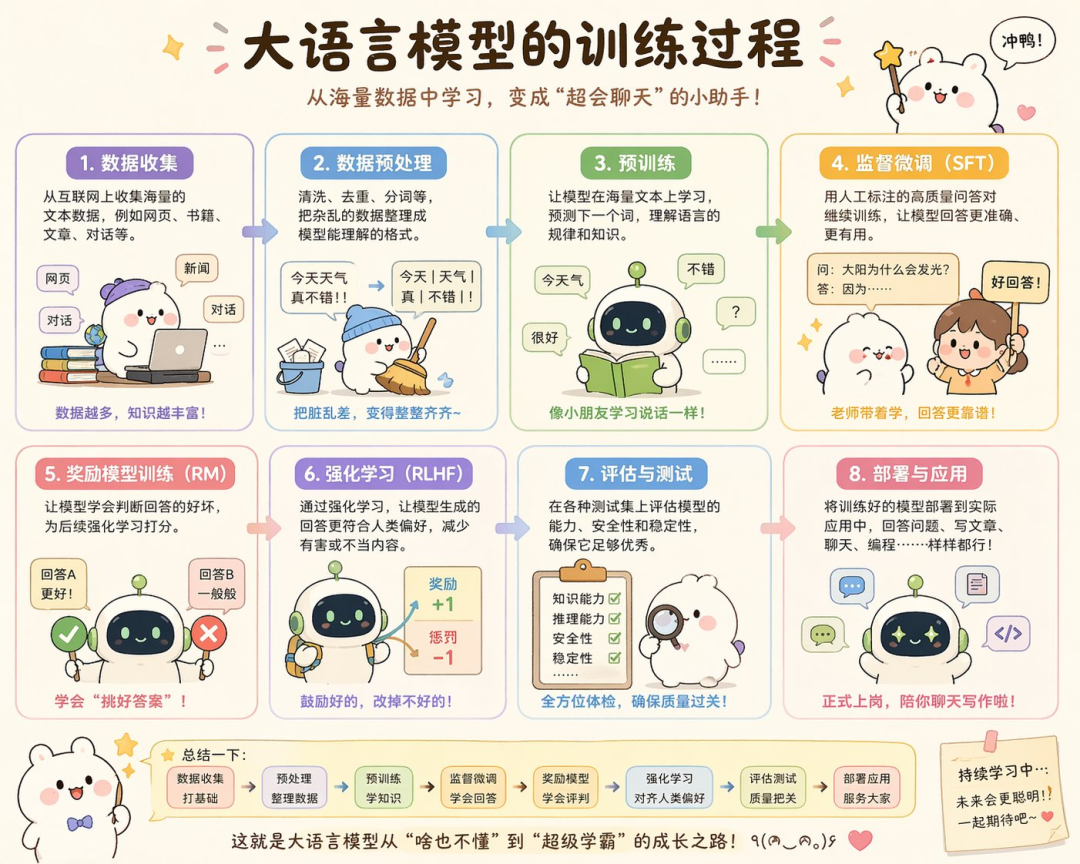
Knowledge cards demand rich layout and accurate world knowledge, which is exactly Image 2's strength.
Draw an explainer graphic of how large language models are trained, in a cute style
It can even produce extra-long vertical infographics — for example, a complete Beijing autumn travel guide covering attractions, itineraries, food, and transportation tips, with meticulous layout:
You don't have to tell it what to draw; it knows what content an explainer graphic should have.
Scenario 3: Game concept and UI design
Game interfaces involve complex UI layouts, character art, and text typesetting, and Image 2 is astonishing here.
Referencing the game style of Valorant, generate a UI image of a character-select screen for a Three Kingdoms-themed, mythology-styled FPS game
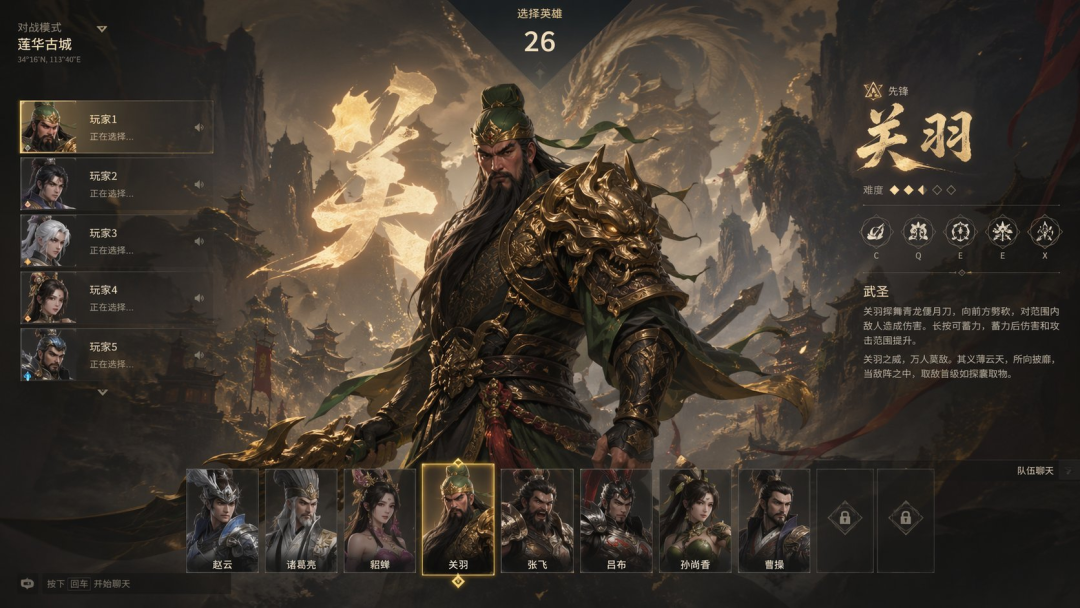
Even minimalist prompts are understood precisely:
Generate a gameplay screenshot of "Black Myth: Wusong"
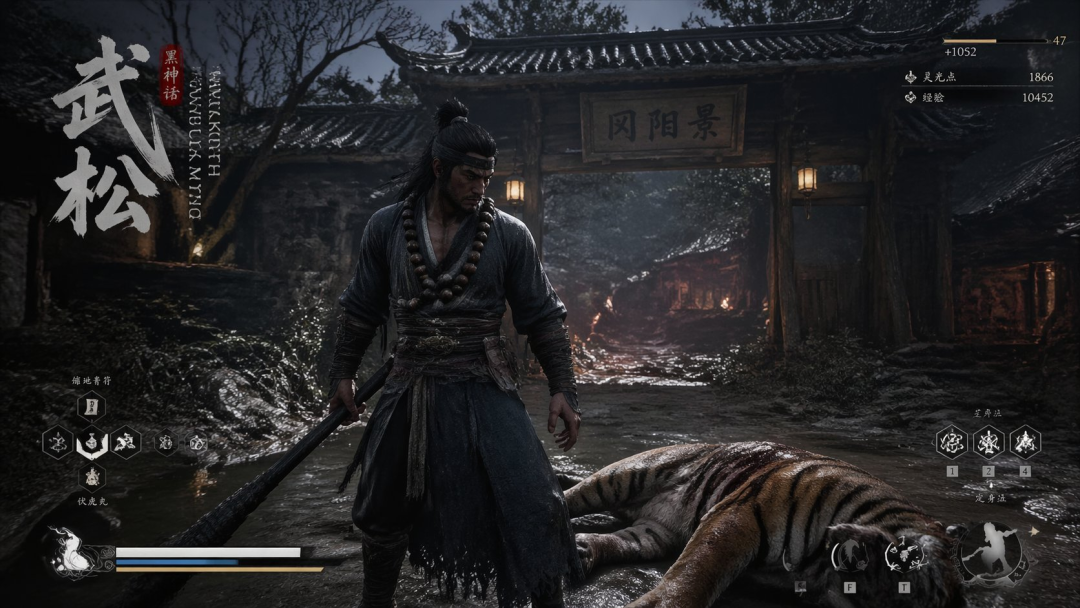
Even better, you can play an ARPG right inside ChatGPT — it generates an interface with character art and choice boxes; pick a direction and it draws the next image.
💡 Tip: One image plus a few lines of dialogue makes a playable game demo — the floor for game prototyping just collapsed another level.
Scenario 4: Web design
This is the most surprising scenario. Given only a side photo of a car, it hallucinated a complete car-brand website:
Generate a website UI design mockup for this car that matches its character and style
Interior shots, cross-sections, wheels, headlights, spoilers, even pricing — all filled in automatically, and the information is mostly correct.
B2B websites are no problem either:
Generate a website UI design mockup for a B2B ad delivery platform
It knows which selling points and information such a site should showcase, like a veteran product manager and designer rolled into one.
Scenario 5: Realistic portrait photography
Portraits are the most brutal test for image models, because the human eye is exquisitely sensitive to detail.
An Asian girl in a white dress in a flower field at dusk, backlit photography

The halo of backlight on the dress, the arc of hair strands blown loose by the wind — details like these used to take a professional photographer half an hour of waiting to catch.
💡 Tip: For the most natural output, the most effective keyword is "photorealistic". The model actively avoids the plastic look and replicates the characteristics of real photos.
Scenario 6: Long-form paper visualizations
Send it a paper and ask it to lay the content out as a magazine-style visual long image:
Use a premium, magazine-quality layout style to introduce this paper's content in detail and graphically, and generate a long image
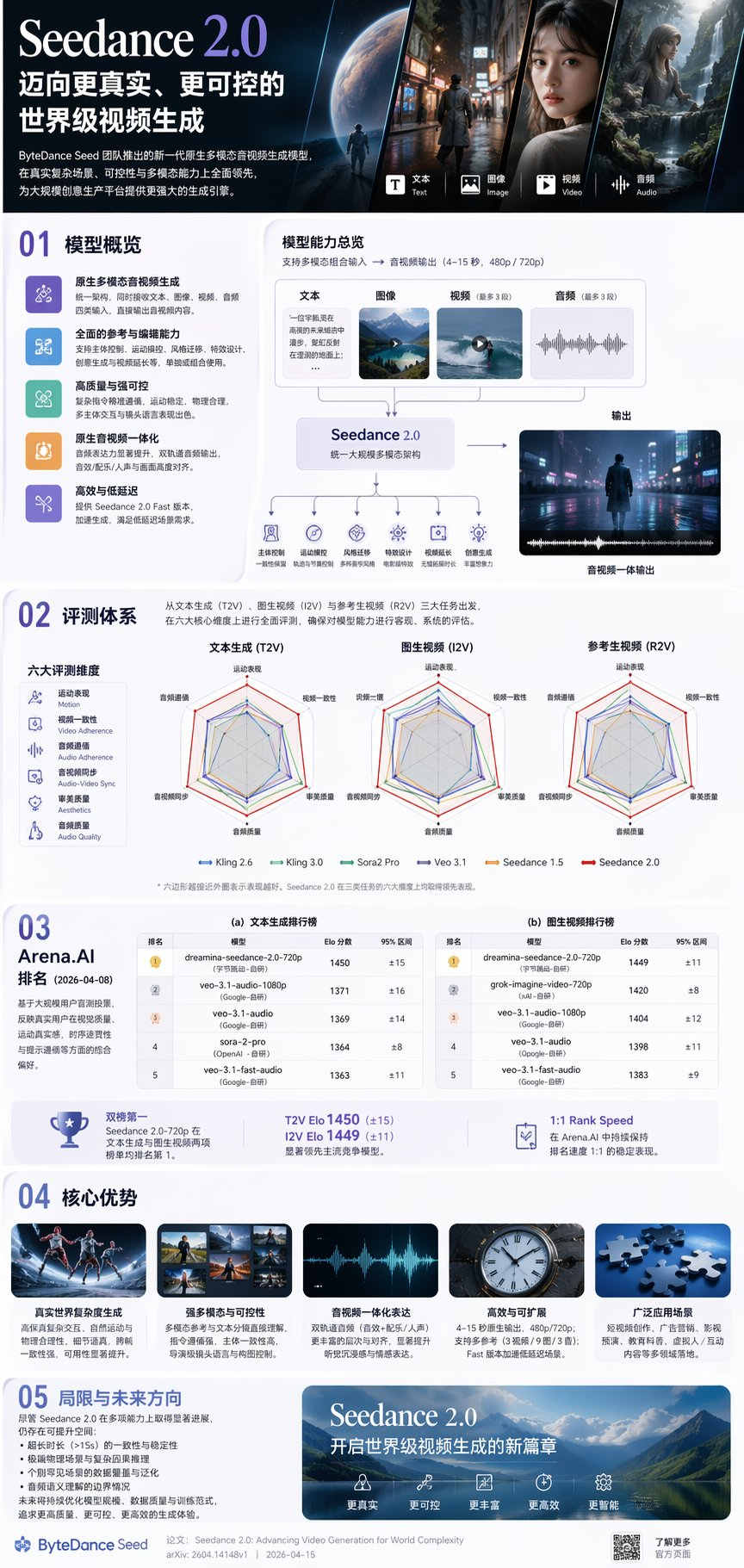
For researchers and developers who need to digest large volumes of papers quickly, this is a genuinely practical use.
Known Limitations
Image 2 isn't perfect. It still stumbles easily in these scenarios:
- Origami step diagrams and Rubik's cube solving sequences, tasks that demand rigorous 3D physical logic
- Tiny details on tilted surfaces, extremely dense repeating textures
- Diagrams involving precise arrows — manual review before use is recommended
- Resolutions above 2K on the API side are still in Beta
Pricing and Access
| Entry point | Mode | Who can use it |
|---|---|---|
| ChatGPT | Instant | All users (one week of free access) |
| ChatGPT Plus/Pro/Business | Thinking | Paid users |
| Codex | Integrated | Codex users |
| API (gpt-image-2) | Billed by quality/resolution | Developers |
Canva, Figma, Adobe, and OpenArt have already confirmed they are integrating gpt-image-2.
Practical Advice
If you're a designer, Image 2 won't replace you — but it will weed out designers who can only execute requests. What it's best at is rapidly producing drafts, batch-generating variants, and handling repetitive design work. Spending the time you save on creative strategy and keeping brand tone on target is the right way to use it.
If you're a developer or product manager, it can directly generate marketing assets, product prototype visuals, and explainer graphics for you — no more waiting in line for design resources.
Toolin Editorial Team
Categories
Related articles
Big PPT Skill Update: Swiss International Style + AI Illustrations in One Click
The open-source PPT Skill adds a Swiss International style, GPT-Image 2.0 auto-illustrations, and multi-platform cover generation -- the whole outline-to-publish workflow in one conversation.

Qwen Meets Taobao, Tested: Conversational Shopping, a Closed Loop from Discovery to Checkout
Qwen is officially connected to Taobao: users can search, compare prices, place orders, pay, and check logistics entirely within a conversation. Four scenarios put the AI shopping experience to the test.
Claude Code + Feishu CLI: 5 Hands-On Agent Workflows
The open-source Feishu CLI exposes nearly 120 capabilities; combined with Claude Code it powers meeting knowledge bases, work retrospectives, reconciliation automation, collaborative boards, and automated expense reports — all free to use.
Mureka V9: The First AI Music API to Clear the Production-Readiness Bar
With its MusiCoT chain-of-thought architecture, Mureka V9 delivers publish-on-generation music quality; Sondo doubled its business after switching over entirely, and the API is now officially open.