
Running LLMs on-Device, Hands-On: Building a Local Agentic Coding Environment with Pi + LM Studio
With the Pi agent framework, an LM Studio inference server, and a Docker sandbox, you can run the Gemma 4 series on a local M2 Mac for agentic coding, linting, and unit tests — reaching roughly 75% of frontier-model accuracy.

Running LLMs on-Device, Hands-On: Building a Local Agentic Coding Environment with Pi + LM Studio
With the Pi agent framework, an LM Studio inference server, and a Docker sandbox, you can run the Gemma 4 series on a local M2 Mac for agentic coding, linting, and unit tests — reaching roughly 75% of frontier-model accuracy.
Locally running AI models have hit a genuine watershed in the past six months — intelligence, agentic capability, and tooling maturity have all crossed a threshold. In this article the author, Vicki Boykis (founding machine learning engineer at a startup, previously at Mozilla.ai, Tumblr, and Automattic), turns the Gemma 4 series into a daily coding partner on a 2022 M2 Mac (64GB RAM) using the Pi agent framework + LM Studio, reaching roughly 75% of frontier-model accuracy.
This tutorial breaks her workflow into reproducible steps: install the inference server, configure the agent framework, and get it running inside a Docker sandbox.
Before you start
Hardware you need
- A machine with plenty of memory (the author uses an M2 Mac with 64GB RAM and 1TB storage). Local agents push the KV cache close to the physical memory ceiling.
- At least 16GB of unified memory is recommended; running 12B-class models comfortably calls for 32GB or more.
Software you need
- LM Studio: local model inference server (exposes an OpenAI-compatible
/v1endpoint) - Pi: agent framework (https://github.com/patloeber/gemma-4-pi-agent has a reference setup)
- Docker: keeps agent sessions inside a sandbox so they cannot touch the physical disk directly
Recommended models
The author has tested Mistral 7B, Gemma 3, OpenAI GPT-OSS-20B, Qwen 3 MOE, and others. Current default recommendations:
- gemma-4-26b-a4b (LM Studio implementation): the author's primary default model
- gemma-4-12b-qat: newer, smaller, faster, with little accuracy loss — the example model used in this tutorial
💡 Tip: The author's yardstick for whether a local model is good enough is "do I still need to compare it against an API model." GPT-OSS was the first model that cut her comparisons dramatically, and the Gemma 4 series let her run a stable local agentic coding loop for the first time.
Step by step
Step 1: Download and start the model in LM Studio
- Open LM Studio, search for
google/gemma-4-12b-qat, and download it. - Start the local inference server from LM Studio's Server tab; it listens by default at
http://localhost:1234/v1(OpenAI-compatible endpoint).
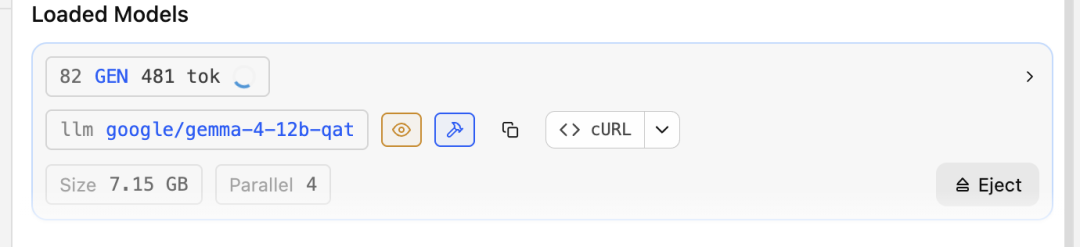
LM Studio's advantage is that you can watch tokens flow in and out in real time, adjust the context window, and compare different quantization settings.
Step 2: Point Pi's models.json at the local endpoint
Since all Pi sessions run inside Docker containers, you need to edit Pi's models.json so that Pi inside the container can reach LM Studio on the host via host.docker.internal:
"lmstudio": {
  "baseUrl": "http://host.docker.internal:1234/v1",
  "api": "openai-completions",
  "apiKey": "not-needed",
  "models": [
    {
      "id": "google/gemma-4-12b-qat",
      "input": [
        "text",
        "image"
      ]
    }
  ]
}
Step 3: Write docker-compose.yml
services:
  pi:
    build:
      context: .
      dockerfile: Dockerfile
    image: pi-agent:0.74.0
    init: true
    stdin_open: true
    tty: true
    extra_hosts:
      - "host.docker.internal:host-gateway"
    environment:
      OPENAI_API_KEY: ${OPENAI_API_KEY:-not-needed}
      OPENAI_API_BASE: ${OPENAI_API_BASE:-http://host.docker.internal:1234/v1}
    volumes:
      - ${HOME}/.pi/agent/models.json:/config/models.json
      - ${WORKSPACE:-.}:/workspace
      - pi-config:/config
      - pi-sessions:/sessions
    working_dir: /workspace
volumes:
  pi-config:
  pi-sessions:
💡 Tip: Mounting the working directory into the container's
/workspacelets Pi modify the files of the repo you are editing inside the container without ever touching the physical disk — a key safety cushion against accidental deletion.
Step 4: Run Pi with a launch script
#!/usr/bin/env bash
# Pi — Start the containerized Pi agent.
SCRIPT_DIR="$(cd -- "$(dirname "${BASH_SOURCE[0]}")" && pwd)"
WORKSPACE_DIR="${WORKSPACE:-$(pwd)}"
export WORKSPACE="$WORKSPACE_DIR"

repo_slug="$(basename -- "$WORKSPACE_DIR" | tr -c 'a-zA-Z0-9_.-' '-' | sed 's/^-//')"
[[ -z "$repo_slug" ]] && repo_slug="workspace"
container_name="pi-${repo_slug}-$$"

cmd=(
  docker compose
  --project-directory "$SCRIPT_DIR"
  -f "$SCRIPT_DIR/docker-compose.yml"
  run --rm
  --name "$container_name"
  -e OPENAI_API_KEY
  -e ANTHROPIC_API_KEY
  -e GEMINI_API_KEY
  pi
)
exec "${cmd[@]}"
Save it as pi, make it executable, and run ./pi from your working directory to start a local agent session inside an isolated sandbox.
Verified results
Using this setup, the author completed these tasks (none of which local models could do 6 months ago):
- Refactoring a Python script (originally a notebook) into a repo of 5-6 modules with type-hint linting
- Proofreading blog posts and writing unit tests
- Building a recommender-system repo based on a two-tower model from a blank environment
The loop accuracy / speed of the agent workflow reached roughly 75% of frontier models.
Security recommendations
The author applies three layers of tightening, well worth copying:
- Model choice: the tutorial uses
gemma-4-12b-qat— smaller and faster than the 26B recommended in the reference article, with little accuracy loss. - Sandbox isolation: all Pi sessions run in Docker containers with only bash permissions; running Python directly or browsing the web is not allowed (for research that needs the internet, spin up a separate image that permits curl).
- Directory mounting: Pi modifies its own repo files inside the container, and you start it inside the target working repo, so the physical disk's files are never directly erased.
Common issues
- Slow inference: local models are limited by your hardware. Using
llama.cppdirectly will be faster than LM Studio and is a future optimization direction. - Small context window: constrained by physical memory. The author saw the KV cache grow to nearly 64GB during agent runs.
- Prompt template mismatches: a common problem in early versions, though usually fixed quickly.
- Ready for production development?: the author is explicit that it is still unclear. For now it fits personal agent workflows, learning model behavior, and studying the token inference process.
References
- Original article (Vicki Boykis' blog): https://vickiboykis.com/2026/06/15/running-local-models-is-good-now/
- Pi reference setup: https://patloeber.com/gemma-4-pi-agent/